CONNEX
TM
User Guide
42
Configuring the Link
The following describes how to configure the link between an Air Unit and the Ground
Units. This procedure is performed on an Air Unit only.
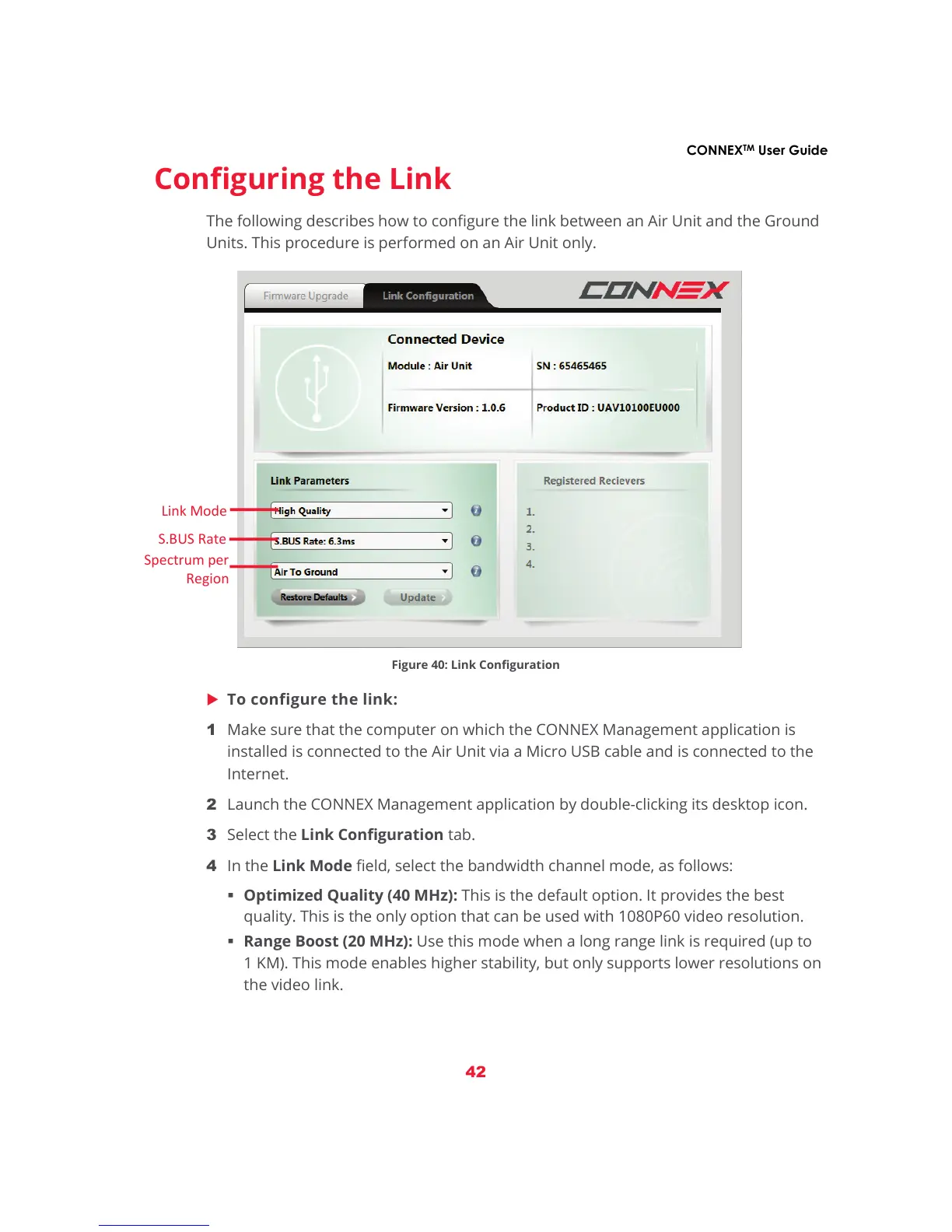
Figure 40: Link Configuration
X To configure the link:
1 Make sure that the computer on which the CONNEX Management application is
installed is connected to the Air Unit via a Micro USB cable and is connected to the
Internet.
2 Launch the CONNEX Management application by double-clicking its desktop icon.
3 Select the Link Configuration tab.
4 In the Link Mode field, select the bandwidth channel mode, as follows:
Optimized Quality (40 MHz): This is the default option. It provides the best
quality. This is the only option that can be used with 1080P60 video resolution.
Range Boost (20 MHz): Use this mode when a long range link is required (up to
1 KM). This mode enables higher stability, but only supports lower resolutions on
the video link.



 To Next Page