www.amulethotkey.com | 12
Amulet Hotkey K4u
+
Manual
default Mouse Point behaviour and switches on K4u
+
identifier checking.
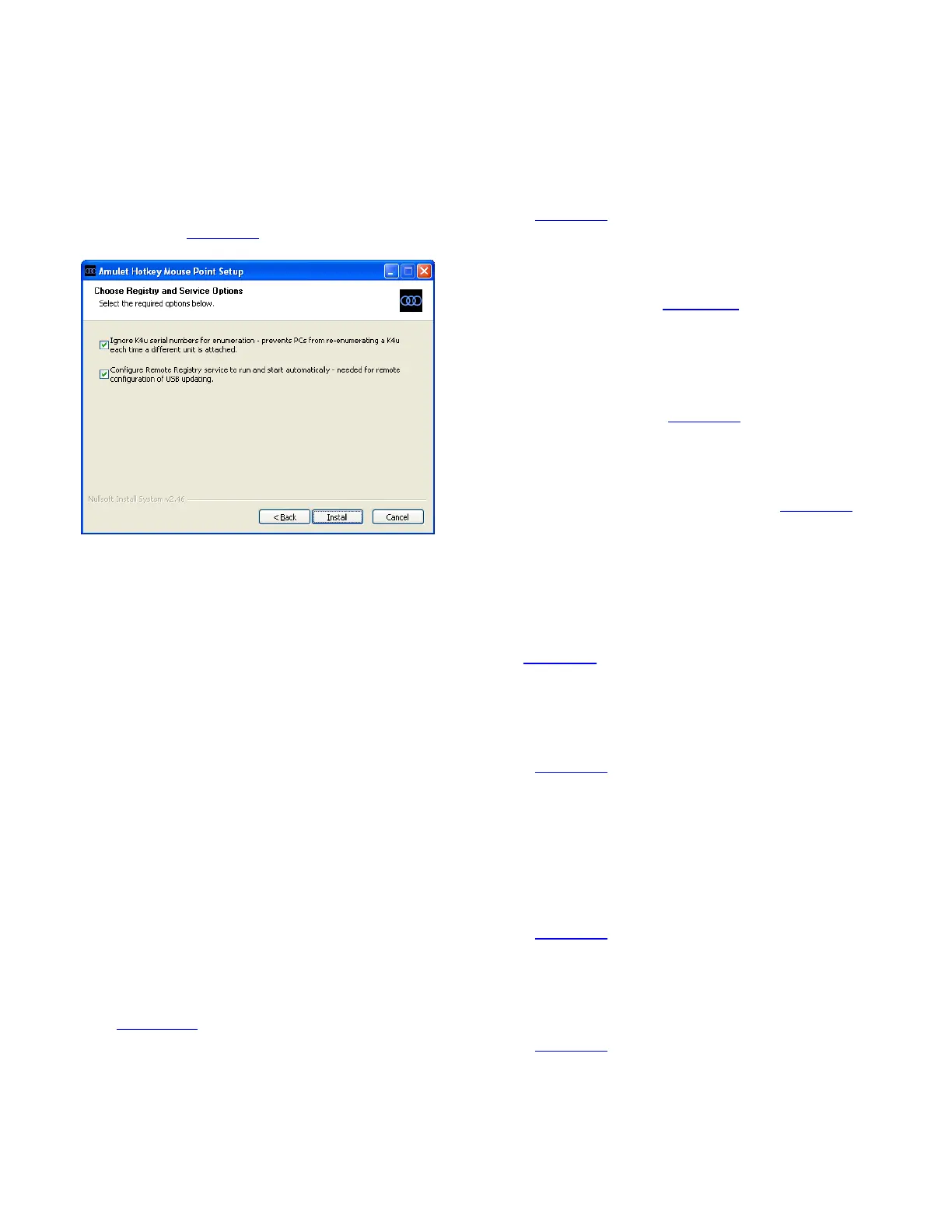
● Configure the Remote Registry service…
This service enables remote users to modify registry
values on the host computer. If you intend to run remote
firmware updates to the K4u
+
, ensure this check box is
selected. See section 8. 3.
Mouse Point installer, Registry and Service Options screen
5. 3 Command line installations with install.cfg
For scheduled, unattended installations, you can run the
following command:
Mouse_Point_2_10.exe /S
This command reads a configuration file, install.cfg, for firmware
update settings.
Note:
The /S option must be an upper case ‘S’.
5.3.1 About install.cfg
The Mouse Point installer reads values from a configuration file,
install.cfg, when you run a command line installation. This file
must be in the same folder as Mouse_Point_2_10.exe.
Each setting in install.cfg takes an optional value. Use a single
space to separate settings and their value. Values are not case
sensitive. If no value is assigned to a setting, a default value
is used.
Typically, your Amulet Hotkey contact will provide a template
install.cfg file that you can edit as required. An example file is
shown in section 5.3.3.
5.3.2 Supported settings for install.cfg
Install.cfg supports the following settings and values:
UsbStatusUploadDisabled <Yes or No>
Default value is to No. If set to Yes, this setting disables the
Read Switch Status via USB item in the Mouse Point menu.
See section 5. 5.
usbPackageDownloadDisabled <Yes or No>
Default value is to No. If set to Yes, this setting disables the
Update Switch Firmware and FPGA via USB item in the
Mouse Point menu. See section 5. 5.
remoteLogFilePath <folder path>
This setting specifies a UNC path to the remote folder where
you want to save K4u
+
log files. For example:
\\UNX-NY-01\AmuletHotkey\switches\logs
Log files are described in section 6. 7.
forceFocusForUpdates <Yes or No>
Defaults to No. If set to Yes, this setting forces the K4u
+
to
switch channels to the Mouse Point host computer before
running a scheduled firmware update. See section 8. 4.
oneShotUpdateFilename <file name>
Specifies the full UNC path and file name of the firmware
package for the next one-shot firmware update. For
example:
\\UNX-NY-01\Amulet Hotkey\Test\k4u0P333.pkg
Remote manual ‘one-shot’ firmware updates are described
in section 8. 3.
enableScheduledUpdates <Yes or No>
Defaults to No. If set to Yes, this setting enables scheduled
firmware updates; Mouse Point runs a daily firmware
update at the time specified by ScheduledUpdateTime.
See section 8. 4.
scheduledUpdateTime <time>
Specifies the time (in 24 hour format) for scheduled
firmware updates. Leading zeroes for hours and a colon
separator between hours and minutes are both optional.
Valid examples are:
01:45, 1:45, 0145 and 145.
See section 8. 4 for details.
remoteUpdatePath <file path>
Specifies the full UNC path of the folder containing the
package file for scheduled firmware updates. For example:
\\UNX-NY-01\Amulet Hotkey\Switch Firmware
See section 8. 4 for details.


 To Next Page