www.amulethotkey.com | 20
Amulet Hotkey K4u
+
Manual
6. 5 Set up channel sharing
You can connect two K4u
+
switches to allow two users to
control a single shared computer. You can share any supported
computer type (USB, legacy Sun or PS/2).
In fact, you can even share a computer between a K4u
+
switch
and a K4u or K4vu switch. For simplicity, this guide only refers to
K4u
+
switches when describing how to share a channel.
Access to the shared computer is restricted on first-come,
first-served basis. Only one user can control the shared
computer at any time.
To take control of the shared computer, a user simply switches
channels as normal. The computer remains assigned to that user
until they relinquish control.
A user relinquishes control of the shared computer
automatically when they stop using it and the K4u
+
detects no
further mouse or keyboard activity.
A pair of optional LEDs can indicate which user has control of
the shared computer; see section 6.5.2.
6.5.1 Share a computer
In these instructions, the master K4u
+
is attached directly to the
computer that you want to share. The secondary K4u
+
is
attached to a hosted front panel USB port (A to D) on the
master K4u
+
.
Follow these steps:
1 Attach the computer that you want to share to any channel
port on the rear of the master K4u
+
. This channel becomes
the shared channel.
2 Use DIP switches B1 and B2 on the master K4u
+
to specify
the shared channel:
For DIP switch details, see section 3.
To share B1 B2
Channel 1 OFF OFF
Channel 2 ON OFF
Channel 3 OFF ON
Channel 4 ON ON
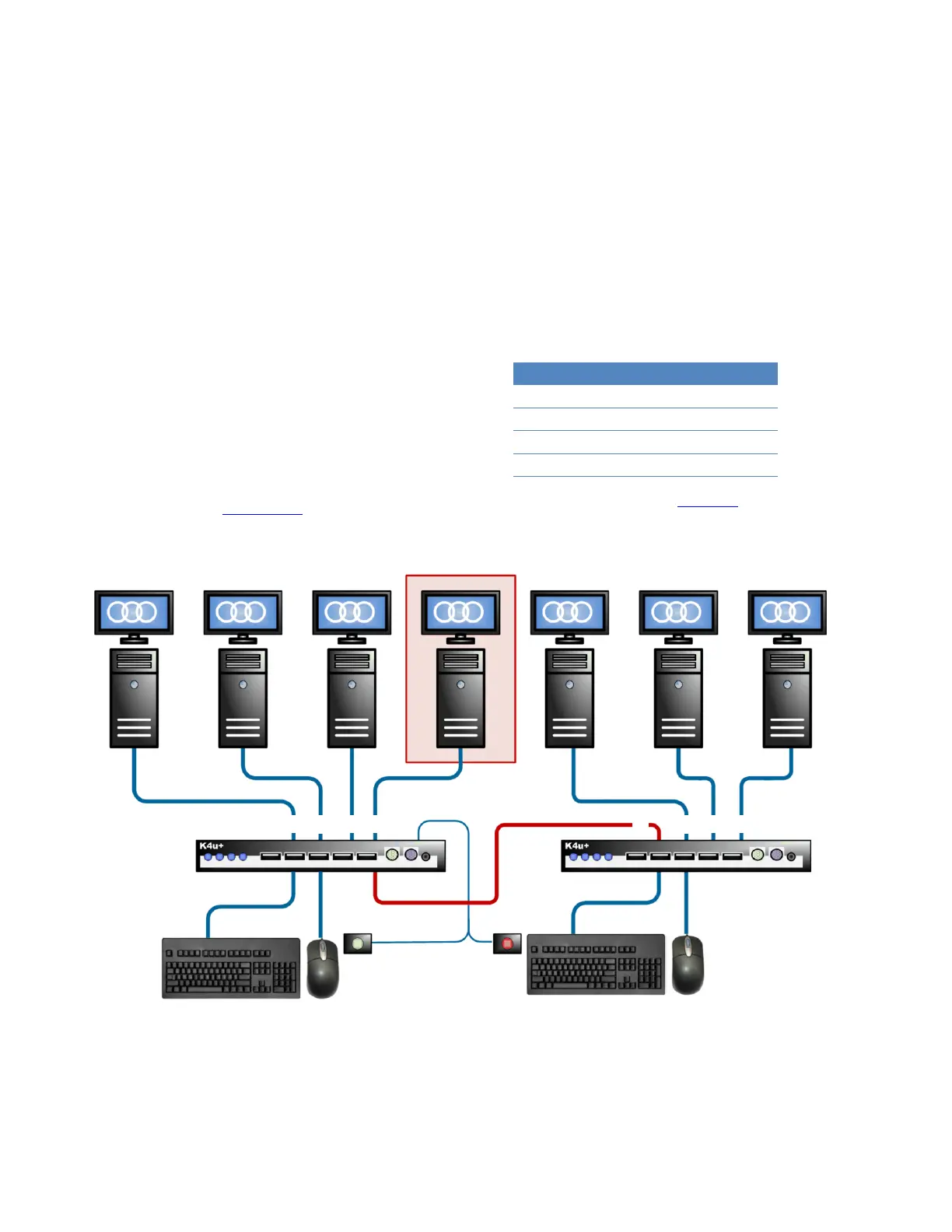
Sharing one computer between two K4u
+
units: In this example, channel 4 on the master K4u
+
connects to the shared
computer. Channel 1 on the secondary K4u
+
connects to the master K4u
+
and enables sharing mode. Indicator LEDs
show that, in this example, the user connected to the master K4u
+
currently has control of the shared computer.
Shared computer
Secondary K4u
+
Master K4u
+
USB cable
LED
LED


 To Next Page