www.amulethotkey.com | 18
Amulet Hotkey K4u
+
Manual
6. 4 Set up a cascade of multiple switches
Cascading two or more K4u
+
switches allows you to increase the
number of computers that you can control with a single
keyboard and mouse.
In fact, you can even combine a K4u
+
with K4u or K4vu switches
in a single cascade. For simplicity, this guide only refers to K4u
+
switches when describing cascade deployments.
Note:
When you cascade K4u
+
units, you must use hot keys or
a keyboard with dedicated channel keys (such as the Amulet
Hotkey AHK3000E) to change channels. You cannot use
Mouse Point or mouse buttons to change channels.
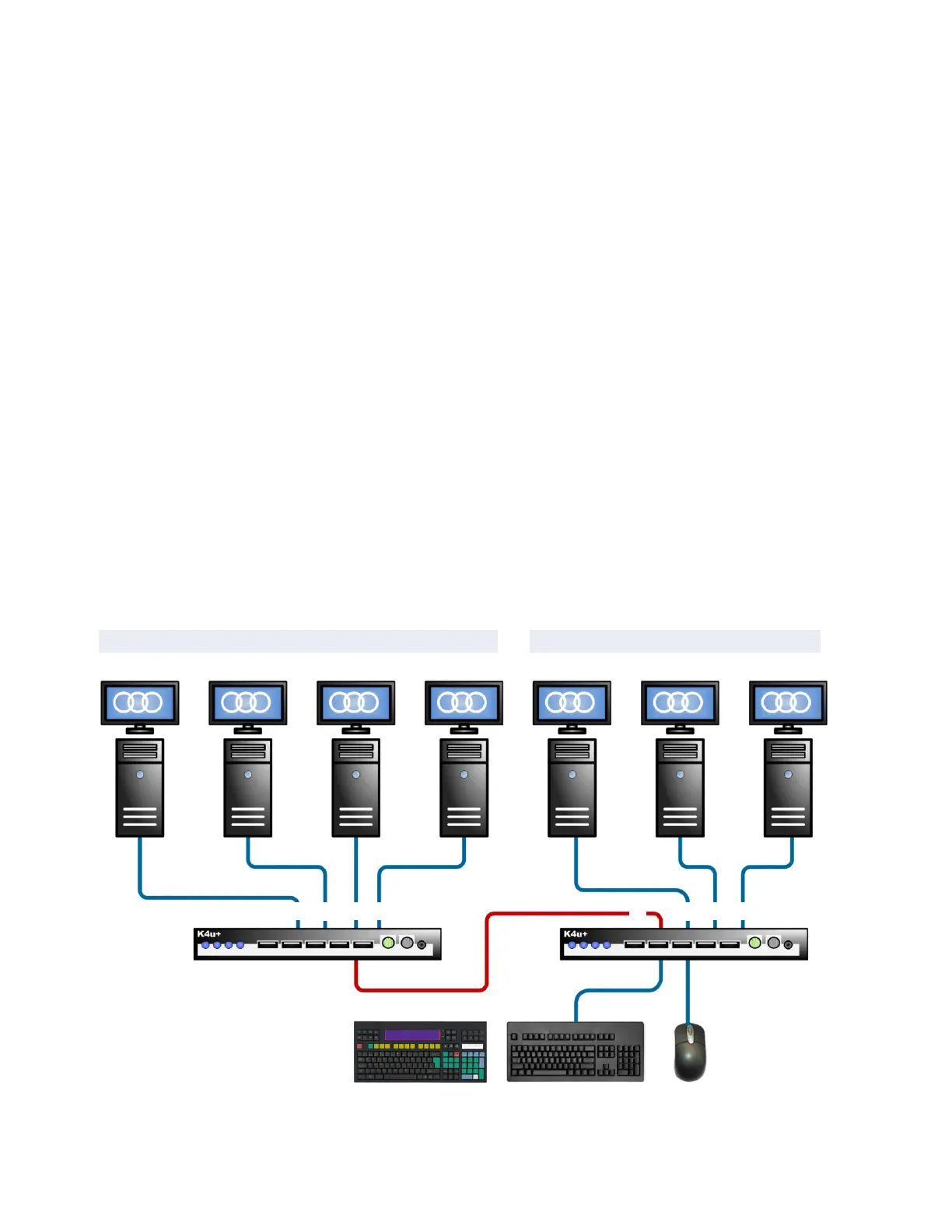
6.4.1 Cascades with two switches
You can daisy-chain a secondary K4u
+
to a master K4u
+
with a
USB cable, allowing you to control up to 7 computers from a
single keyboard and mouse:
■ Three computers are attached to channels 2, 3 and 4
respectively on the master K4u
+
.
■ Four computers are attached to channels 1, 2, 3 and 4
respectively on the secondary K4u
+
.
■ Channel 1 on the master K4u
+
gives access to channels on
the secondary K4u
+
.
To set up the cascade:
1 Plug a USB cable into the channel 1 USB port on the rear of
your master K4u
+
and into any hosted front panel USB port
(A to D) on the secondary K4u
+
.
2 Disable channel changing with a mouse. To do this, set DIP
switch A3 to OFF on both K4u
+
units.
3 Specify different hot-key combinations on the master and
secondary K4u
+
units. For example, if the master K4u
+
uses
Alt + Space, set the secondary K4u
+
to use Caps Lock + Alt.
To change channels using hot keys:
■ For channels 2, 3 or 4 on the master K4u
+
, press Alt+Space
plus 2, 3 or 4 as required. (Hold down all three keys
together.)
■ For channel 1, 2, 3 or 4 on the secondary K4u
+
, press
Alt+Space plus 1. Then press Caps Lock + Alt plus 1, 2, 3, or 4
as required.
For example, to connect to channel 2 on the secondary K4u
+
,
press Alt+Space+1 followed by Caps Lock+Alt+2.
Cascading two K4u
+
units: Channels 2, 3 and 4 on the master K4u
+
are accessible directly. Channels 1, 2, 3 and 4
on the secondary K4u
+
are accessible indirectly through channel 1 on the master K4u
+
.
Channels on master K4u
+
Channels on secondary K4u
+
1 2 3 4
Master K4u
+
Secondary K4u
+
USB cable
Optional AHK3000E keyboard
(with CN202 applied)
2 3 4


 To Next Page