www.amulethotkey.com | 35
Amulet Hotkey K4u
+
Manual
9. 2 Bloomberg keyboards
These keyboards have a built-in thumb print reader and work
seamlessly with the K4u
+
.
9.2.1 Requirements
The K4u
+
includes built-in support for the SEA100 and FRE100
Bloomberg keyboards.
To use the recent Bloomberg Keyboard 4 (model STB100), the
K4u
+
must have Amulet Hotkey concession CN661 note applied;
contact Amulet Hotkey technical support for details.
9.2.2 Connecting a Bloomberg keyboard to the K4u
+
Follow these steps:
1 Switch off all attached PCs.
2 Set the K4u
+
DIP Switch B7 to OFF.
This prevents the hot-plug port from automatically following
the mouse and keyboard focus. (DIP switches are described
in section 3.)
3 Connect the Bloomberg PC to the channel 1 USB port on the
K4u
+
rear panel.
4 Connect the keyboard to the switch.
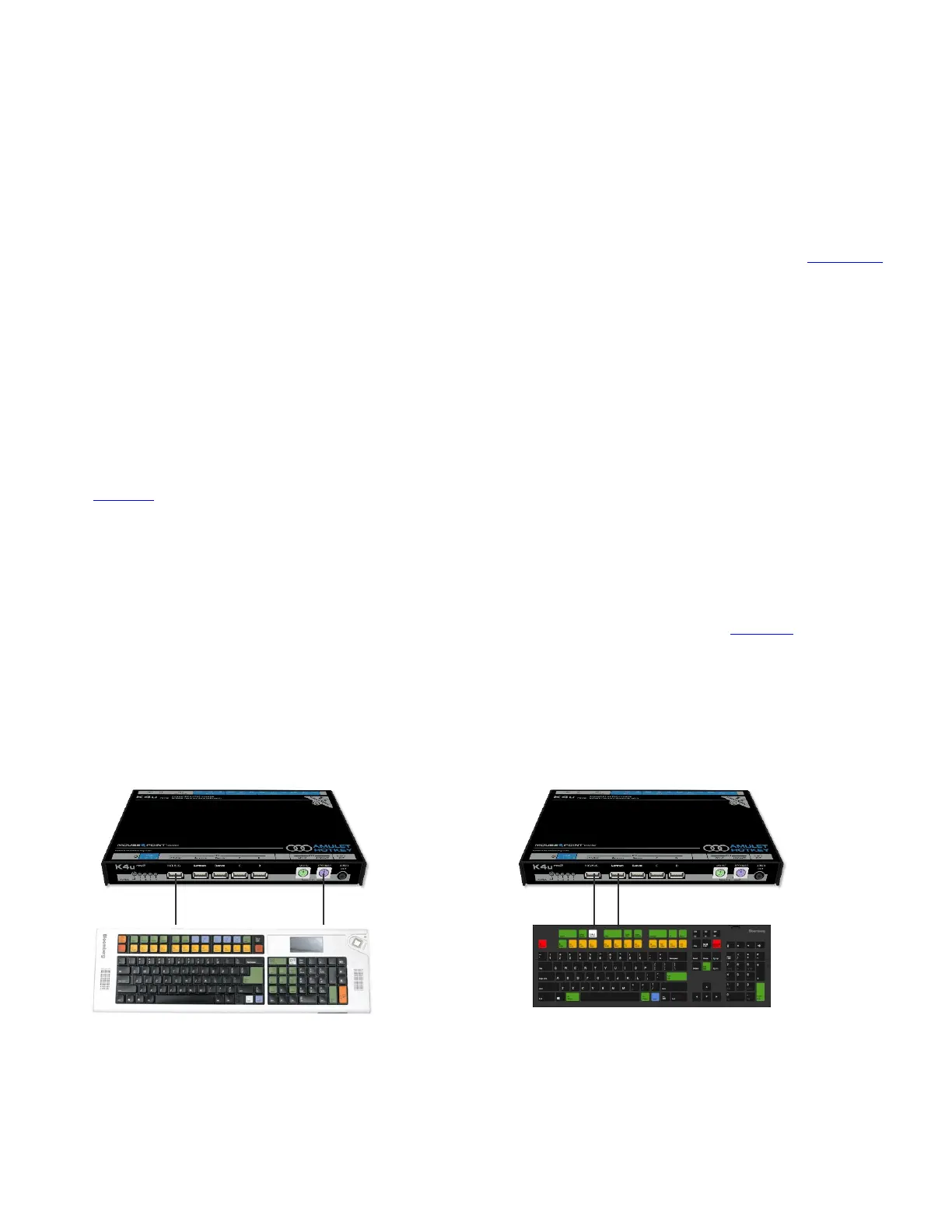
For STB100 keyboards
a. Connect the ‘PC’ mini-USB socket on the underside of the
Bloomberg keyboard to the USB hot-plug port on the
front of the K4u
+
.
b. Connect the ‘KVM’ mini-USB socket on the underside of
the Bloomberg keyboard to the USB keyboard port on
the front of the K4u
+
.
For SEA100 and FRE100 keyboards
a. Plug the USB connector of the Bloomberg keyboard into
the USB hot-plug port on the front of the K4u
+
.
b. Plug the PS/2 connector of the Bloomberg keyboard into
the PS/2 keyboard port on the front of the K4u
+
.
Note:
K4u
+
front panel ports are described in section 2. 1.
5 Connect a mouse to the USB 'Mouse' port on the front of
the K4u
+
.
6 Attach other computers to K4u
+
channels 2, 3 and 4,
as required.
7 Power up the K4u
+
. Then power up all attached computers.
This completes the setup for your Bloomberg keyboard.
Note:
In order to use the fingerprint sensor and audio
features on the Bloomberg keyboard, the hot-plug port on
the K4u+ must be assigned to channel 1 (the Bloomberg
channel; see step 3 above). The hot plug port is set to channel
1 by default, but if you experience problems with these
features (for example, the fingerprint sensor does not work or
you are unable to hear streamed audio), verify that the hot-
plug port is switched to the Bloomberg channel. To do this,
switch the K4u+ to the Bloomberg channel and then press the
hot keys + U. For hot key details, see section 4.
Models SEA100 and FRE100: Bloomberg keyboard connected to
USB hot-plug port (1) and PS/2 keyboard socket (2) on the K4u
+
.
Model STB100: Bloomberg keyboard connected to USB
hot-plug port (1) and USB keyboard socket (2) on the K4u
+
.
21


 To Next Page