www.amulethotkey.com | 6
Amulet Hotkey K4u
+
Manual
6 General purpose USB sockets
These two sockets can support other USB devices, such as
hubs or a DXR2. These sockets follow the keyboard and
mouse focus and can never connect to more than one
channel at a time.
7 PS/2 keyboard and mouse sockets
Use the keyboard socket to connect a PS/2 keyboard. You
can use a PS/2 keyboard with a USB mouse.
The PS/2 mouse socket is inactive in the current version of
the K4u
+
, but it may be re-activated in future versions.
Note:
If you connect both PS/2 and USB keyboards, the
K4u
+
only references the USB keyboard.
8 Audio output
Use this socket to connect desktop speakers or headphones.
The K4u
+
can take the audio output of the attached
computers and either switch or mix it through to this socket.
When switched, only audio from the current channel is
routed to this socket. When mixed, audio inputs from all
channels are mixed and fed to this socket.
You specify audio switching or mixing by setting a DIP switch
A4; for details, see section 3. You can also mute a selected
audio feed by using a hot-key combination; for details, see
section 7. 3.
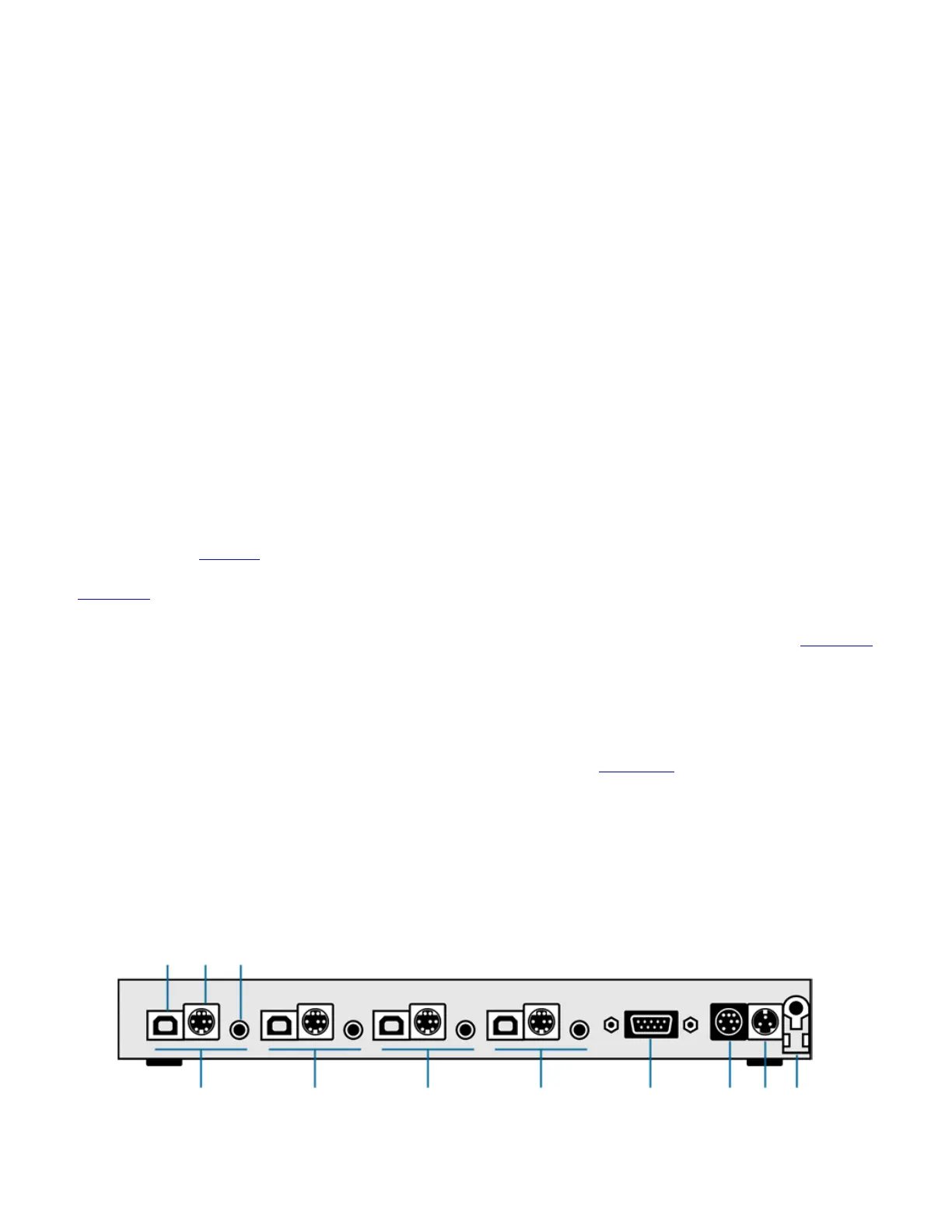
2. 2 Rear panel
1 Channel 4 connections
USB, legacy and audio connections for channel 4:
1a USB type B output: This socket connects a computer to
channel 4 on the K4u
+
. It carries USB keyboard and
mouse data sent to this channel. Data from the hot-plug
port is also merged if the port is switched to this channel.
1b PS/2 & legacy Sun® output: This socket is provided for
support of legacy systems, including PS/2 computers and
Sun computers.
For connection to PS/2 computers, a splitter cable is
available (CL-XX01-4021) that connects this port to the
PS/2 keyboard and mouse sockets of the computer.
For connection to legacy Sun computers, a cable is
available (CL-XX01-0011) to connect this port to the
keyboard and mouse socket of the Sun computer.
The K4u
+
automatically detects which protocol is present
and translates keyboard and mouse data accordingly.
1c Audio input: This 3.5mm stereo jack socket connects to
the audio output of the computer on channel 4.
2 Channel 3 connections
USB, legacy and audio connections for channel 3. For
descriptions, see Channel 4 connections above.
3 Channel 2 connections
USB, legacy and audio connections for channel 2. For
descriptions, see Channel 4 connections above.
4 Channel 1 connections
USB, legacy and audio connections for channel 1. For
descriptions, see Channel 4 connections above.
5 Serial Connection
This RS232 port provides a method for updating firmware on
the K4u
+
. Amulet Hotkey provide a utility to manage
firmware updates. You can run this utility on any Windows
computer with an appropriate serial port. See section 8. 5 for
details about serial updating.
Note:
You can also update the K4u+ firmware using a USB
port connected to one of the attached computers. This
method is more suited to enterprises with a large number
of switches because the update process can be managed
centrally. See section 8. 1.
K4u
+
Rear Panel


 To Next Page