www.amulethotkey.com | 33
9. Using the K4u
+
with trading keyboards
The K4u
+
works with the Amulet Hotkey AHK3000D™ and
Bloomberg® trading keyboards. This section describes how to
set up the K4u
+
to support these keyboards.
9. 1 Amulet Hotkey AHK3000D keyboard
The AHK3000D trading keyboard supports the Thomson
Reuters® Dealing 3000™ (D3k) protocol and is approved for use
with the D3k service by Thomson Reuters.
If you want to use the AHK3000D keyboard to control a remote
Dealing 3000 keystation and up to four computers attached to
the K4u
+
, you must use an extender such as the Amulet Hotkey
DXR2. The DXR2 extender provides the necessary power and
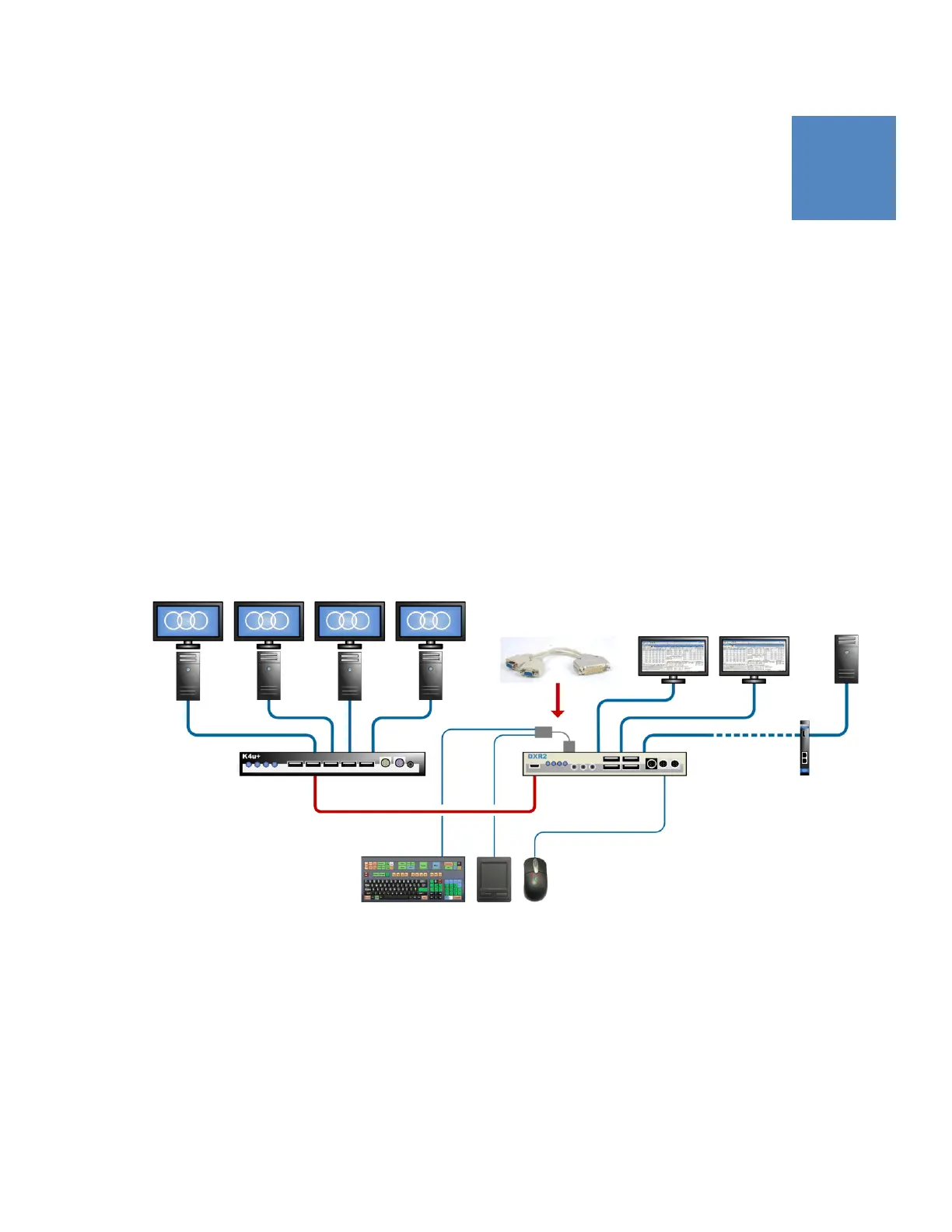
connections for the AHK3000D keyboard. You connect the K4u
+
to the DXR2 with a mini USB-B cable. See the diagram below for
an example setup.
Note:
You can also use the Amulet Hotkey KMD3 break-out
box in conjunction with the K4u
+
for a similar deployment.
Details are in Application Note 024, available from Amulet
Hotkey technical support.
K4u
+
connected to a AHK3000D keyboard and DXR2:
The AHK3000D is connected to a Dealing 3000 keystation plus
four computers attached to the K4u
+
. A mini USB-B cable
connects a hosted front panel USB port (A to D) (1) on the K4u
+
to the flash port (2) on the DXR2 extender.
A Dealing Adaptor (3) routes keyboard input from the
AHK3000D and, optionally, another serial input device (4) to the
DXR2. Finally, the DXR2 connects to the Dealing 3000 keystation
through an Amulet Hotkey DXC2 or DXK2 rack card (5).
DXR2K4u
+
AHK3000D keyboard
1 2
3 (CL-DXDL-0001)
4
Dealing 3000 keystation
PCs attached
to K4u
+
DXC2 or
DXK2
5


 To Next Page