EasyManua.ls Logo

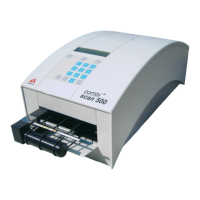
Analyticon combi scan 500 - User Manual

Analyticon combi scan 500
32 pages
Print Icon
To Next Page IconTo Next Page
Loading...
User‘s Manual
Analyzer for
CombiScreen
®
11 SYS
urine test strips

Questions and Answers

  • G
    gwallaceAug 17, 2025
    What to do if I get a data communication error E-51 on my Analyticon Measuring Instruments?
    • J
      Joel TorresAug 17, 2025
      If you encounter a data communication error (E-51) on your Analyticon Measuring Instruments, check the connection cable and the communication settings to resolve the issue.
  • C
    Catherine MorrisAug 20, 2025
    Why are the results not printing out from my Analyticon Measuring Instruments?
    • J
      Jeremy ValdezAug 20, 2025
      If the results are not printing from your Analyticon Measuring Instruments, the printer may be switched off or the paper roll might be inserted incorrectly. Ensure the printer is on.
  • P
    Paige HaynesAug 22, 2025
    What to do if I see error E-60 on my Analyticon combi scan 500 Measuring Instruments?
    • G
      Guy LeonardAug 22, 2025
      If you see error code E-60 on your Analyticon Measuring Instruments, it indicates a carriage mechanical error due to an obstruction or incorrect control signal. Disconnect and reconnect the power supply. If the error persists, contact your local distributor.
  • M
    Meghan EspinozaAug 26, 2025
    What should I do if I get a barcode error E-33 on my Analyticon combi scan 500?
    • G
      Grant VasquezAug 26, 2025
      If you receive error E-33, a barcode error, on your Analyticon Measuring Instruments, ensure you are entering a valid barcode.
  • M
    Mark SmithAug 28, 2025
    What to do if my Analyticon combi scan 500 says 'The waste bin is full'?
    • J
      Jonathan PerezAug 28, 2025
      If your Analyticon Measuring Instruments displays 'The waste bin is full', it means the waste bin has not been emptied for 150 measurements. Empty the waste bin to resolve this.
  • K
    Kiara WilliamsAug 31, 2025
    What to do if my Analyticon Measuring Instruments shows error E-25?
    • M
      Mike RobertsonAug 31, 2025
      If your Analyticon Measuring Instruments displays error E-25, it indicates a missing or improper strip. Ensure you are using a proper test strip.
  • R
    Ryan PerezSep 2, 2025
    How to fix calibration error E-31 on Analyticon combi scan 500 Measuring Instruments?
    • K
      Kurt DiazSep 2, 2025
      If you are getting a calibration error E-31 on your Analyticon Measuring Instruments, perform a new calibration.
  • T
    Timothy JosephSep 5, 2025
    What does error E-41 mean on my Analyticon combi scan 500 and how can I fix it?
    • A
      Angelica MartinezSep 5, 2025
      Error E-41 on your Analyticon Measuring Instruments indicates a validity calibration error due to an expired calibration card. Perform a new calibration to fix this.
  • D
    David GarciaSep 8, 2025
    What should I do if my Analyticon combi scan 500 says 'The waste bin is out'?
    • C
      Chelsey WashingtonSep 8, 2025
      If your Analyticon Measuring Instruments displays 'The waste bin is out', it means the waste bin is not in the correct position. Move the waste bin back into the device and push it carefully until it locks in place with a click.
  • A
    Alejandra MurphySep 12, 2025
    What causes E-21 or E-22 errors on Analyticon combi scan 500 Measuring Instruments and how to resolve them?
    • R
      richard50Sep 12, 2025
      Errors E-21 or E-22 on the Analyticon Measuring Instruments can occur due to improper test performance caused by false positioning of the test strip or contaminated belts. Clean the conveyer belts and repeat the test, ensuring correct strip positioning.

Summary

Introduction to CombiScan 500

Methodology of the urine test

Explains urinalysis principles and the function of urine analyzers like CombiScan 500.

The test strips

Details the CombiScreen 11SYS test strips and the parameters they test.

Intended use of the instrument

Specifies the CombiScan 500's purpose for in-vitro urine parameter determination.

Description of the reader

Packing list

Lists all items included with the CombiScan 500 instrument for setup and operation.

Installation Guide

Operation of the CombiScan 500

Switching on and off

Instructions for powering the instrument on, off, and placing it in standby mode.

Overview of the Menu system

Explains the multilevel menu structure and navigation for instrument control.

Worklist Management

Defines a worklist for sample sequencing and planned evaluation.

Adding a worklist

Details how to create or add patient IDs to a worklist via keypad or reader.

Editing a worklist

Describes how to modify, delete, or clear items within an existing worklist.

Starting Measurement

Instructions on initiating sample measurement in worklist or manual modes.

Measurement Process

Step-by-step guide on properly placing and measuring urine test strips.

Result printout details

Explains the format and content of printed or transmitted measurement results.

Instrument Menu Overview

Overview of instrument menu options for configuration and data management.

Setup menu options

Details customization of instrument settings for specific user requirements.

Output settings configuration

Configuration of printer, serial port, and language settings for data output.

Strip options settings

Settings for measurement units, pad sensitivity, and printout sequence.

Clock and date settings

Setting the instrument's internal clock and date for accurate timestamping.

Service functions

Accessing functions for instrument calibration and conveyor cleaning.

Calibration settings

Steps for calibrating the instrument using a calibration card or manual code.

Memory management

Overview of how the instrument stores measurement results and patient data.

Memory data transfer

Instructions for printing or sending stored data to a host computer.

Data download procedures

Details on downloading measurement results using the CombiScanner Data Management software.

Care of the instrument

Cleaning of the waste bin

Instructions for emptying and cleaning the waste bin for used test strips.

Cleaning of the conveyor

Detailed procedure for cleaning the conveyor mechanism, belts, and cylinders.

Warnings and Precautions

Troubleshooting Guide

Technical Data

Symbols Explained

Appendix: System Navigation and Data

Main menu structure

Visual flowchart illustrating the instrument's main menu navigation.

Memory menu structure

Visual flowchart illustrating the instrument's memory menu options.

Setup menu structure

Visual flowchart illustrating the instrument's setup menu navigation.

Table of results (English)

Lists parameters, units, and reference values for English language results.

Performance data

Details detection limits and agreement to reference for various parameters.

Analyticon combi scan 500 Specifications

General IconGeneral
BrandAnalyticon
Modelcombi scan 500
CategoryMeasuring Instruments
LanguageEnglish

Related product manuals