34
Connect to the Internet
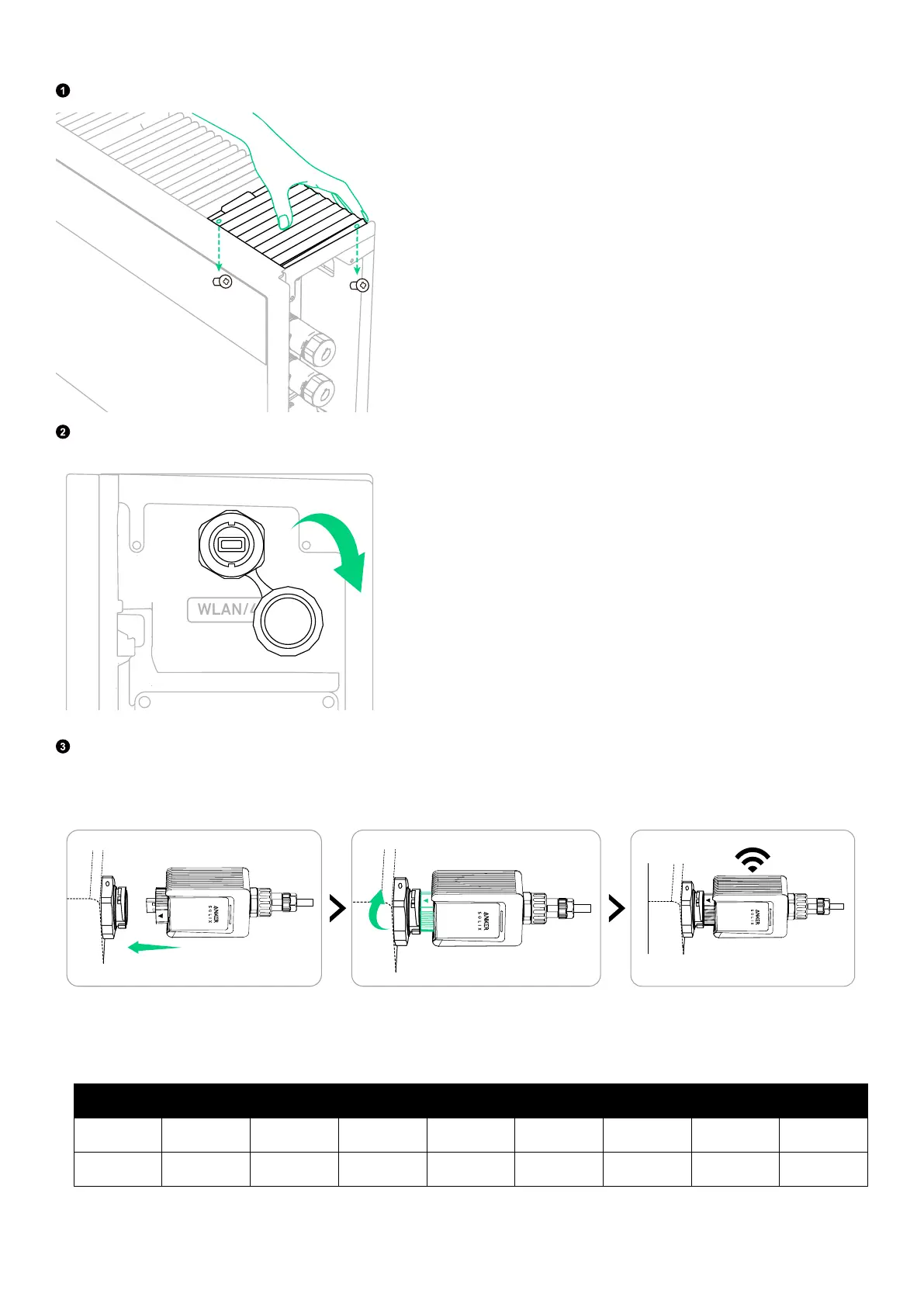
Remove the panel from the upper right of the power module. Keep the two screws (M3×8 mm) for later reinstallation.
Open the WLAN/4G port cover on the right side of the power module.
Install the appropriate dongle according to the networking methods.
Option 1: Connect via Wi-Fi.
Insert the WLAN dongle (DG-WF-H, included) into the WLAN/4G port.
Option 2: Connect via Ethernet.
Plug an Ethernet cable (Cat 5 or higher, 5-6 mm in diameter, not included, shielding recommended) into the WLAN dongle
(DG-WF-H, included).
From Bottom to Top (Clip Faces Away):
Pin 1 2 3 4 5 6 7 8
Wire Color Orange-White Orange Green-White Blue Blue-White Green Brown-White Brown



 To Next Page