10
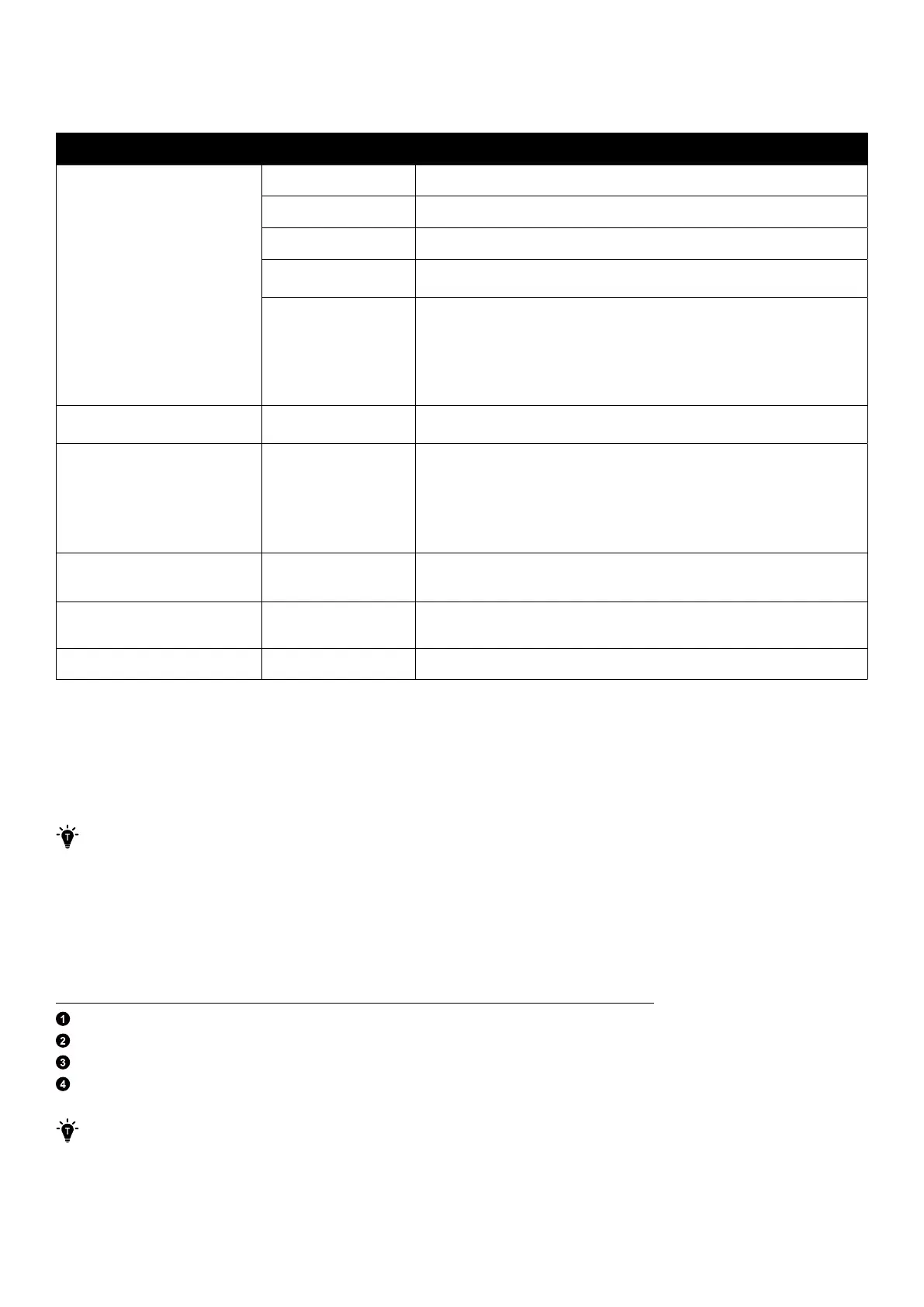
Required Supplies
·
Cable conduits: depending on local electrical requirements.
·
Prepare cables in compliance with relevant local codes. All cables are rated minimum 90°C.
Function Required Supplies Specifications
Connection between two columns
of modules
GND cable Yellow/green, 6 mm², minimum 600 V rated, copper
Positive DC power cable Red, 8 mm², minimum 600 V rated, copper
Negative DC power cable Black, 8 mm², minimum 600 V rated, copper
RJ45 signal cable Cat 5 or higher, 5-6 mm in diameter, 8-conductor, shielded (recommended)
Cable conduit
For wall-mount installation: flexible metal conduits, inner diameter of 15 mm, outer
diameter of 20 mm, 304 stainless steel
For floor-mount installation: rigid metal conduits, inner diameter of 20 mm, outer
diameter of 25 mm, 304 stainless steel
Connection from the power module
to the WLAN dongle
Signal cable Cat 5 or higher, 5-6 mm in diameter, 8-conductor, shielded (recommended)
Connection from the power module
to the AC grid / backup loads
3-conductor power cable
·
Outer diameter: 7-12.5 mm
·
L1 conductor: Brown, 6 mm², minimum 300 V rated, copper
·
L2 conductor: Blue, 6 mm², minimum 300 V rated, copper
·
GND conductor: Yellow/green, 6 mm², minimum 300 V rated, copper
Connection from the power module
to the power sensors
Signal cable
Outer diameter: 5±0.5 mm
Conductor cross-sectional area: 0.2-0.35 mm²
Connection from the power module
to the DRED
Signal cable Cat 5 or higher, 5-6 mm in diameter, 8-conductor, shielded (recommended)
Connection between power modules Signal cable Cat 5 or higher, 5-6 mm in diameter, 8-conductor, shielded (recommended)
5. Installation
You can mount the modules on a floor mounting base or to the wall. The procedures describe the installation of one power
module and six battery modules (power module and three battery modules in the first column; another three battery modules
in the second column) as an example.
·
We suggest leaving a minimum of 300 mm of workspace on either side of the equipment.
·
Parallel cables between two support bases of model X1-P6K-B20-S, X1-P6K-B25-S, X1-P6K-B30-S shall be installed
in troughs or protected by a metallic cable duct or conduit. The metallic cable duct or conduit, provided that that
metallic parts are connected with the equipotential bonding system and comply with IEC 62477-1 clause 4.4.4.2.2.
5.1 Floor Mounting
Step 1: Mark pilot holes for the first module.
If there is no baseboard or the baseboard is no more than 15 mm thick, follow these steps.
Position the floor mounting base on a level surface against the wall or the baseboard.
Fold the positioning card (included with the power module package) along the crease.
Align the card with the top of the floor mounting base and use a level to ensure it is horizontal.
Select and mark a hole on each side based on the wall conditions to secure the first module.
If anchoring to a wall with studs, select position A for studs spaced 508 mm apart, position B for studs spaced 406
mm apart, or position C for studs spaced 304 mm apart.



 To Next Page