58
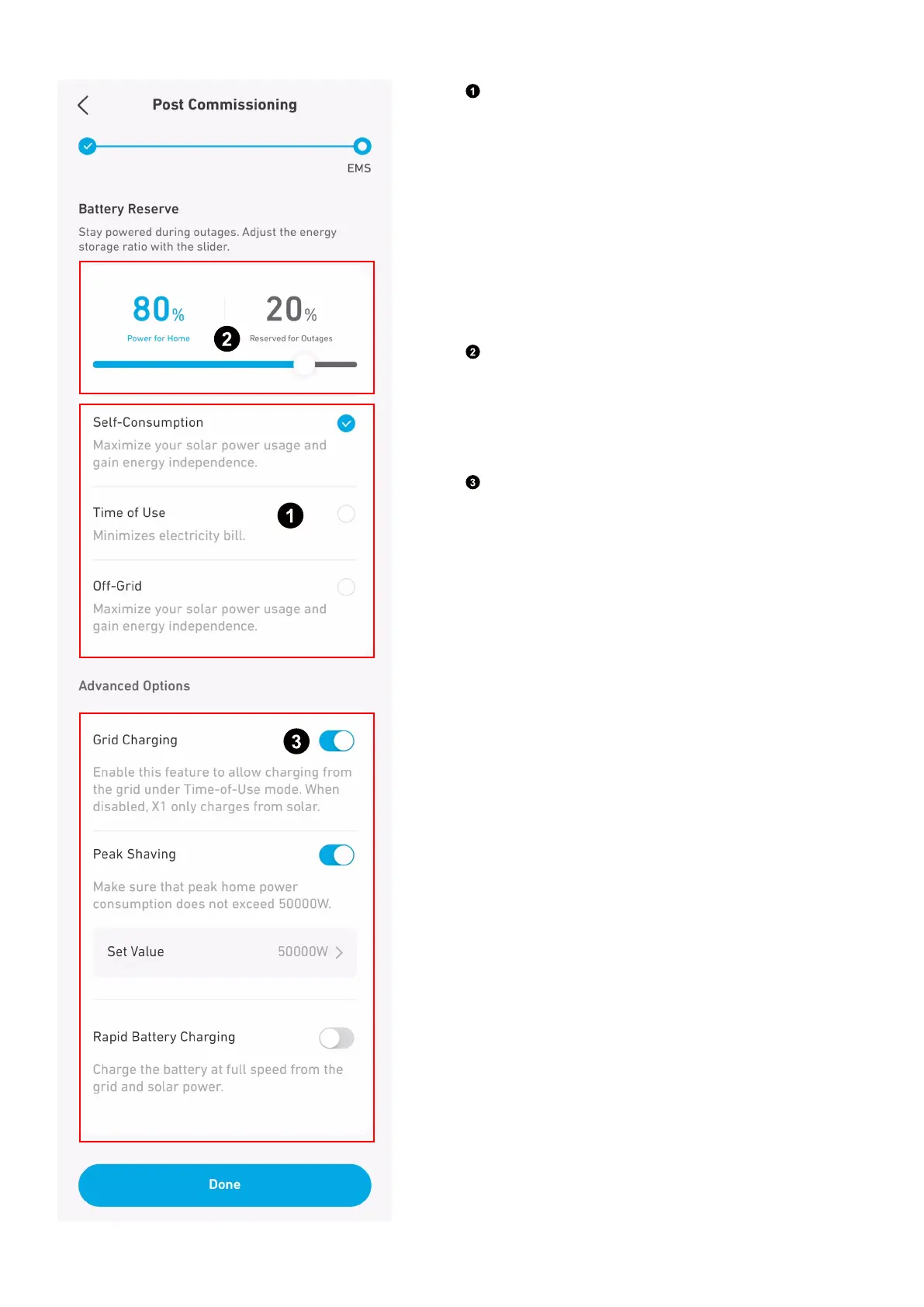
Step 2: Customize Power Mode
Choose one power mode from the following.
·
Self-Consumption: Maximize the use of solar power and
reduce grid power consumption.
·
Time of Use: The battery will charge when electricity prices
are low and discharge when they're high.
·
O-Grid*: Power your home with solar power and stored
battery energy when the grid goes down.
* Anker SOLIX X1's o-grid mode is incompatible with the
Sunlight Backup mode of the Enphase microinverter.
Disable Sunlight Backup mode before using Anker SOLIX
X1 o-grid.
Set backup reserve by adjusting the slider.
·
To allow more capacity for Self Consumption mode or Time
of Use mode, set a lower reserve percentage.
·
To reserve more energy for use during an outage, set a
higher reserve percentage.
Select advanced options.
·
Grid Charging: This feature is only available when grid
charging is permitted. Enable the feature to charge the
battery modules from the grid for backup reserve and
for daily use in Time of Use mode. Disable the feature to
charge the battery modules solely from solar power.
·
Peak Shaving: Set the peak power to prevent tripping or an
increase in grid charges (in some areas).
·
Rapid Battery Charging: Charge the battery modules at full
speed using both grid and solar power.



 To Next Page