6
P/N 1011550 Rev. D 03/21
Installing the Release Sheet
The Release Sheet allows buns to pass
through the toaster without sticking. The
toaster should never be operated without
a clean Release Sheet installed.
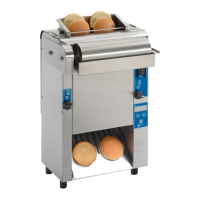
Bun Thickness Compression
Knob Settings
The toaster uses two Bun Thickness
Compression Knobs for proper toasting
of buns (heels and crowns).
For best results, set both Bun Thickness
Compression Knobs to 4.
The compression settings range from 1
to 6. Setting 1 is the thinnest setting and
Setting 6 is the widest setting.
WARNING
Do NOT operate the toaster without the
release sheet installed. Do not use any
abrasive cleansers or tools such as
scrubbers or scrapers on the Platen.
Damage to the Platen from operation
without a Release Sheet or damage
caused from abrasive cleansers or
tools voids the warranty.
Crease here
Fold down
Bun
Feeder
Release
Sheet
Platen
1. Fold and crease edges of Release
Sheet as shown below.
2. Fold and crease Release Sheet in
half at center point.
3. Turn unit on and Install Release
Sheet over Platen. The unit will feed
the Release Sheet into place.
Re-install Bun Feeder.
Figure 3. Bun Thickness Compression Settings






 To Next Page