© Ikonix USA
23
System Parameter Setting/
Range
Description
Factory Default
- Allows you to restore default factory settings (requires a password). This function is for
troubleshooting purposes. Contact us for more information.
Performing Factory Default will delete all test files
and restore all system settings.
Calibration
- Allows you to select a maximum voltage threshold, or ceiling level, for the AC output
voltage programmed in the test parameters.
4.3 Editing System Parameters
Some system parameters have dierent states that can be set and others have a range of numerical values. All
the available selections and ranges are displayed at the bottom of the screen for each system parameter. For
more details on each system parameter reference the table in section 4.2.
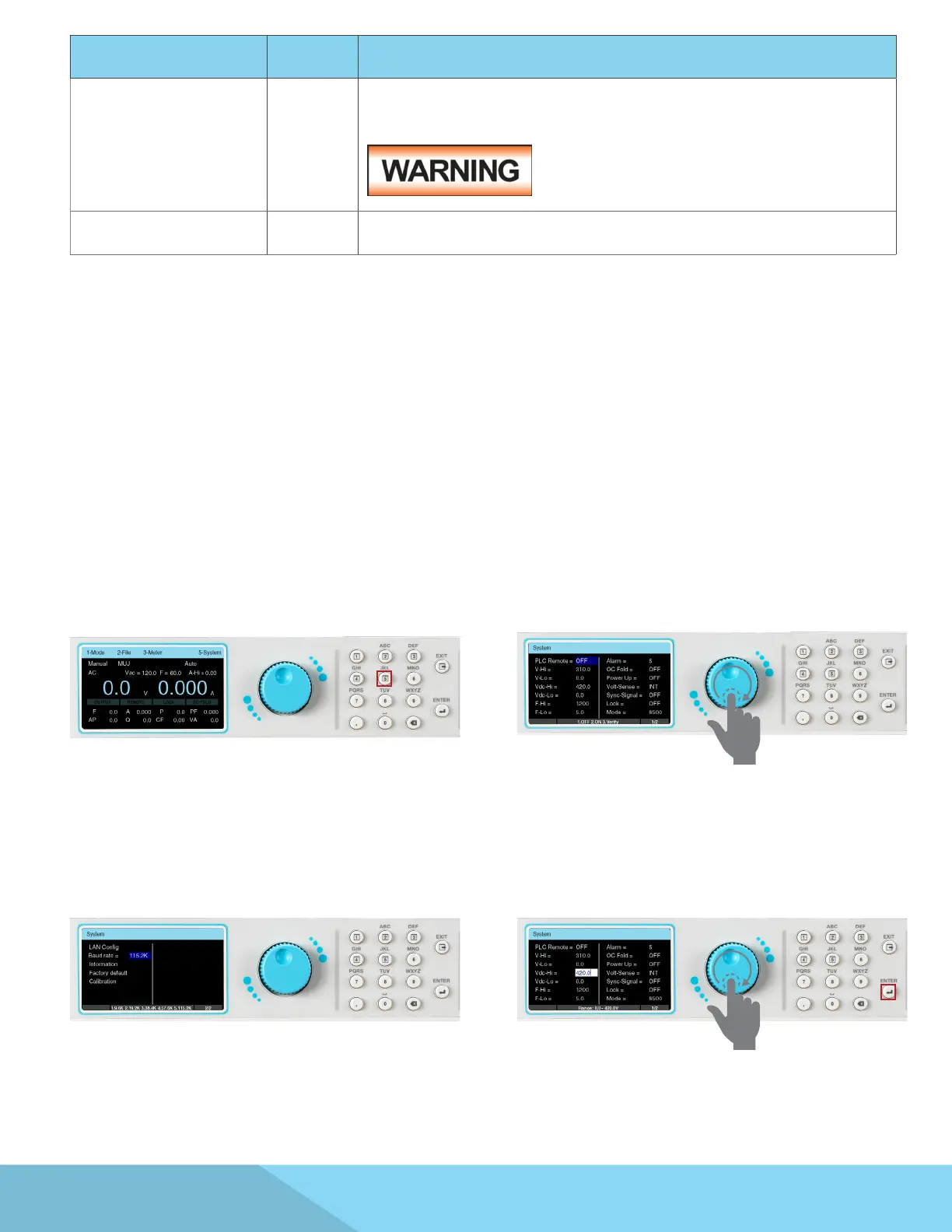
1. To edit system parameters press any key on
the keypad from the test screen, a drop-down
menu will appear. Press the number 5 key on the
keypad to enter the System Parameter screen.
2. The System Parameter screen will open and
display all the parameters available for editing.
Use the rotary knob to scroll through the system
parameters.
3. Some of the system parameters are listed on
the next page.
4. To edit system parameters use the rotary knob
to highlight the desired parameter, press the
rotary knob or the ENTER key and the parameter
eld will turn white with a blinking cursor:



 To Next Page