© Ikonix USA
25
4.4.1 Create Test File – Manual Mode
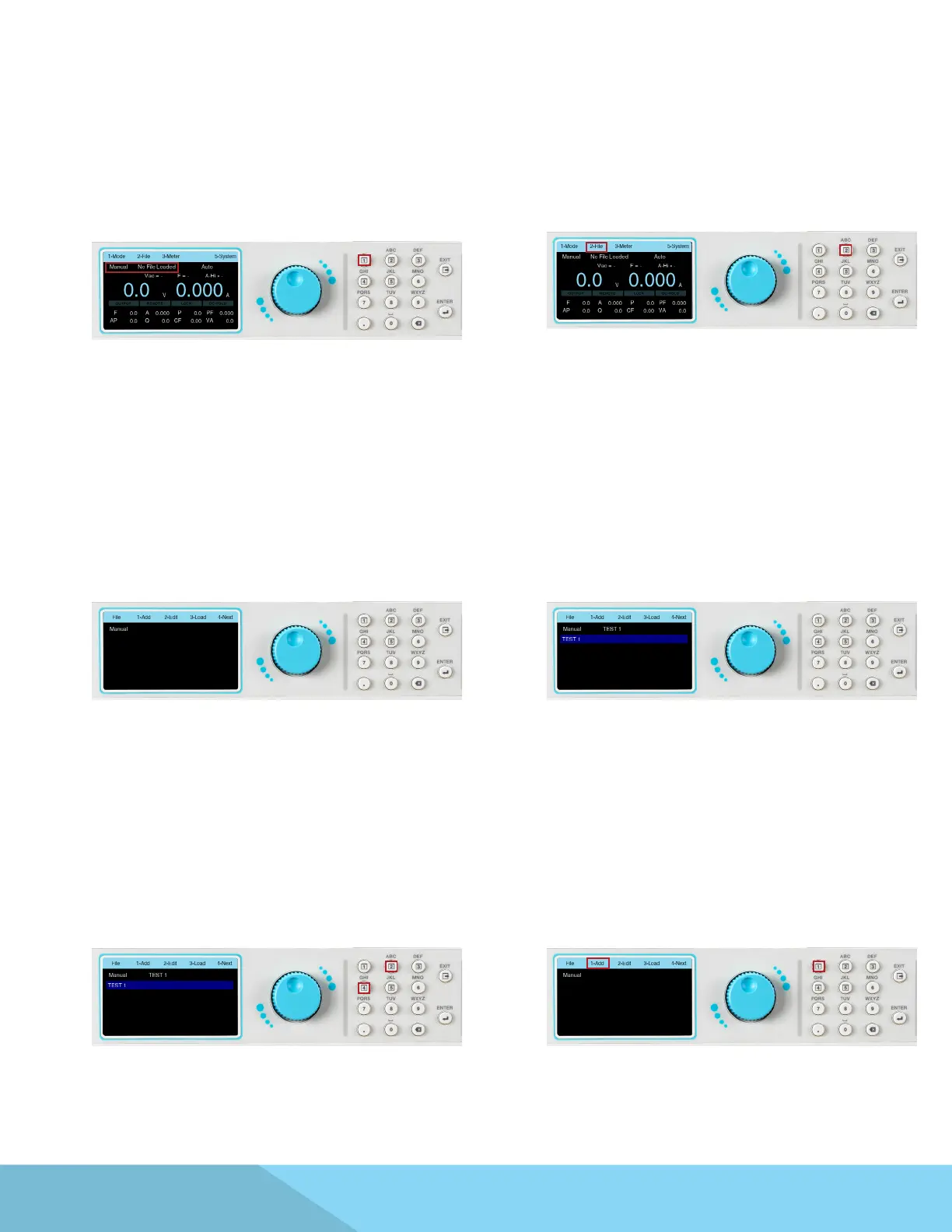
1. From the Mode menu press the number
1 key on the keypad to change the Mode to
Manual. The next screen displayed will reect
the Mode as Manual, along with a test le name
or a “No File Loaded” message if no test le has
been loaded in Manual Mode:
2. Once the Mode has been set to Manual press
any key to drop down the menu bar then press
the number 2 key on the keypad to enter the
File menu:
3. The File screen will be displayed and the
selections on the menu bar will change. If there
are no previously saved test les for Manual
Mode the screen of the File menu will display the
selections to Add, Edit or Load a test le on the
menu bar. The Next selection on the menu bar
will not do anything:
4. If there are any test les previously saved for
Manual Mode they will be listed on this screen:
5. Press the number 4 key on the keypad to
view the next page of the File menu. The next
page will display the selections to Copy or
Delete an existing test le. Selecting Next (by
pressing the number 3 key on the keypad) will
display the previous page of the File menu:
6. To start adding a test le press the number 1
key on the keypad to select Add:



 To Next Page