© Ikonix USA
42
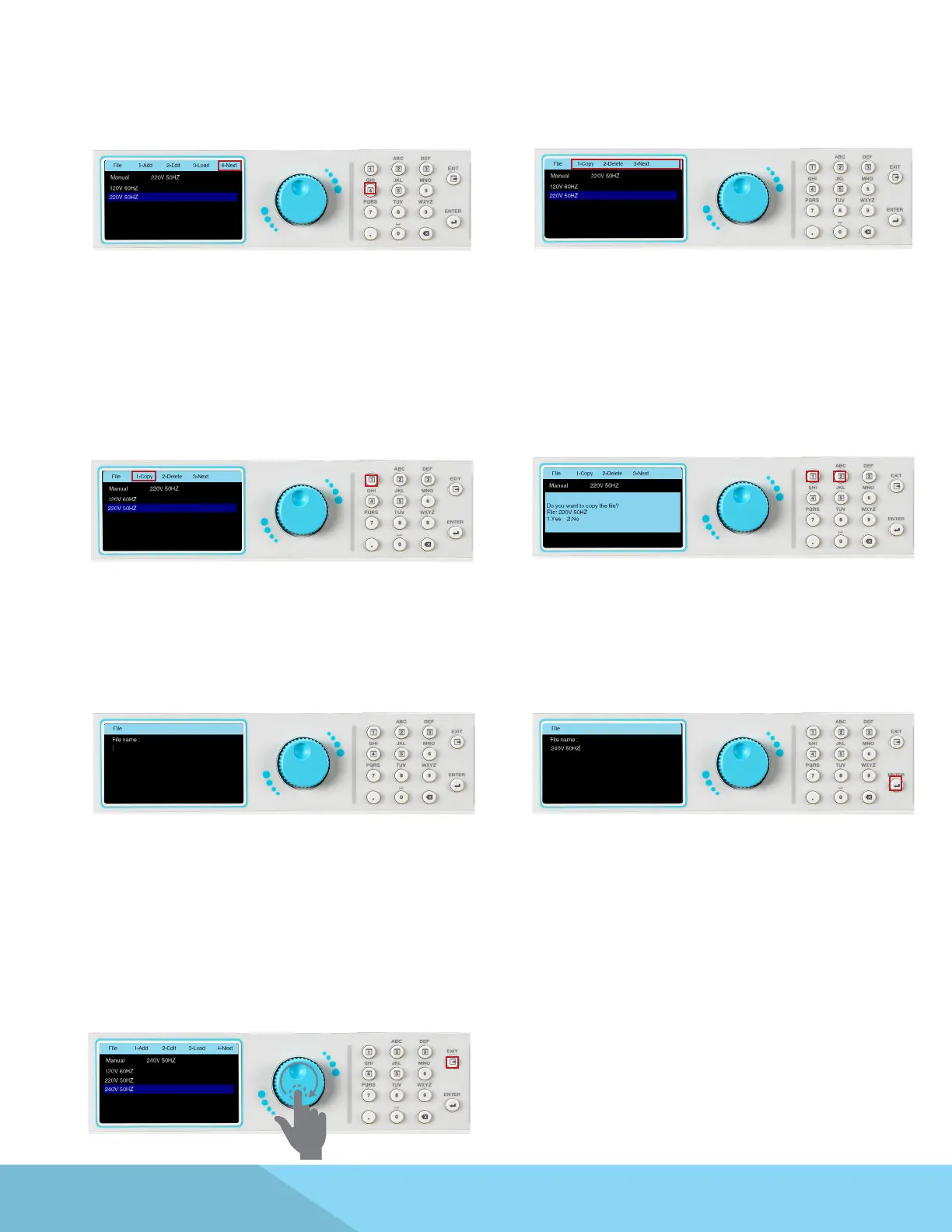
4.5.2 Copy
1. When the File menu appears press the number
4 key on the keypad to view the Next page:
2. The selections in the menu bar will change and
the option to select Copy, Delete, or Next will
appear:
3. To copy a le, use the rotary knob to
highlight the le to be copied and press the
number 1 key on the keypad:
4. The following message will appear on the
screen to conrm if you would like to proceed
with copying the selected le. Press the number
1 key on the keypad to select Yes, or press the
number 2 key on the keypad to select No:
5. If Yes is selected the screen will display a eld
for entering a le name for the copied le:
6. Use the keypad to type the le name and press
the ENTER key to save the newly copied le:
7. The next screen will display all the
test parameters for the copied le. Use a
combination of rotary knob and keypad if you
wish to edit the test parameters. Press the EXIT
key and the screen will display the newly copied
test le along with other les:



 To Next Page