AQUA SALT
+
MAINTENANCE AND INSTRUCTION MANUAL
Salt chlorine genera ENGLISH
ADSP7000753 rev. 5.0 09/07/2019 14/51
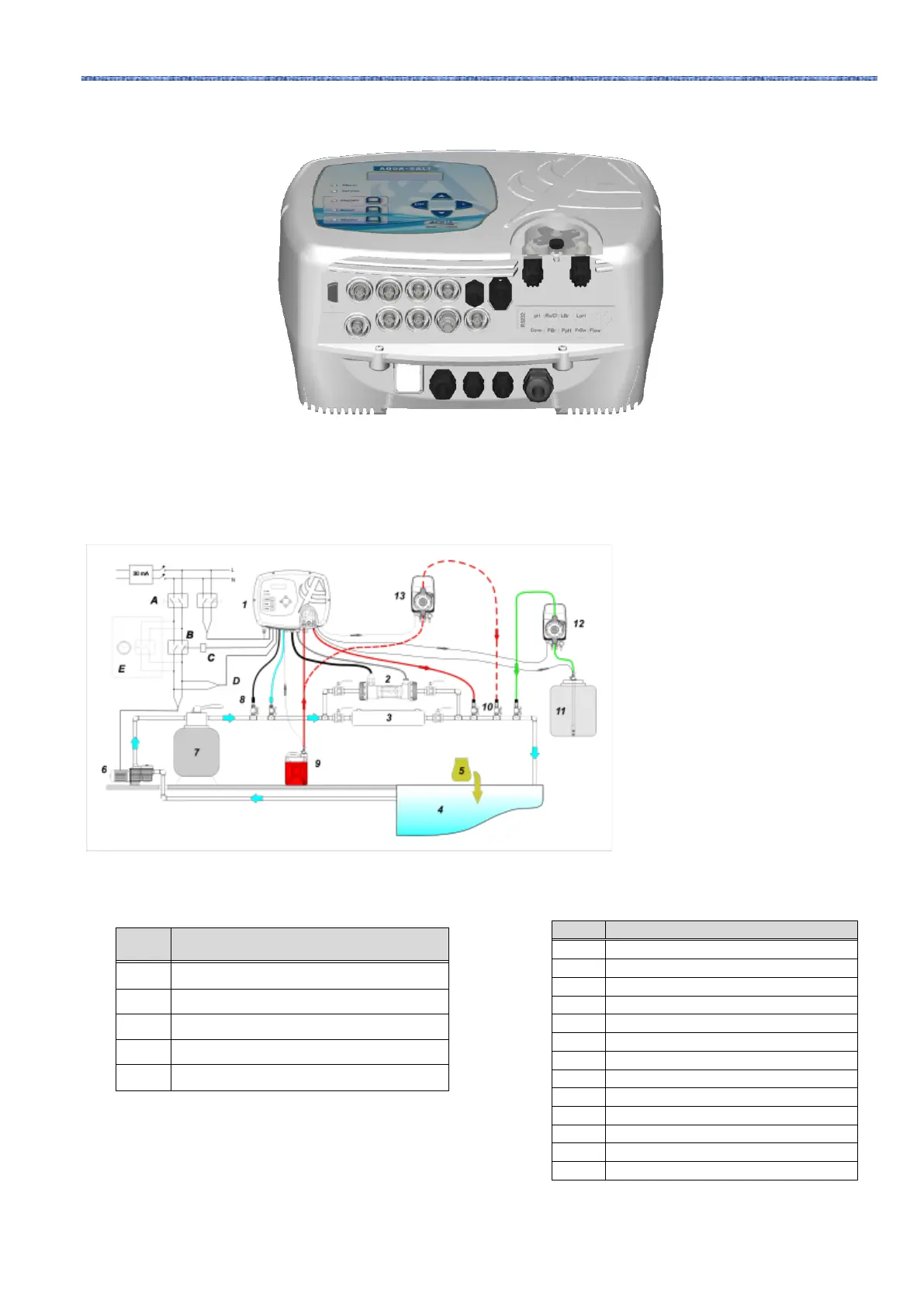
3 Connector overview. Lower part of the control box
Number 12 in picture 9 indicates the
electromagnetic pump for brine
restoration. In order for the pump to
work correctly, it is necessary to
connect the level signal of the product
in the tank. Connect the pump to the
connector indicated with PBr, and the
level signal to the connector indicated
with LBr, both shown in picture 8.
Number 13 in picture 9 indicates an
external pump to correct pH. If you
want to use the external pH pump,
connect it to the PPh connector, and
connect the level signal to the
connector indicated with LPh, shown
in picture 8.
4. Installation example pH, Rx and ClJ models. It is advisable to enter the redox /
chlorine probe before the sand filter.



 To Next Page