AQUA SALT
+
MAINTENANCE AND INSTRUCTION MANUAL
Salt chlorine genera ENGLISH
ADSP7000753 rev. 5.0 09/07/2019 21/51
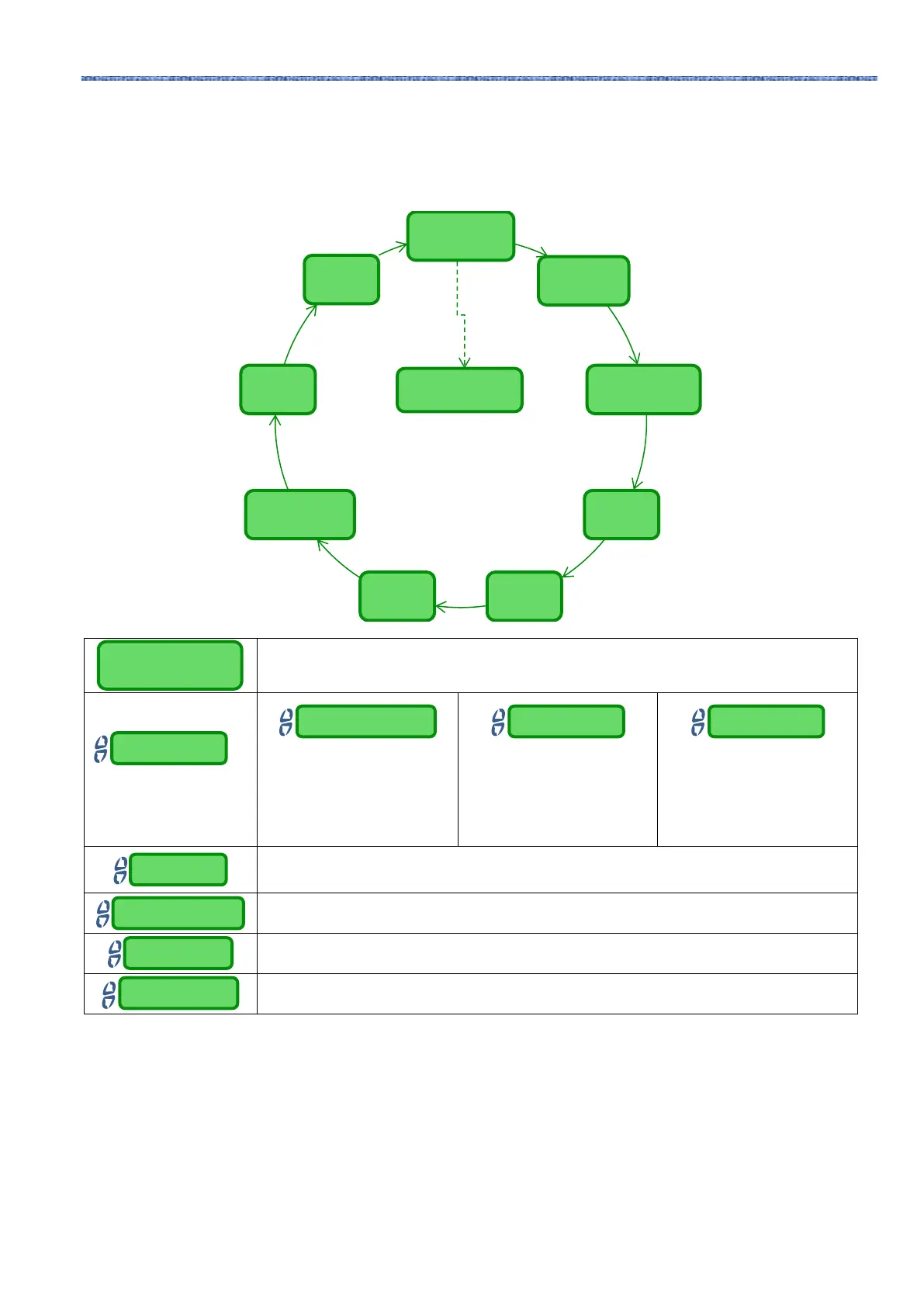
Restore
Parameters
Language
Set password
Date
TimeCell Type
temperature
unit
System
unit
Salinity
unit
4.5.2
System
settings
menu
This menu manages the general operation settings of the chlorine generator, like unit of measurement of
temperature and salinity, current date and time, clock type and others.
• Press and hold Enter for more than 1 second to go back to the System Settings section of the Installer
Menu.
It allows you to set the system back to the initial conditions with the default programming
parameters shown in Annex D.
Allows you to choose the
language
Allows you to set a four-
character password.
Press Enter to confirm the
character and move to the
next one.
Allows you to set the date with
the format:
Mon…Sun DD/MM/YY
Press Enter to confirm the
character and move to the
next one
Allows you to set the time with
the format:
HH/MM
Press Enter to confirm the
character and move to the
next one.
Indicates the dimensions of the titanium plates inside the electrolytic cell among the following
four: 50/100/150/200
Choose the temperature unit between Celsius or Fahrenheit
Sets the reference measurement system between Metric or English
Choose the salinity unit between g/l or ppm
4.5.3
Chlorine
probe
calibration
menu
The Menu "Calibration of chlorine probe" allows you to perform the calibration of the chlorine probe, if the
Aqua Salt
+
model provides for their presence. Calibration should be performed before using the sensor using
the following procedure:
1) The probe must be inserted by at least two hours in the probe holders under the following conditions:
Flow of 30 l / h, 0.8-4 ppm chlorine level, pH range 4-12 pH, pressure less than 0.5 bar. For proper
installation of the probe see the Addendum to this manual, specifically for the CL-J probe.
2) From the screen that prompts you to insert the probe into the water, press ENTER.
3) You will see a countdown at the end of the countdown or after you press the Enter key shows the chlorine
value read by the probe expressed in mA. You can leave out this information. A probe functioning
correctly (reading range 0-5 ppm) roughly follows the following equation: mA = 4 mA + 3.2mA / ppm.
Reset parameters
Press Enter
Reset parameters
Confirm? Yes/No



 To Next Page