AQUA SALT
+
MAINTENANCE AND INSTRUCTION MANUAL
Salt chlorine genera ENGLISH
ADSP7000753 rev. 5.0 09/07/2019 38/51
8.3 MENUS
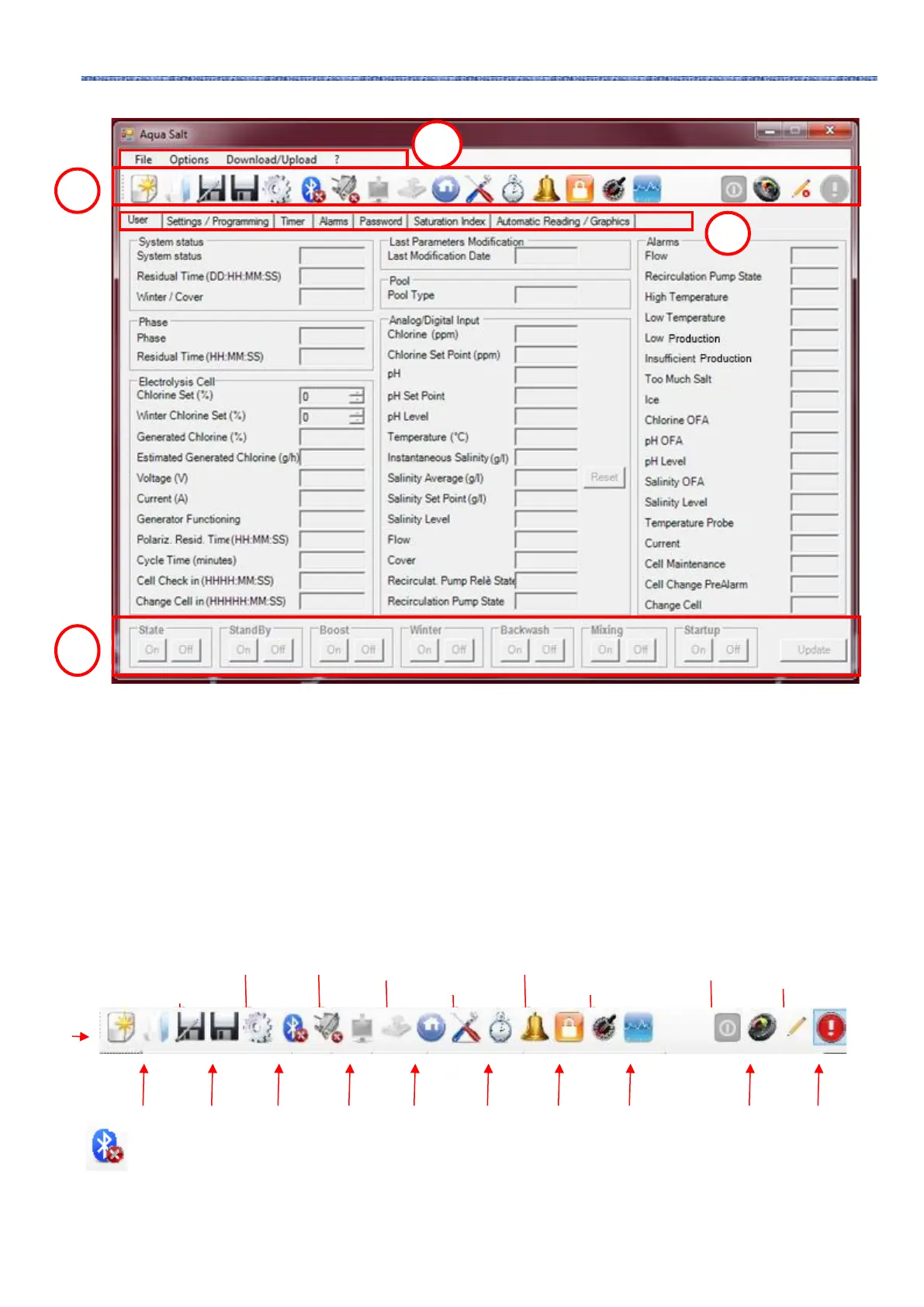
The File Menu includes the typical sections: new, open to open the files where the working parameters of your
generators are saved; save, save as, exit to close the application.
The Configurations menu includes the following sections: set language to select your language, data folder to choose
the path (do not select root C:\\ if you are using Windows 7 or Vista) to save the data of the generator, serial
port/modbus to set the data of serial configuration and modbus, customer name to insert the name of the customer.
The Download/Upload menu includes the following sections: download to download within the remote management
software the configuration of the device, upload to upload the configuration of the software installed on the PC to the
device.
8.4 ICONS
Icons allow to quickly perform some operations of the menus (see menus described above) or of the tabs (see tabs
described below). The last four icons provide information about the state of the system.
By clicking on the Bluetooth icon, you can connect the device and the PC through bluetooth connection (if supported).
To connect PC and device, follow this procedure:
• Clicking on the icon, the following window will open:



 To Next Page