001-31249-EN rev. 3
Switching Between Dual and Single Modes 33
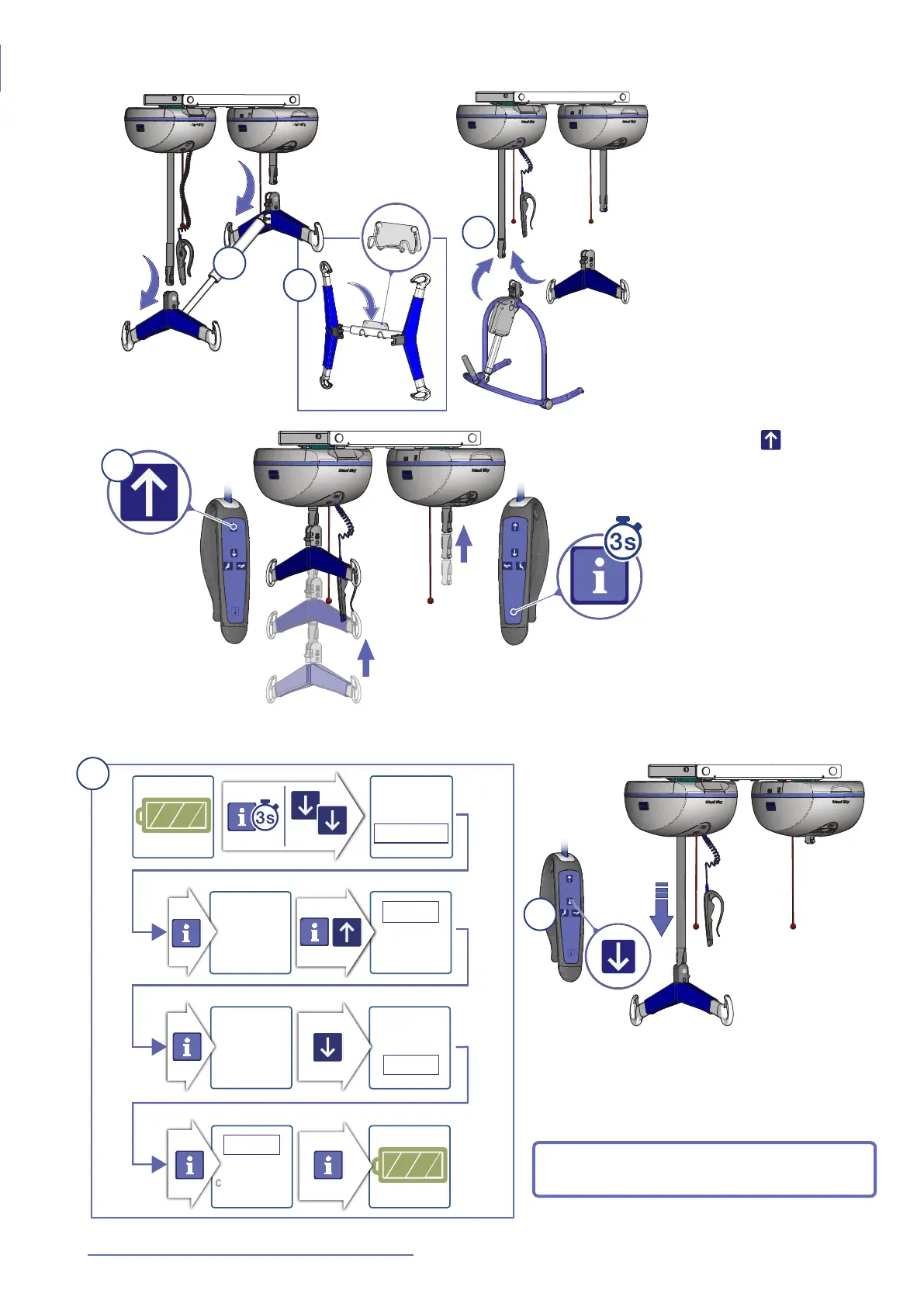
Switching From Dual Mode to Single Mode
Fig. 71
1) Detach both the Maxi
Sky 2 Plus head and foot-
end spreader bars (see
page 32).
2) It is recommended to
store the MaxiSky2 Plus
spreader bar on the wall
support or cart designed for
it.
3) Install a compatible
MaxiSky2 ceiling lift
spreader bar onto the
leading ceiling lift (i.e. the
one with the hand control).
Fig. 72
4) Press the button until
both straps are fully
retracted to their highest
limit.
5) Follow the steps shown in Fig. 73 to set the
MaxiSky2 Plus in Single Mode.
b
ack
monitoring
custo
mizing
back
monitoring
customiz
ing
Dual
mode
Single
Dual
ba
c
k
Single
Mode
Single
Mode
b
ac
k
Fig. 73
Fig. 74
6) The spreader bar can be lowered for use.
The MaxiSky2 Plus will now operate in Single
Mode.
NOTE: In Single Mode, the display on the
driven ceiling lift will be turned off.
1
2
3
4
5
6



 To Next Page