001-31249-EN rev. 3
Switching Between Dual and Single Modes34
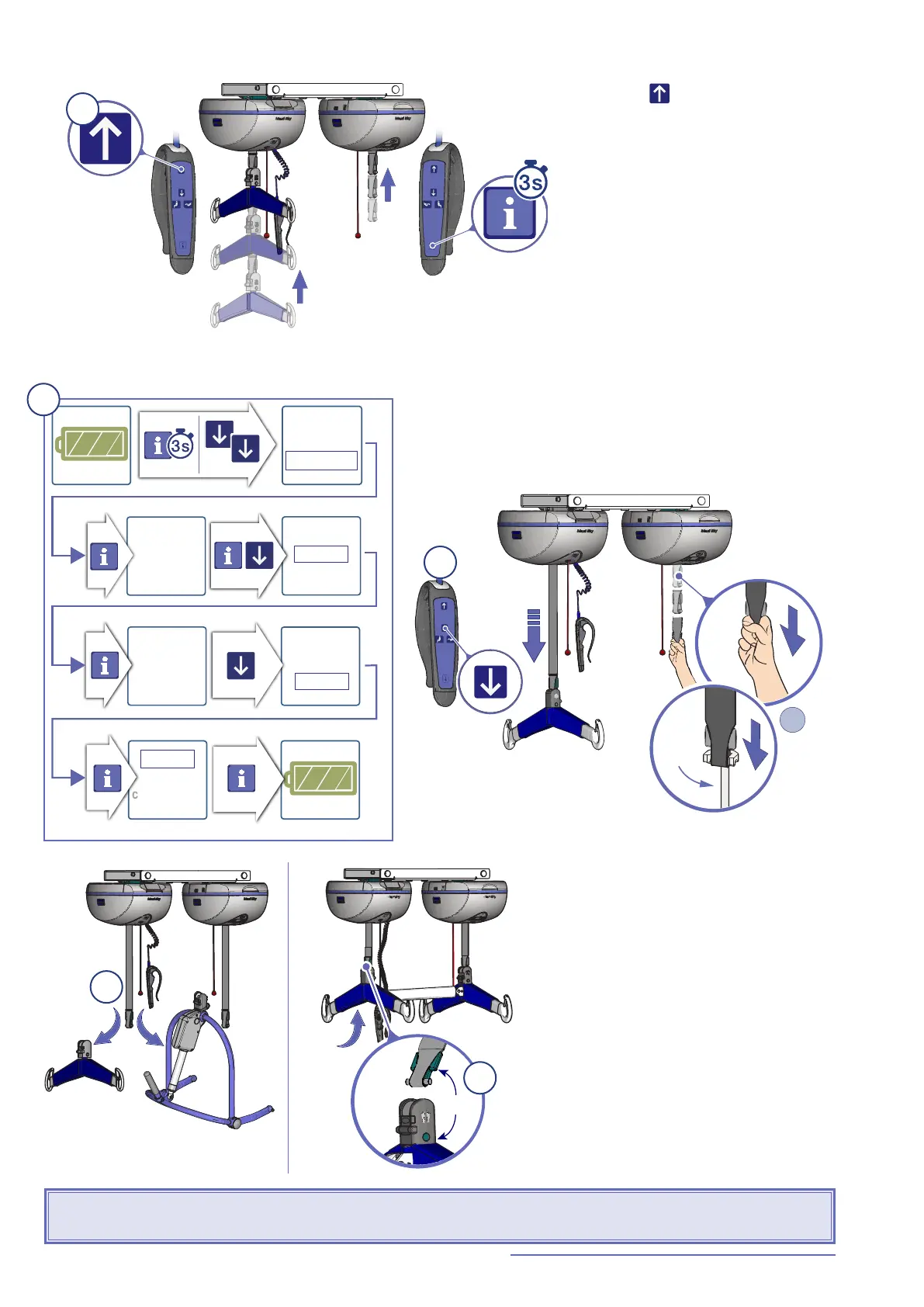
Switching from Single Mode to Dual Mode
Fig. 75
1) Press the button and bring the
spreader bar to its highest limit.
2) Follow the steps shown in Fig. 76 to set the
MaxiSky2 Plus in Dual Mode.
back
monitoring
custo
mizing
back
monitoring
customiz
ing
Single
mode
Single
Dual
ba
ck
Dual
Mode
Dual
Mode
b
ack
Fig. 76
3) Lower the spreader bar while simultaneously pulling
down on the empty strap (either with your free hand or
with the "strap puller" tool, #700-31299).
Strap
puller
OR
Fig. 77
Green
Fig. 78
4) Remove the Maxi Sky 2 ceiling lift
spreader bar.
5) Install the MaxiSky2 Plus
spreader bar making sure to match
the green quick connect adaptor with
the foot-end spreader bar (i.e. with
the green dot).
The MaxiSky2 Plus can now be
used in Dual Mode.
WARNING: Ensure that the spreader bars are attached correctly. If they are reversed, adjusting the
patient's position will result in inverting the patient positioning motion.
1
2
3
4
5



 To Next Page