!
15 Status!
!
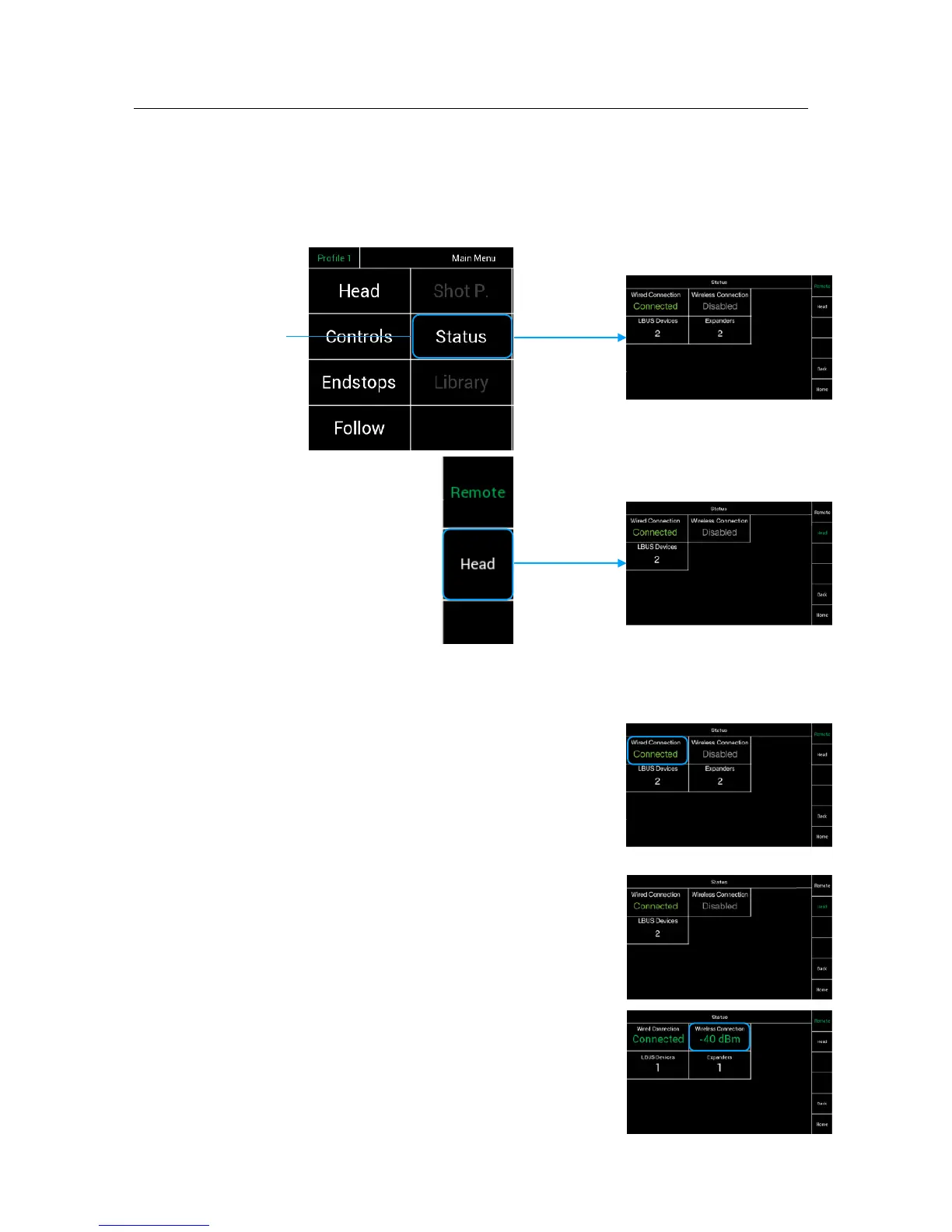
Selecting Status will open a new touchscreen display menu. The Status menu will display
the status of controller expanders, wireless status, and status of individual connections.
(LBUS, FS-CAN Bus, wireless connection)!
!
!
!
!
!
!
!
!
!
!
!
!
Selecting Status will first !
open the Remote status.
Selecting Head will open
the Head status
!
15.1 !
Head & Remote Status Displays !
!
The Remote and the Head Status screens indicates
the status of the wired connection, the wireless connections
LBUS and Expander controllers.!
!
Wired Connection indicates that the FS Can Bus cable
is connected. !
NOTE!
Connecting the FS Can Bus cable, will overrule !
the wireless connection.
The wireless connection will remain, but no data !
will be send as long the cable is plugged in. !
!
Wired NC indicates that the connection is now wireless.
NOTE!
As soon the FS Can Bus cable gets disconnected !
and the radio module is switched enabled, all data !
will be transferred wireless.!
!
NOTE!
The quality of the wireless connection will be indicated !
by the dBm value. !
!
!



 To Next Page