!
!
21.7!
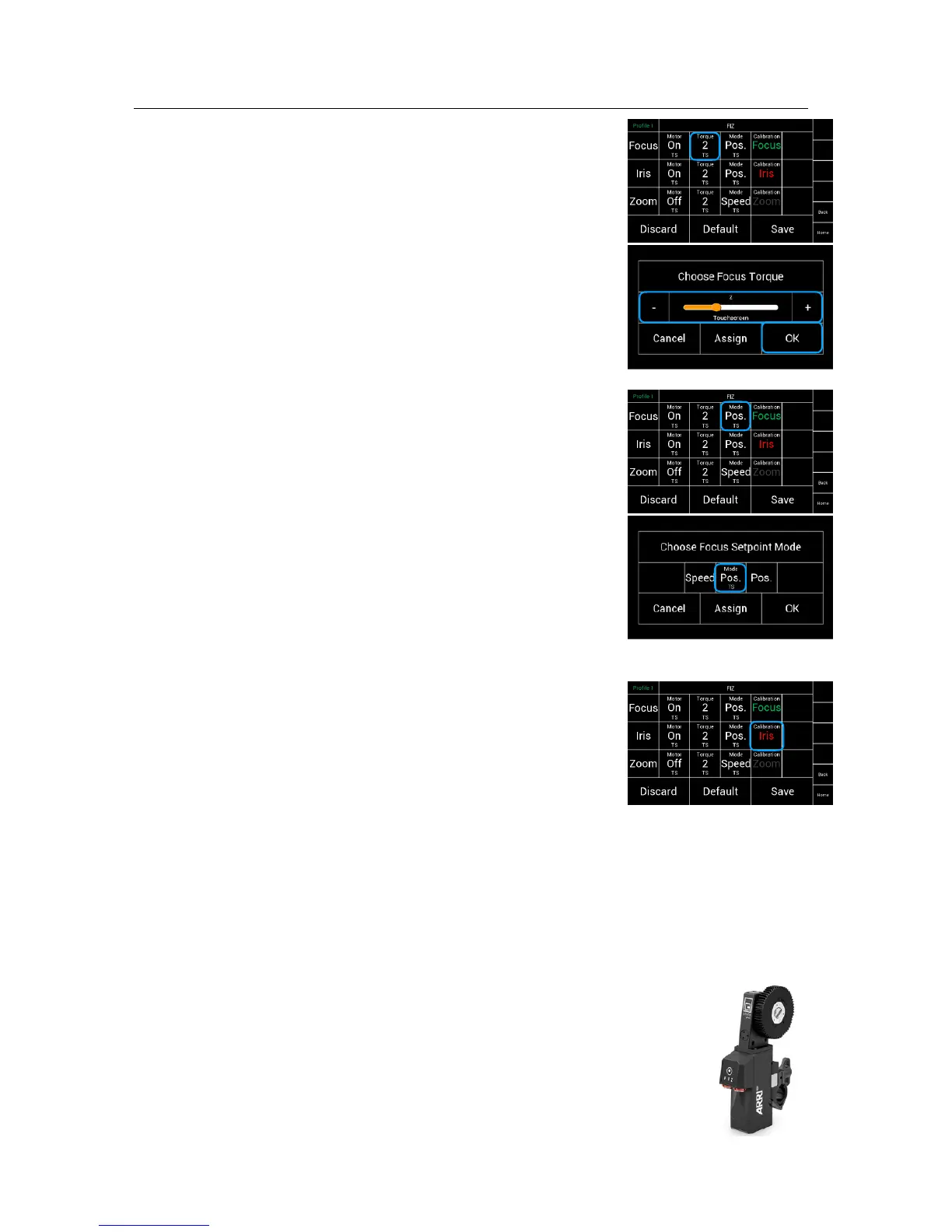
Torque!
!
The Torque selection will open a new
touchscreen display with a slider to allow the operator !
to set the needed Torque for the selected lens motor.!
!
!
!
!
!
!
!
!
!
21.8!
Mode
In the Motor Mode column the motors can be !
adjusted from speed to angle measurement. !
!
NOTE!
If you use: !
!
a Focus Wheel, the mode should be set on Position.
!
a Iris Slider, the mode should be set on Position.
a Zoom Rocker or the joystick for zoom, the mode !
should be set on Speed
!
!
!
!
21.9!
Calibration
By touching Calibrate, every singe motor will be calibrated.!
!
NOTE!
!
Green indicate that the motor had been calibrated.!
Red indicate that the motor needs to be calibrated.!
!
Quick setup procedure for cforce motors
!
• Mount the motors to the camera!
• Connect each motor through LBUS cables
•
Press the FIZ button at the motors to assign each motor to Focus, Iris or Zoom
•
Touch FIZ in the Home Screen
•
Touch the field below the desired FIZ function
•
Assign the desired FIZ controllers to the wanted lens motors
•
Enter the Main Menu and select FIZ
•
Check if the lens motors are switched on
•
Adjust the Torque. (minimum 2)
•
Check the motor mode (Focus and Iris is Position, Zoom is Speed)
• Touch Calibration



 To Next Page