Overview
IPC1100 Advanced IP Client Video Set-top • Installation and Operations Manual
365-095-24769 x.1 10/13
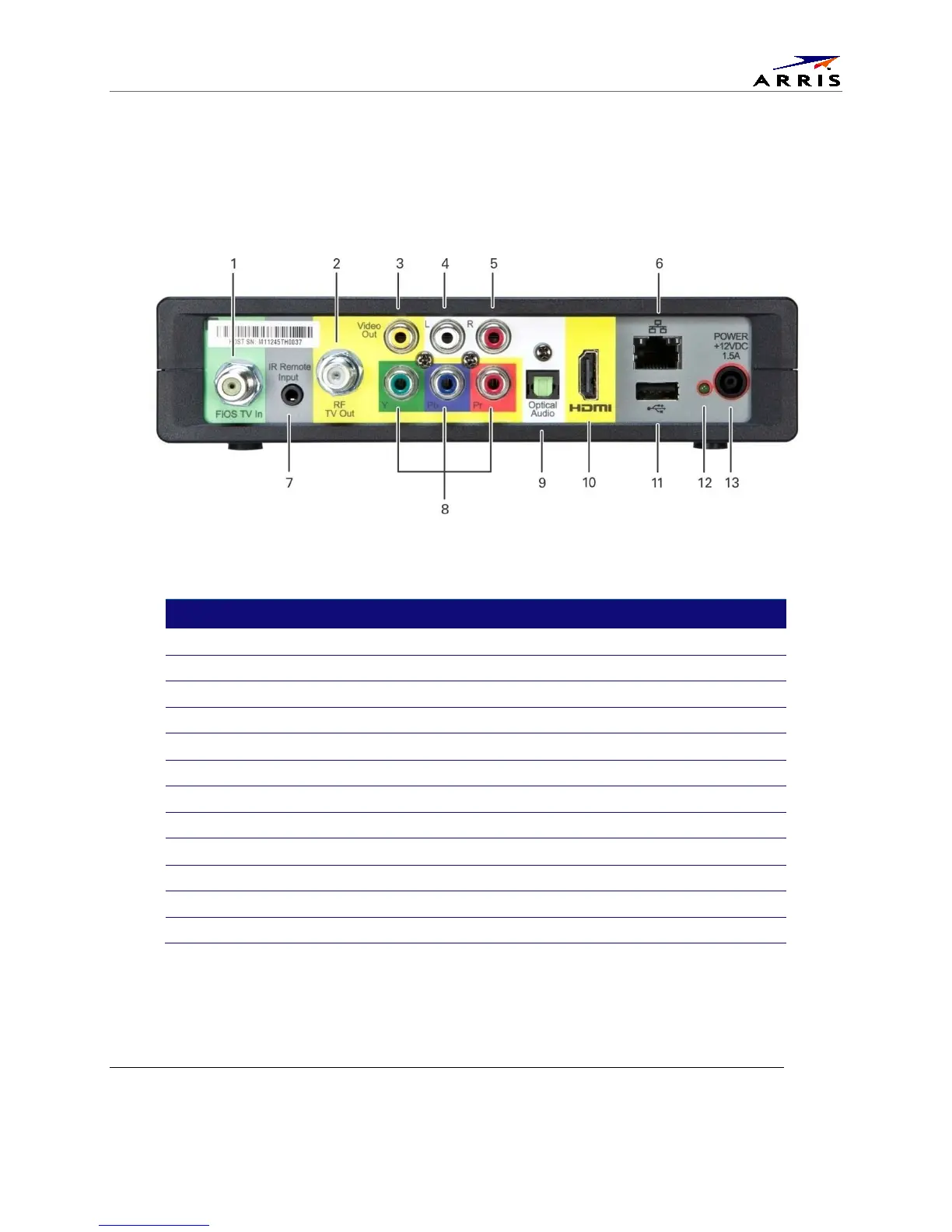
Rear Panel
The rear panel contains connectors for video, audio, and RF cabling, data output, and data interface
connectors. Some connectors are not enabled and require the support of application software.
Figure 3 – Rear panel
Table 3 – Rear panel connections
Label
Description
1 FiOS TV In — Connects to your VMS gateway
2 RF Out — Ch 3/4 modulated audio/video (SDTV) to TV or VCR
3 Video — Composite Video
output
4-5 Audio — Composite Audio L/R outputs
6 Ethernet* — Network connection
7 IR Remote Input — Connects to a remote control set-top accessory cable
8 YPbPr — Component video output
9 Optical Audio (S/PDIF)* — Provides Dolby
®
Digital 5.1 audio or PCM output
HDMI — High-Definition TV (HDTV) connector
11 USB 2.0 — Optional for future use
12 Power LED
13 Power cord connector



 To Next Page