Installation
IPC1100 Advanced IP Client Video Set-top • Installation and Operations Manual
365-095-24769 x.1 10/13
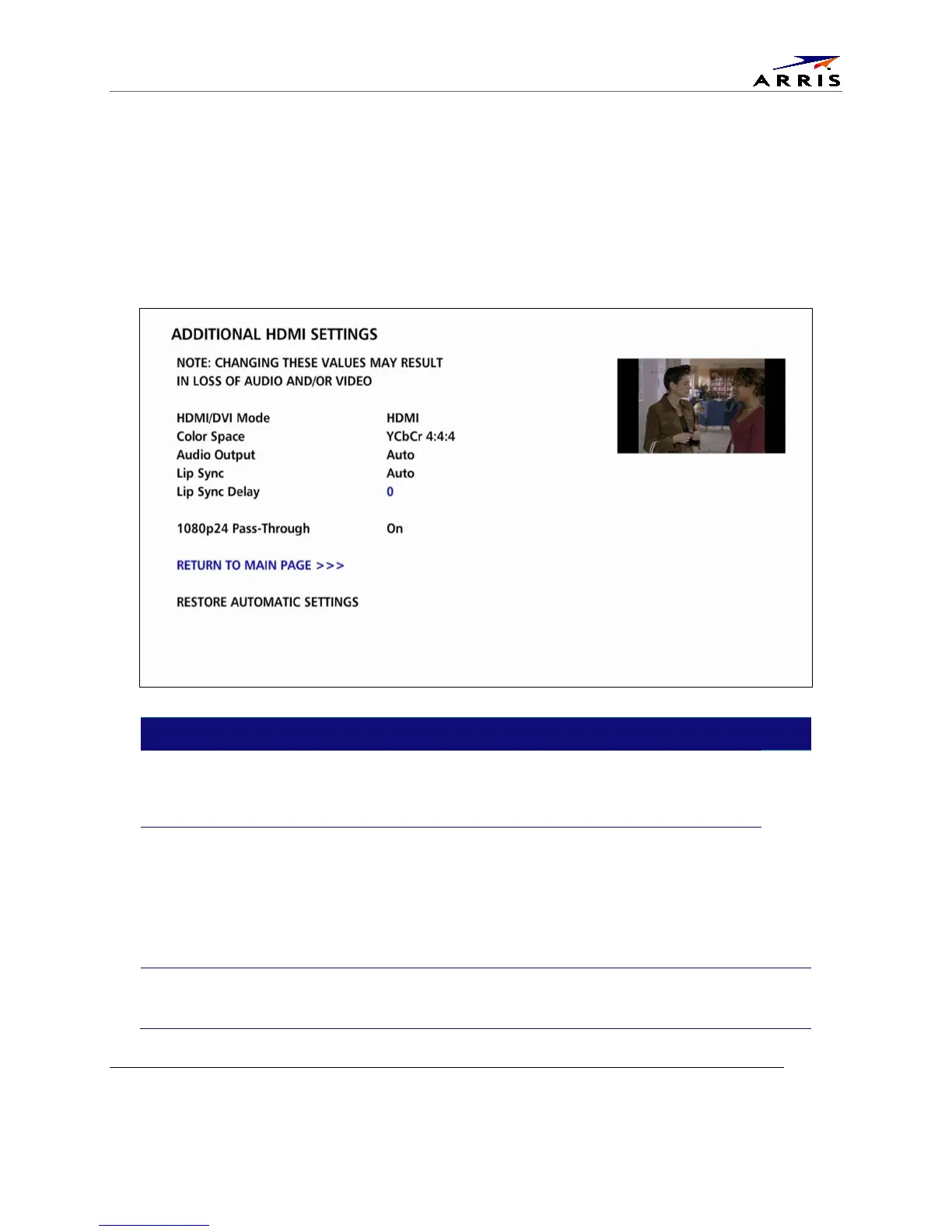
Additional HDMI Settings
The Additional HDMI Settings menu is used to configure advanced options that affect the operation of
the IPC1100 with HDMI and DVI display devices. Adjustable options include display mode, color space,
audio output mode, audio lip sync delay, and 1080p passthrough.
The Additional HDMI Settings menu screen is illustrated and defined below.
Setting Description
Additional HDMI
Settings
The Additional HDMI Settings option is available whenever an HDMI connection
is in place. Selecting this option will present a new menu screen with settings
specific to the HDMI connection, for example DVI/HDMI Mode, Color Space,
Audio Output, and Lip Sync settings.
HDMI/DVI Mode
The HDMI/DVI Mode setting allows you to optimize the HDMI output to work with both
DVI-equipped televisions and HDMI-equipped televisions. By default, this option is set
to HDMI. The options are used as follows:
HDMI— The IPC1100 is optimized to work with an HDMI television or home theater
receiver.
DVI — The IPC1100 is optimized to work with a DVI television or display device
(connected via an HDMI-to-DVI adapter).
Color Space
The Color Space setting allows you to adjust the color space used by the IPC1100 to
generate the video signals on the HDMI output. By default, this option is set to YCC
4:4:4. The options are used as follows:



 To Next Page