LED Icon Blinking On (Solid)
Scanning for an Internet
connecon.
Green: Startup process completed.
*Blue: Indic
ates DOCSIS 3.0 operaon (high-speed Internet access) which may not be
available in all locaons. Check with your service provider for availability in your area.
Rear panel
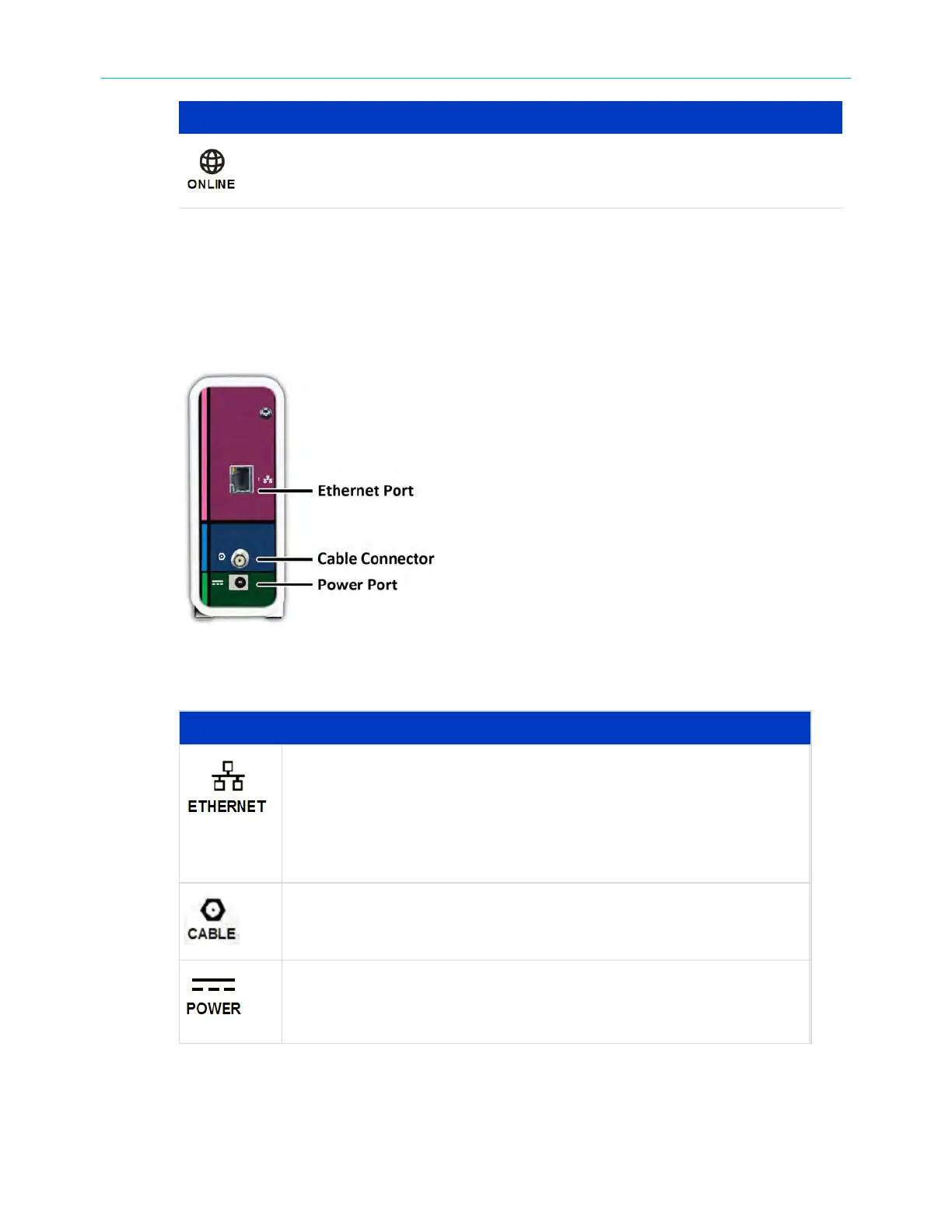
SB6183 rear view
SB6183 rear panel ports & connectors
Descripon
10/100/1000 Base-T Ethernet port
■ Gr
een: LED is ON – Indicates a 1 Gb data connecon is made
■ Green: LED is Blinking - Indicates data trac is in progress
■ Amber: LED is ON – Indicates a 10/100 Mb data connecon is made
■ Amber: LED is Blinking – Indicates data trac is in progress
Coaxial cable connector
+12VDC Power connector
Warning: T
o avoid any damage to your SB6183, only use the power
supply provided in the box.
Chapter 2: Product overview
SURFboard
®
SB6183 DOCSIS
®
3.0 Cable Modem User Guide STANDARD Revision x.4 11











 To Next Page