PN 365-095-30001 x.1 Touchstone CM8200 Cable Modem User Guide
Copyright 2016, ARRIS Enterprises, LLC. All rights reserved. 10
Chapter 3 Jill.Goldberg@arris.com
Product Overview
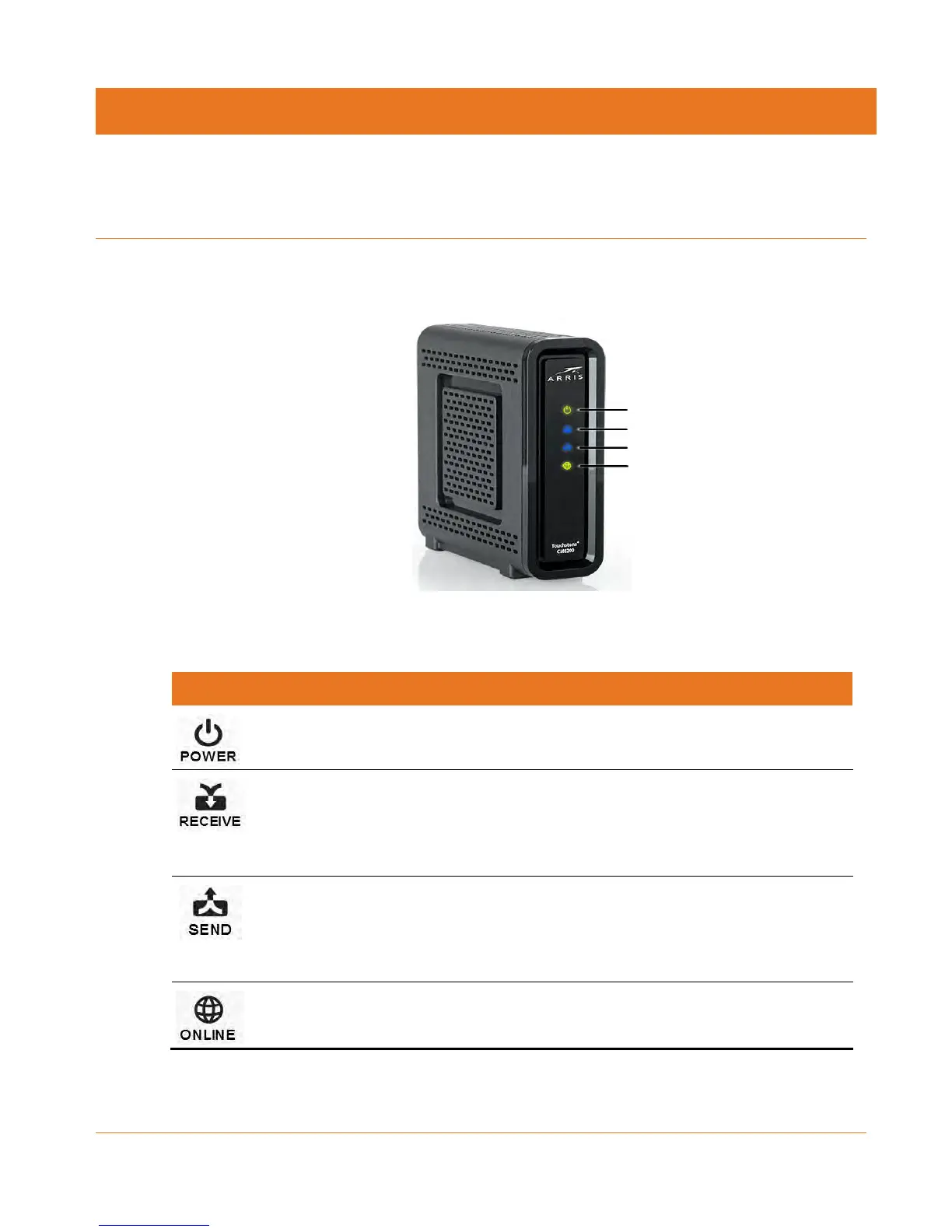
Front Panel
Figure 1: CM8200 Front View
Table 2. CM8200 Front Panel LED Icons
Not applicable — icon does not
flash
Green: Power is properly connected
Scanning for a downstream
(receive) channel Internet
connection
Green: Downstream channel is connected in
DOCSIS 3.0 mode
Blue *: High-speed Internet connection with
downstream channels in DOCSIS 3.1 mode
Scanning for an upstream (send)
channel Internet connection
Green: Upstream channel is connected in
DOCSIS 3.0 mode
Blue*: High-speed Internet connection with
upstream channels in DOCSIS 3.1 mode
Scanning for an Internet
connection
Green: Connection to the Internet is
completed
*Blue - Indicates DOCSIS 3.1 operation (high-speed Internet access) which may not be available
in all locations. Check with your service provider for availability in your area.
Power
Receive
Send
Online













 To Next Page