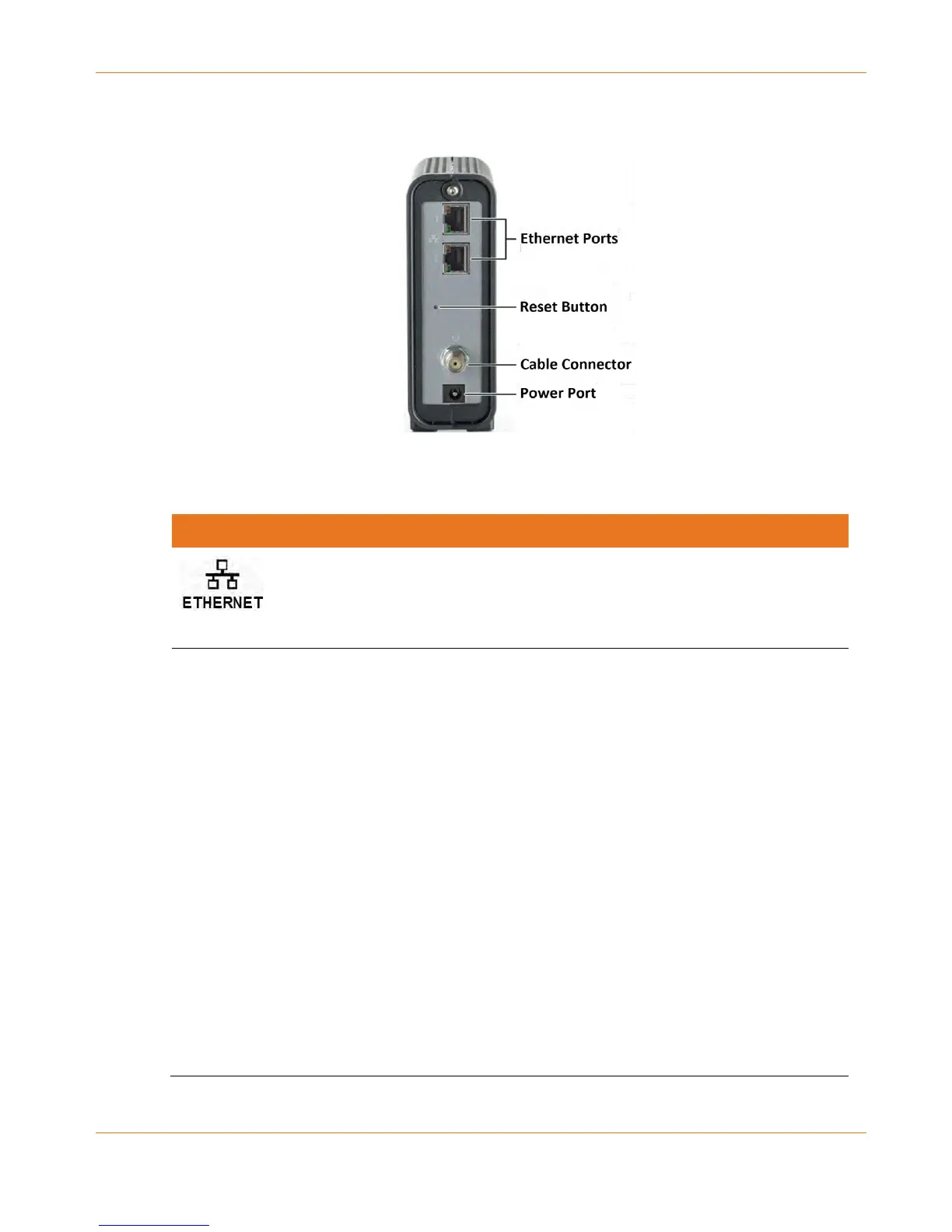
Table 3. CM8200 Rear Panel Ports & Connectors
Two Ethernet ports for RJ-45 network cable connections
Green: LED indicates a GigE data connection is made
Amber: LED indicates a 10/100 Mbps data connection is made
Recessed button located on the back of the CM8200 can be used to either
reboot the cable modem or reset the cable modem configuration settings.
To reboot (or restart) the cable modem:
1. Insert the end of a paper clip or other small object with a narrow tip
into the Reset opening on the back of the CM8200.
2. Press and hold the indented Reset button for three to four seconds
only.
3. Remove the paper clip or small object from the Reset opening.
To reset the cable modem configuration back to the factory default
settings:
1. Insert the end of a paper clip or other small object with a narrow tip
into the Reset opening on the back of the CM8200.
2. Press and hold the Reset button for 10 seconds or until the front panel
LEDs flash.
3. Remove the paper clip or small object from the Reset opening.
See Reset the Cable Modem Configuration Settings for more information
on restoring the factory default settings on the CM8200.













 To Next Page