Chapter 4: Installing and Connecting your Data Gateway
Release 34 DRAFT 1.6 June 2017 Touchstone DG3450 Data Gateway User Guide
© 2017 ARRIS Enterprises LLC. All Rights Reserved. 20
Connecting the Data Gateway
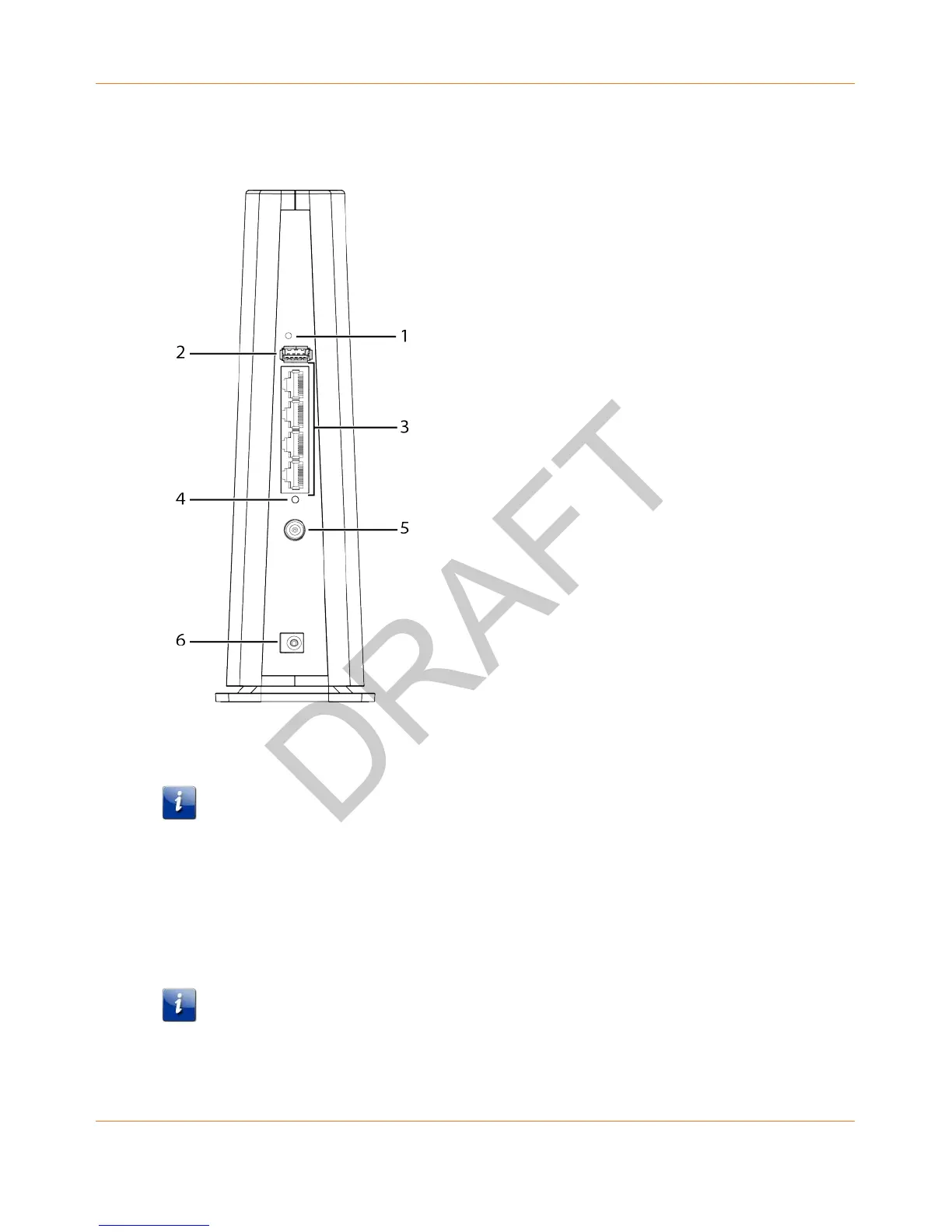
1. Connect one end of the coax cable to the cable outlet or splitter, and the other end to
the Data Gateway’s Cable connector (5). Tighten the connections by hand, then tighten
an additional 1/8 turn with a wrench.
Note: For best performance, use high-quality coax cable and minimize or eliminate
splitters between the cable jack and the Data Gateway.
2. Insert the plug from the power cord into the Power connector on the back of the Data
Gateway (6) and insert the power cord into a convenient AC outlet.
3. Connect one end of the Ethernet cable to any Ethernet port on the back of the Data
Gateway, (3) and the other end to the Ethernet port on a computer, hub, or broadband
router.
Note: If you are connecting to a computer, use the Ethernet cable included in the Data
Gateway package.














 To Next Page