Chapter 6: Using the Data Gateway
Release 34 DRAFT 1.6 June 2017 Touchstone DG3450 Data Gateway User Guide
© 2017 ARRIS Enterprises LLC. All Rights Reserved. 31
Event Wi-Fi LED Status LED Behavior
Clients found, but
no traffic (2.4 GHz
band only)
Blue (steady)
Clients with active
traffic/WPS (2.4
GHz band only)
Blue (fast blink)
Caution: If all LEDs are blinking blue (fast blink), a grounding defect has been detected.
Unplug the device until the grounding defect can be addressed.
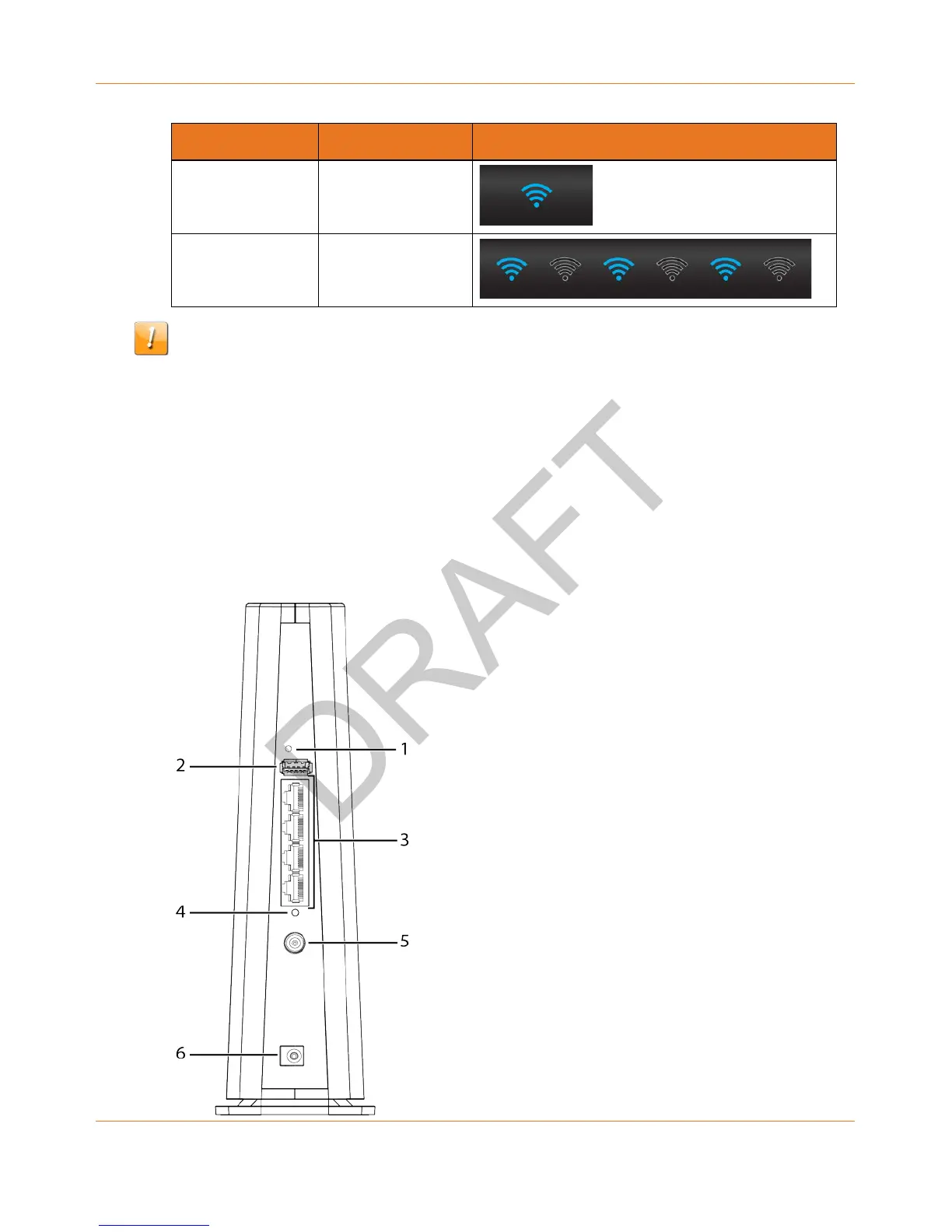
Using the Reset Button
Use the Reset button (1), on the back of the Data Gateway, to reset the modem and perform
initialization as if you power cycled the unit. You may need to reset the Data Gateway if you
are having problems connecting to the Internet. Using this button will be rare.
Use a pointed non-metallic object to press this button. The Reset button is recessed to
prevent accidental resets.














 To Next Page