ARTURIA – CS-80V – USER’S MANUAL
64
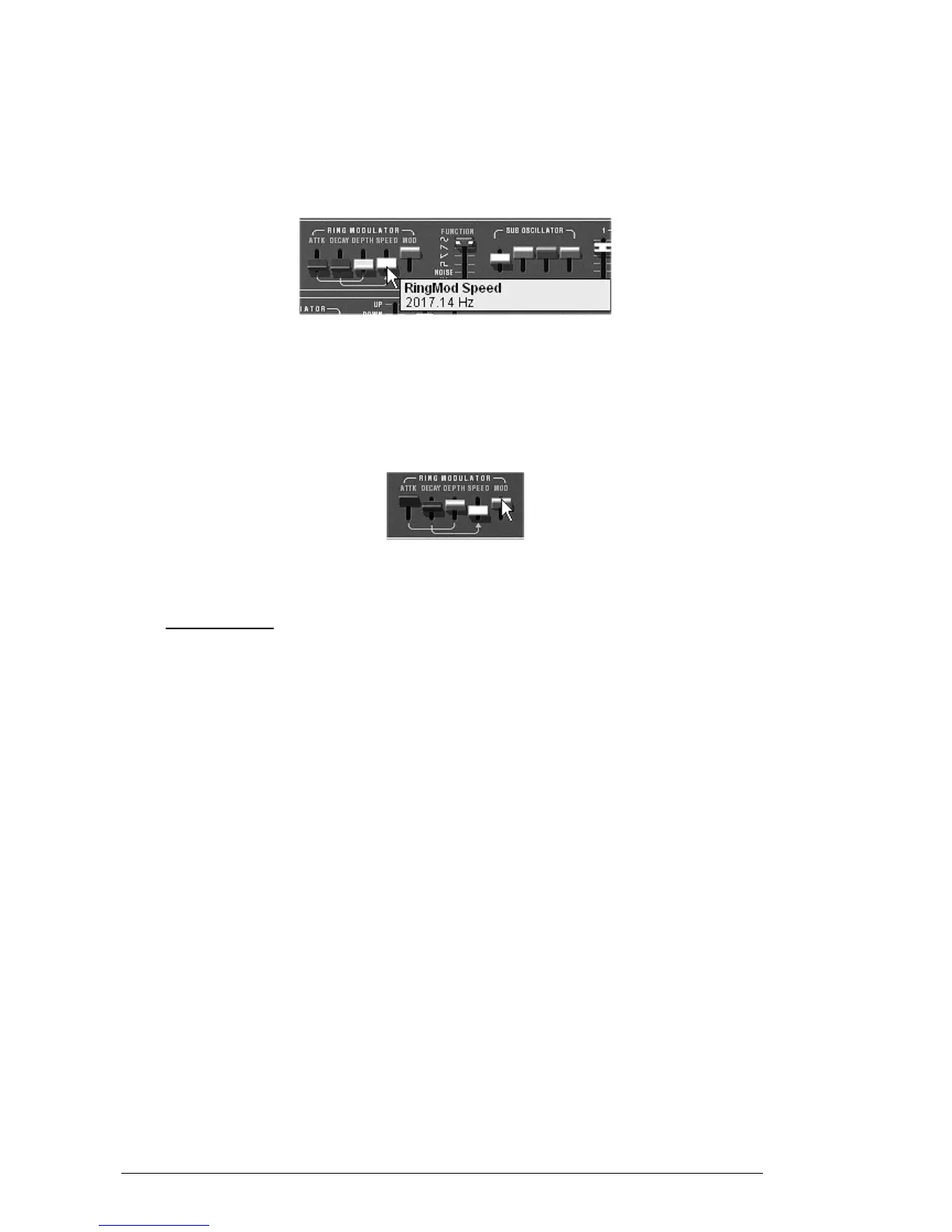
The «Speed» setting of the ring modulator allows you to very quickly increase the
number of secondary harmonics in order to create a bell sound (around 150 Hz – around
the halfway mark for the potentiometer) a simple beating identical to a tremolo (around
2 Hz).
To get a bell sound, the oscillation frequency must be high, set this potentiometer
around 2,000 Hz
The «Speed» setting
Lightly lower the «MOD» lever (around 0.20) to mix the volume of the «raw» sound
with the one coming from the ring modulator.
If you wish, you can control the speed of the ring modulator in a progressive manner
with an attack envelope («A»), decay envelope («D») or even through an external
MIDI controller. This helps you to easily make special effects.
Using the ring modulator for a bell sound
7.2 MULTI MODE
The Multi mode allows the creation of a combination of different sounds (up to 8) spread
across keyboard zones (up to 4) within an individual preset. They bring very different
results which directly influence how a sound or sequence is played !
7.2.1 Four different sounds on the keyboard.
Choose the preset «split1» in the bank «Templates» sub-bank «Multi1»
The first 4 voices occupy zone1 (C0 to B2), the fifth, zone2 (C3 to B4), the sixth zone 3
(C5 to B5) and finally the seventh and eighth for zone 4 (C6 to C7).
Each of the 4 zones has a different «single» sonority (the «singles» named 1,2,3 and 4).
These singles can be detuned, given panoramic and mixed.
In this example, the 8 voices all have the same settings.
Change the panoramic of the first voice. Place the sound to the right of stereo space
(turn the «Pan» potentiometer fully to the right – value 1.00R)
Also detune it by lightly turning the «Detune» potentiometer to the right (value of
1.00)
Now change the panoramic of the second single (fully to the left - value 1.00L)
Detune the third (set the «Detune» potentiometer to a value of 0.99)
Use pan to position this single lightly to the right (value 0.78R)
Detune the fourth (put the «Detune» potentiometer to a value of 1.00)
Place these 4 voices to «Unison» play mode by selecting the «UniLast» function in the
«play mode» menu of the edit zone.



 To Next Page