ARTURIA – CS-80V – USER’S MANUAL
19
3 QUICK START
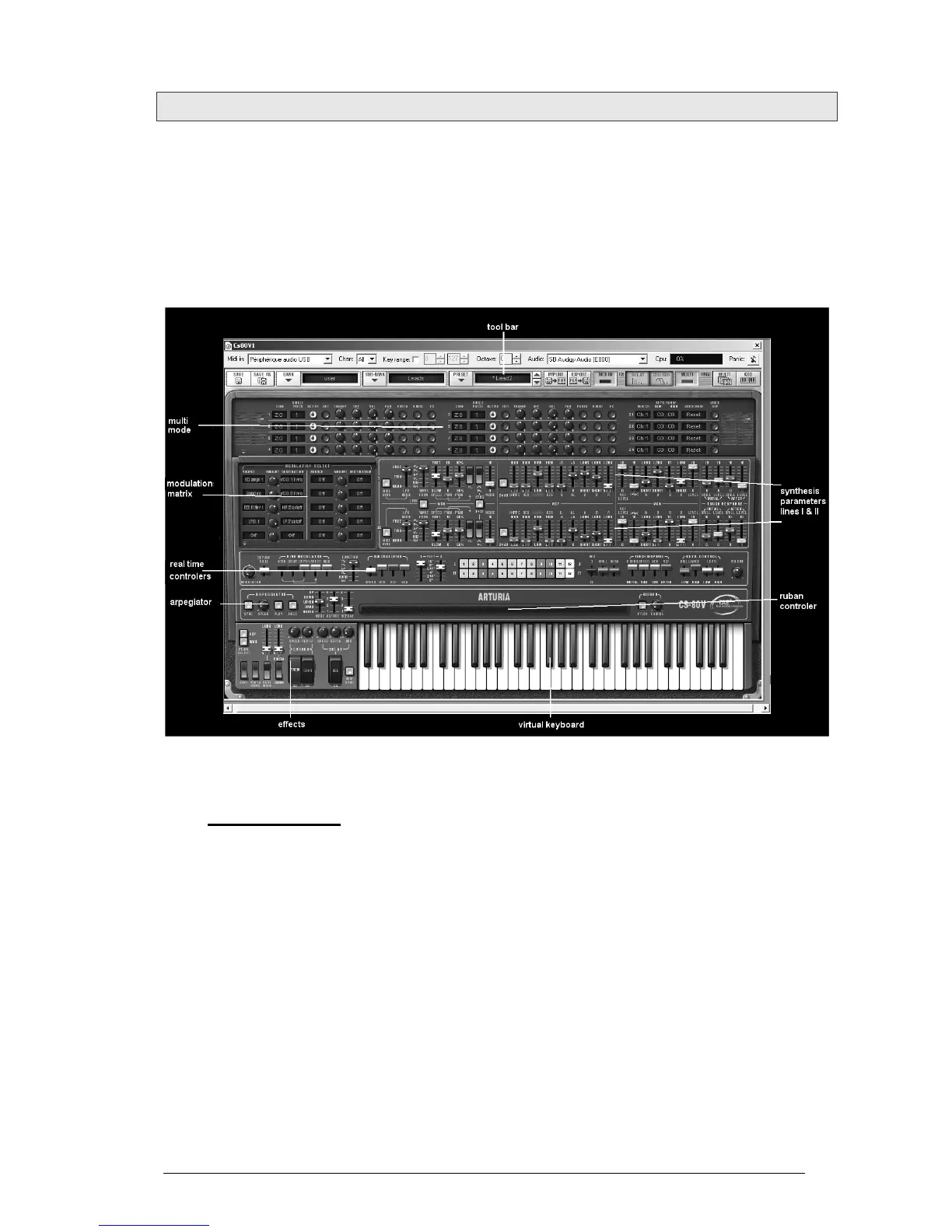
This chapter will help you to familiarize yourself with the general usage of the CS-80V.
You will be presented with an overview of the different sections of the synthesizer as well
as the Single voice and Multi mode settings. You will find a precise and detailed
description of all settings and controllers in the chapters that follow.
Chapter 6, A few elements of sound design will be of particular interest for users who
have never worked with a subtractive synthesizer, but wish to understand the basics in
this domain.
The CS-80V
3.1 USE OF PRESETS
Use of presets is one of the main areas of evolution of the CS-80V when compared to the
original. In fact, it allowed only 4 spaces in memory for saving 4 sounds!
In the CS-80V, a preset (memorized sound) contains all parameter settings of the
synthesis voice (Single), as well as Multi mode parameters and the different real time
controllers and effects needed to reproduce the sound.
To get to know a few of the different sounds contained in the CS-80V, we will select the
preset «Brass1».
For this, click on the button «BANK» (at the left of the display indicating the name of
the bank currently in use). By clicking, you will see a dropdown menu indicating the
available banks. Choose the bank «JMB».
When the menu appears, it opens sub menus in a step-by-step manner. This allows us to
get to the «SUB BANK» and «PRESETS» of a sound designer with a single click.



 To Next Page