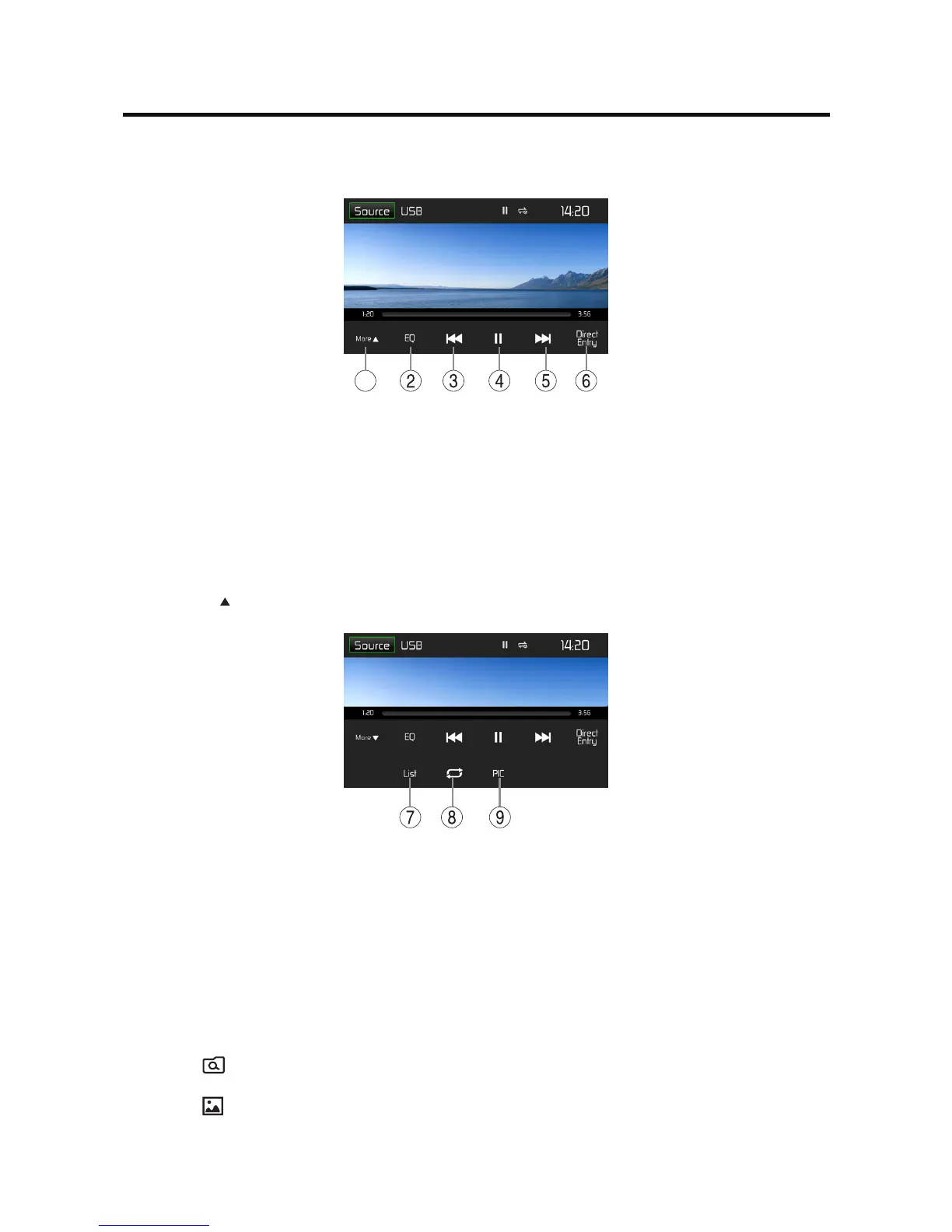
Brieytouchthescreenoncetodisplaytheplaybackmenuagain.
The playback menu is shown.
1
1. Show/Hide the next line of options menu.
2. Enter EQ menu.
3. Shortpress:Previousmovie.
Long press: Fast backward.
4. Pause playback and continue playback.
5. Short press: Next movie.
Long press: Fast forward.
6. Display keypad to directly enter the number of the desired title.
Tap on [ More ] to display additional operating options of the playback menu.
7. Display the folder/le list.
8. StartandendREPEATfunction.
Repeat mode: Repeat One
→
Repeat Folder
→
Repeat All
→
Repeat O
9. Adjust the brightness, contrast, and saturation.
Image playback
Select the desired source via the main menu.
The device changes to the desired source and the playback starts.
If the playback does not start with the image playback, touch the [ List ] icon to change to the folder/
le list.
Touch the [
] icon to display all the folders and les of the data carrier.
- Or -
Touch the [ ] icon to display all the images of the data carrier.
If you selected a image, the playback is started. During the playback, the playback menu is hidden.
Brieytouchthescreenoncetodisplaytheplaybackmenuagain.



 To Next Page