AC24/30/36 Operations Manual....
24
6 OPERATION
6.1 POWER TURN-ON PROCEDURE
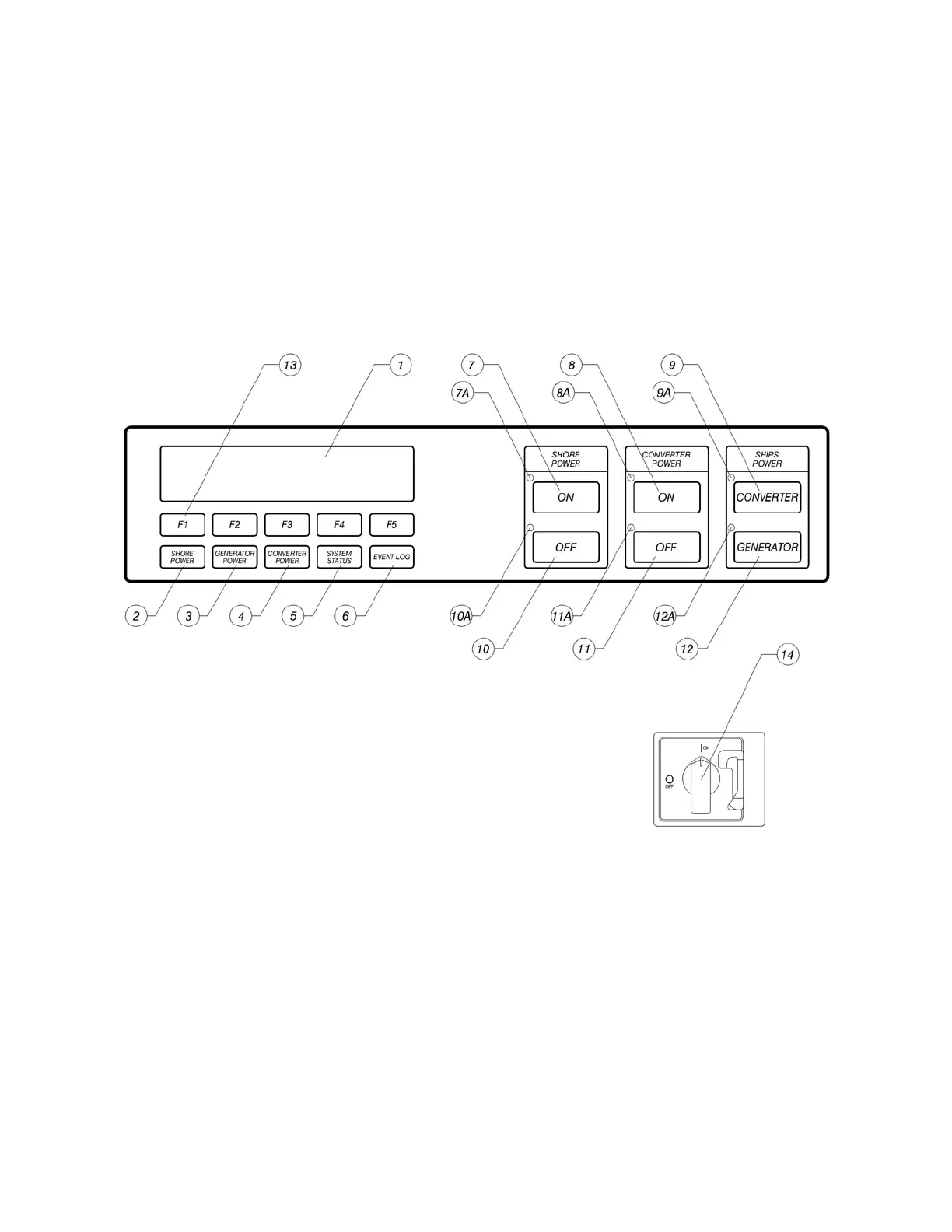
Close the input (shore power) circuit breaker(s) to the converter. Turn the disconnect (14) switch to
the ON position. After approximately 3 seconds, the fans will be heard and the display will
illuminate and become active. Allow the opening message to complete.
FIGURE 5 CONTROLS AND INDICATORS
The display will sequence to the SUMMARY DISPLAY indicating the converter’s operational state.
Both input and output power should indicate OFFLINE at this time. Return to this screen at any
time by pressing the SYSTEM STATUS (5) button. At this time both of the red LED indicators
next to the OFF buttons (10 & 11) should be illuminated. If the system has been ordered with the
Seamless Transfer Option, and a generator is on-line, the green LED (12A) to the left of the
GENERATOR (12) button will be lit.



 To Next Page