Manual, F/T Sensor, Ethernet Axia
Document #9610-05-Ethernet Axia-09
Pinnacle Park • 1031 Goodworth Drive • Apex, NC 27539 • Tel:+1 919.772.0115 • Fax:+1 919.772.8259 • www.ati-ia.com
47
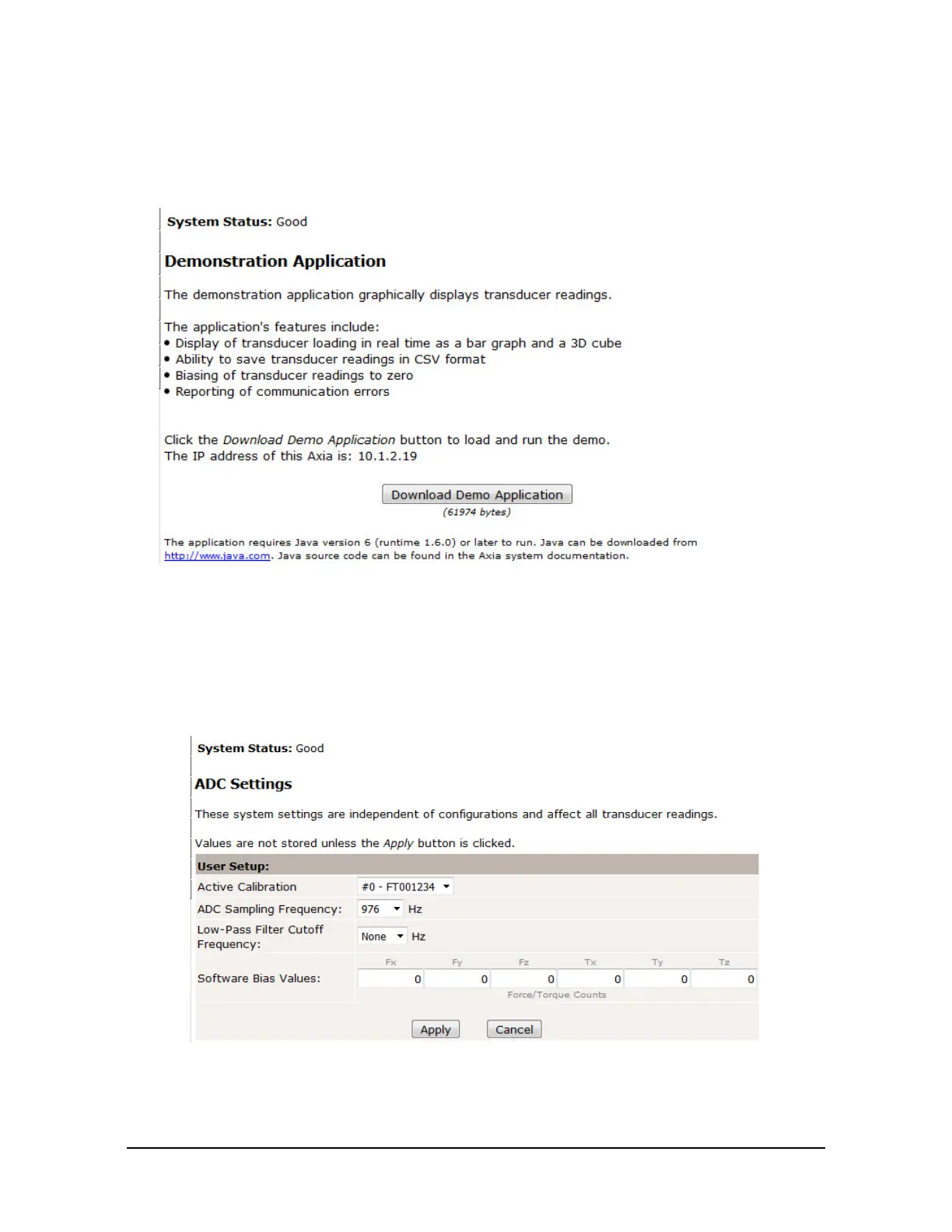
6.3 Demo Page (demo.htm)
From the Demo page, the user may download the Java
®
Demo Application. Refer to Section 7—Java®
Demo Application for more information.
Figure 6.4—Demo Page
6.4 ADC Settings Page (setting.htm)
On the ADC Settings page, the user can select the following: the active calibration, ADC sampling
frequency, low-pass lter cutoff frequency, and software bias values. When the user clicks the Apply button,
the changes on this page are implemented on the sensor.
Figure 6.5— ADC Settings Page


 To Next Page
 Loading...