APPLICATION EXAMPLES
11.6 Soft Braking
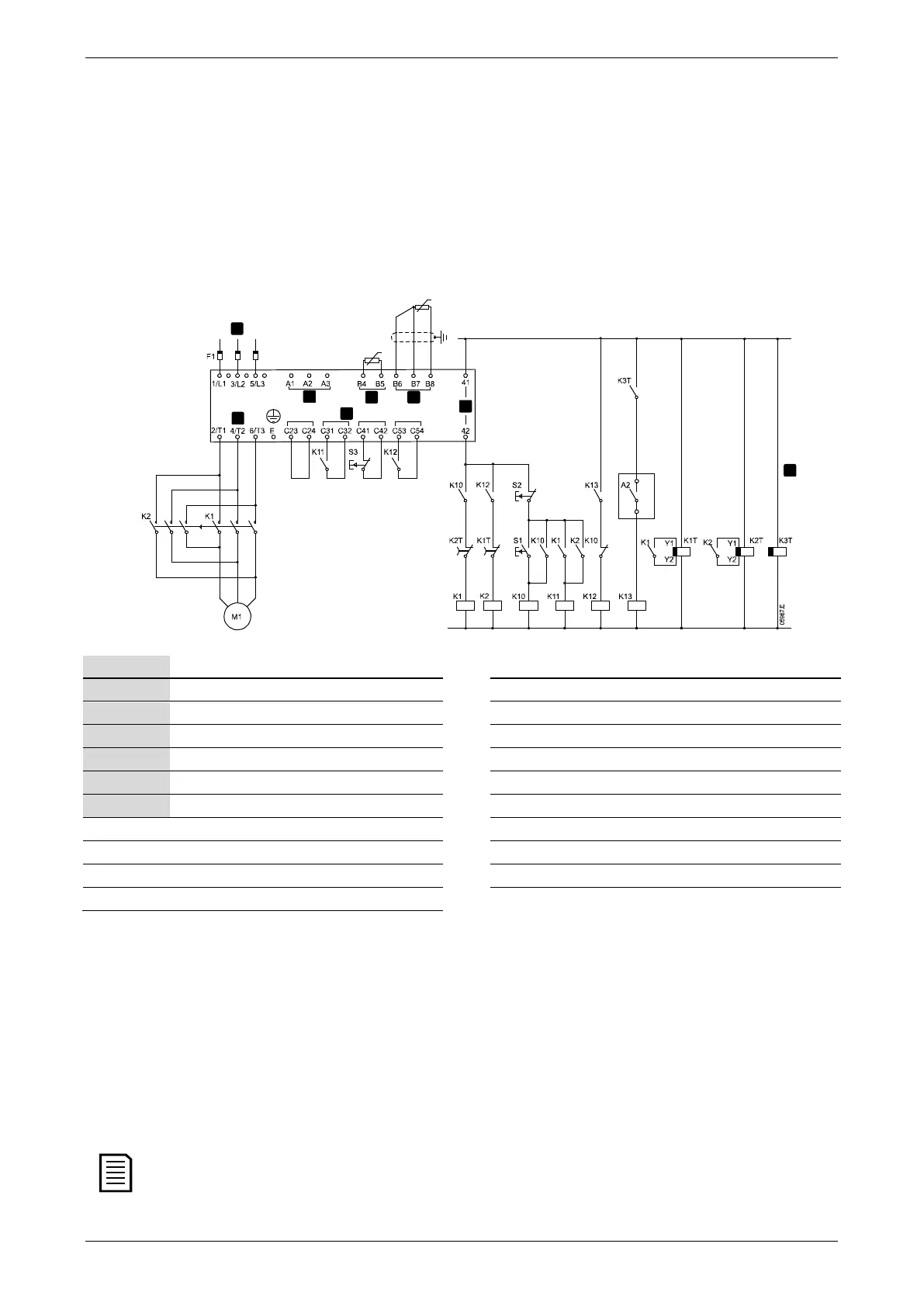
For applications with high inertia and/or a variable load, the EMX3 can be configured for soft braking.
In this application the EMX3 is employed with forward run and braking contactors. When the EMX3 receives a start signal (pushbutton
S1), it closes the forward run contactor (K1) and controls the motor according to the programmed primary motor settings.
When the EMX3 receives a stop signal (pushbutton S2), it opens the forward run contactor (K1) and closes the braking contactor (K2)
after a delay of approximately 2-3 seconds (K1T). K12 is also closed to activate the secondary motor settings, which should be user
programmed for the desired stopping performance characteristics.
When motor speed approaches zero, the zero speed sensor (A2) stops the soft starter and opens the braking contactor (K2).
Control voltage (model dependent) K12 Brake relay
Remote control inputs K13 Zero speed sensor relay
Motor thermistor input K1 Line contactor (Run)
RTD/PT100 input K2 Line contactor (Brake)
Relay outputs K1T Run delay timer
Three-phase supply K2T Brake delay timer
Motor terminals K3T Zero speed sensor delay timer*
A2 Zero speed sensor S1 Start contact
F1 Semiconductor fuses (optional) S2 Stop contact
* The K3T timer is only required if the zero speed sensor is the type that performs a self-test upon power-up and momentarily closes
the output relay.
Parameter settings:
• Parameter 6A
Input A Function
(terminals C53, C54)
• Select 'Motor Set Select' - assigns Input A for Motor set selection.
• Set starting performance characteristics using the primary motor set.
• Set braking performance characteristics using the secondary motor settings.
• Parameter 7G
Relay C Function
• Select 'Trip' - assigns Trip function to Relay Output C.
If the EMX3 trips on supply frequency (parameter 16F
Frequency
) when the braking contactor K2 opens, modify
the frequency protection settings.
User Manual (710-04840-00M) | 67



 To Next Page