Medi a
- For safety reasons, the video image is only
displayed when the vehicle is stationary. On-
ly the sound from the video plays while driv-
ing .
- When synchronizing a portable device with
"Cloud" services, p laylists may display incor-
rectly in the MMI. Use the media center in
the dev ice.
Free text search
App lies to: vehicles with free text search
You con search in the active source by tracks and
video files *, for example
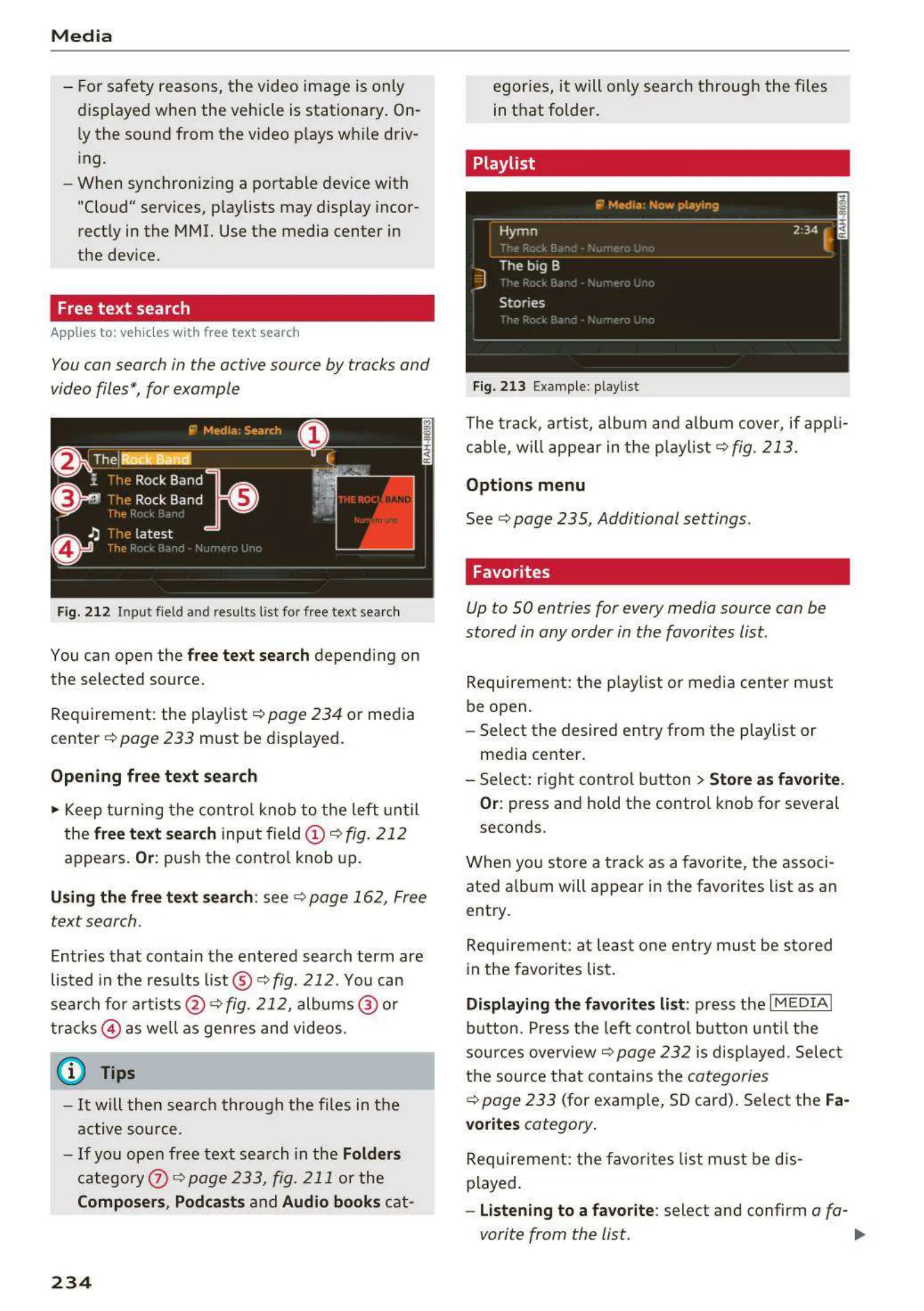
Fig. 2 12 Inpu t field and results list for free te xt search
You can open the free text search depending on
t he selected source.
Requirement: the playlist c::>
page 234 or media
cent e r c::>
page 233 must be display ed.
Opening fr ee text search
.,. Keep turning the contro l knob to the left until
the
free text search inputfield (D 9 fig. 212
appears. Or: push the contro l knob up.
Using the free text search: see 9 page 162, Free
text search.
Entr ies that contain the entered search term are
listed in the results list @ c::>
fig. 212 . You can
search fo r artists @ ¢
fig. 212, albums @ or
tracks @ as well as genres and videos .
(D Tips
- It will then search through the fi les in the
active so urce .
- If you open free text sea rch in the
Folders
category (i) c::>poge233, fig. 211 or the
Composers, Podcasts and Audio books cat-
234
egories, it will only search through the files
in that folder .
Playlist
Fig. 213 Example: playlist
The t rack, a rtist, album and album cover, if app li-
cable, will appear in t he playlist
¢ fig. 213.
Options m enu
See c::> page 235, Additional settings .
Favorites
Up to SO en t ries for every media sour ce con be
stored in any order in the favorites list.
Requirement: the playlist or media center must
be open.
- Select the desired entry from the playlist or
media center .
- Select: right control button
> Store as favorite .
Or:
pr ess and hold the contro l knob for several
seconds .
When you store a track as a favorite, the associ-
ated a lbum will appear in the favorites list as an
entry .
Requireme nt: at lea st one entry must be sto red
in the favorites list .
Displaying the favorite s list : press the I M EDIAi
button . Press the left cont rol button unt il the
sources overview 9
page 232 is disp layed. Selec t
the source t ha t contains the
categories
¢ page 233 (for examp le, SD card). Select the Fa·
vorites
cat egory .
Requireme nt: t he favo rites list must be dis-
played.
- Listening to a favorite : select and confirm a fa-
vorite from the list . ..,.



 To Next Page