Replacing the remote control key battery
.,. Pry the cover @ off of the key (D using a coin
¢ fig.17.
... Insert the new battery with the" +" facing up.
... Press the cover back onto the key until it clicks
into place .
@) For the sake of the environment
Discharged batteries must be disposed of us·
ing methods that will not harm the env iron -
ment. Do not dispose of them in household
trash.
(D Tips
The replacement battery must meet the same
specif ications as the original battery in the re-
mote control key.
Synchronizing the remote control key
The remote control key must be synchronized if
the vehicle does not lock/unlock with the remote
control.
... Press the remote control key button [:@:].
.,. Insert the key in the driver's door lock within
30
seconds c::> page 36 .
.,. Press the ~ button or ~ button .
Unlocking/locking with remote control
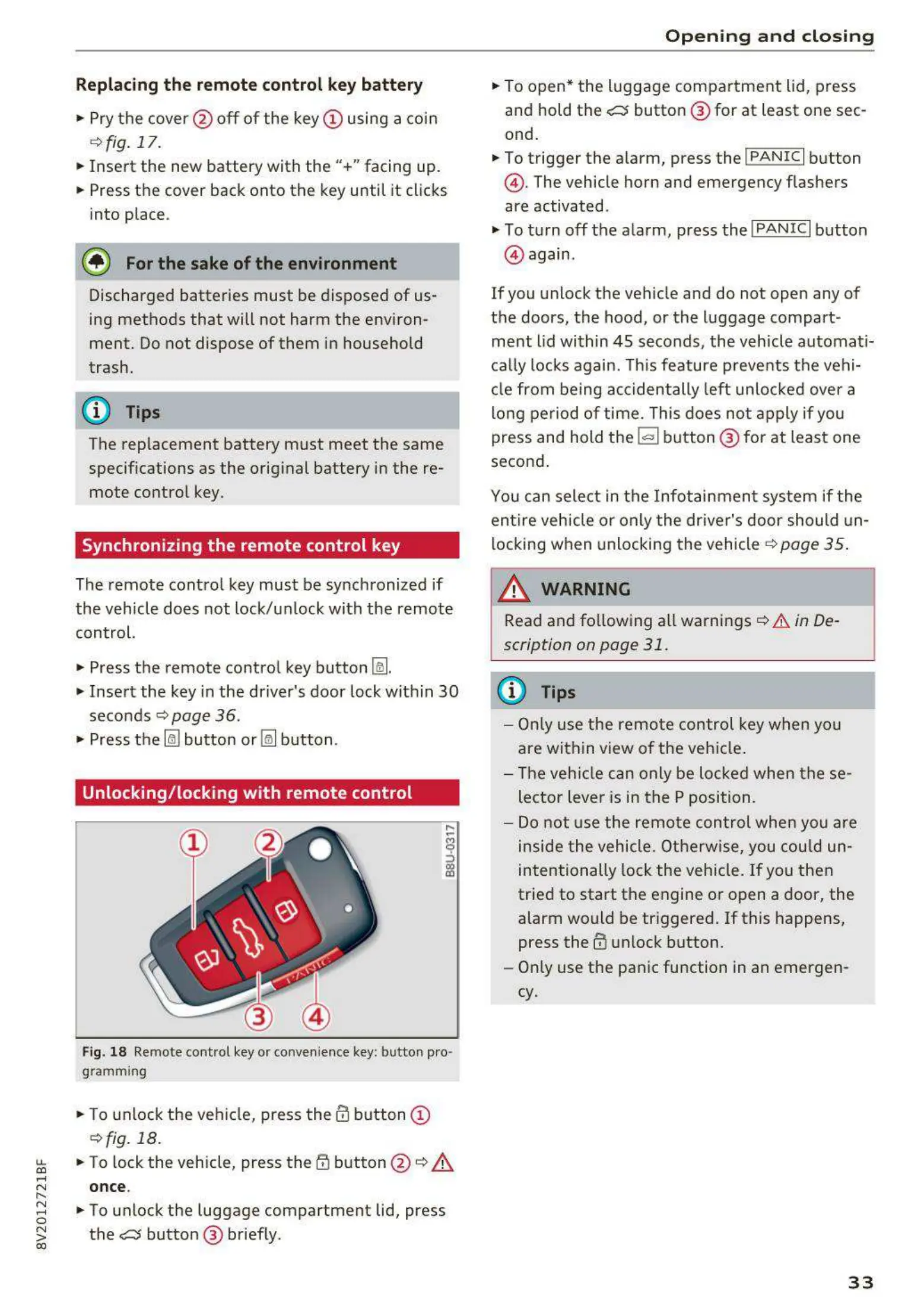
Fig. 18 Remote cont rol key or convenience key: butto n pro -
gram ming
.,. To unlock the vehicle, press the@ button (D
c::>fig. 18.
~
... To lock the veh icle, press the {f) button @ c::> A
....
N once.
"
~
... To unlock the luggage compartment lid, press
0
~
the e:5 button @ briefly .
co
Opening and closing
.,. To open* the luggage compartment lid, press
and hold the
e:5 button @ for at least one sec-
ond.
... To trigger the a larm, press the
!PANIC I button
@ . The vehicle horn and emergency flashers
are activated .
.,. To turn off the alarm, press the
I PANIC I button
@ again .
If you unlock the veh icle and do not open any of
the doors, the hood, or the luggage compart ·
ment lid within 45 seconds, the vehicle automati·
cally locks again. This feature prevents the vehi·
cle from being accidentally left unlocked over a
long period of time. This does not apply if you
press and hold the ~ button @ for at least one
second .
You can select in the In fotainment system if t he
entire vehicle or only the dr iver's door should un-
locking when unlocking the vehicle ¢
page 35.
_&. WARNING
-
Read and following all warnings c::> & in De·
scription on page 31 .
(D Tips
- Only use the remote control key when you
are within view of the vehicle .
- The vehicle can only be loc ked when these-
lector lever is in the P position.
- Do not use the remote con tr ol when you are
inside the vehicle. Otherwise, you could un -
intentionally lock the vehicle. If you then
tried to start the engine or open a door, the
alarm would be tr iggered. If this happens,
press the
III unlock button.
- Only use the panic function in an emergen-
cy.
33



 To Next Page