Light s and Vi s ion
Turn signal and high beam lever
The lever operates the turn signals, the high
beams and the headlight flasher .
®
,
I
@
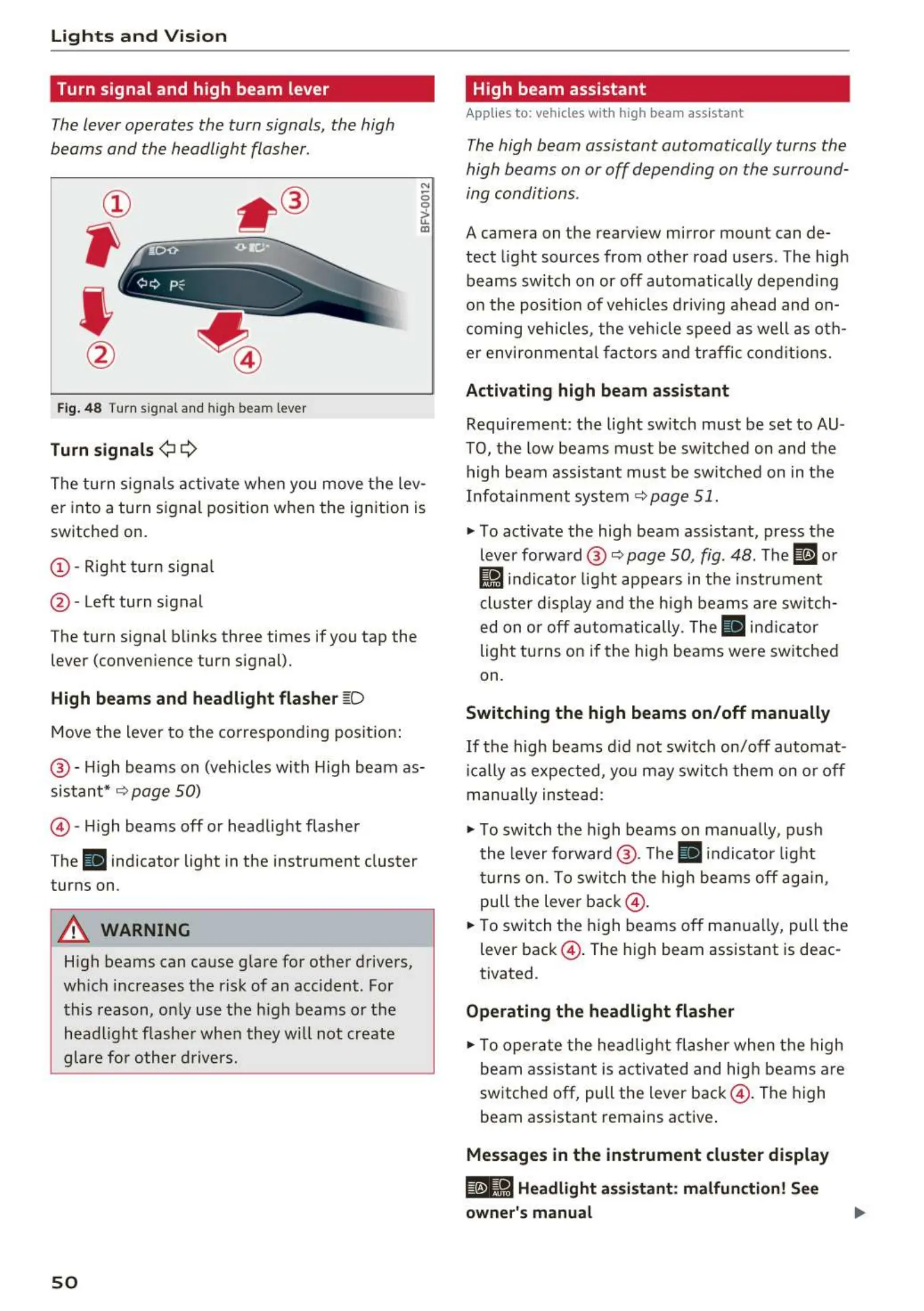
Fig. 48 Turn signal and high beam lever
Turn signals ¢i Q
N
0
0
>
u.
a,
The turn signals activa t e whe n you move the lev-
er into a turn signal position w hen the ignition is
switched on.
(D- Right tu rn signa l
@ - Left turn signal
The turn signal blinks three times if you tap the
lever (conven ience turn signal).
High beams and headlight flash er ~D
Move the lever to the corresponding position :
@ - High beams on (vehicles with High beam as-
sistant*
9 page 50)
© -High beams off or headlight flasher
The
ii indicator light in the instrument cluster
turns on .
A WARNING
High beams can cause g lare for other drivers,
which increases the risk of an accident . For
this reason, o nly use the high beams or the
head light flashe r whe n they will not create
glare fo r other d rivers.
so
High beam assistant
Appli es to: vehicles wit h high beam assistant
The high beam assistant automatically turns the
high beams on or off depending on the surround-
ing conditions .
A camera on the rearv iew mirror mou nt can de-
tect light sources from other road users . The high
beams sw itch on or off automatically depend ing
on the pos it ion of vehicles d riving ahead and on-
com ing vehicles , the veh icle speed as well as ot h-
er environme nta l fac to rs a nd traffic condit io ns.
Activating high beam assistant
Requirement: the light sw itch must be set to AU-
TO, the low beams must be sw itched on and the
high beam assistant must be sw itched on in t he
Infotai nment system
9 page 51.
""To act ivate the hig h beam ass istant, press the
lever forward @
9 page 50, fig . 48 . The ID or
Ji1 indicator light appears in t he instr ument
cluste r d isplay and the high beams are sw itch-
ed on o r off autom atically. The
ii ind icator
light tu rns on if the high beams were switched
on.
Switching the high beams on/ off manually
If the high beams d id not swit ch on/off automat-
ically as expected, you may switc h them on or off
manua lly ins t ead :
""To switch the high beams on manually, push
the lever forward @ . The
ii indicator light
tu rns on. To sw itch t he high beams off aga in,
pull the leve r back @ .
""To switch t he high beams off man ua lly, pull the
lever back @ . The high beam assistant is deac-
tivated .
Operating the headlight flasher
""To operate t he headlig ht flashe r when t he high
beam ass istant is activated and hig h beams a re
switched off, pull the lever back @ . The high
beam assistant remains active .
Messages in the instrument cluster display
@e-8·1 Headlight assistant: malfunction! See
owner's manual



 To Next Page