Verifit
®
User's Guide Version 4.8 © November 2016
Measure WRECD
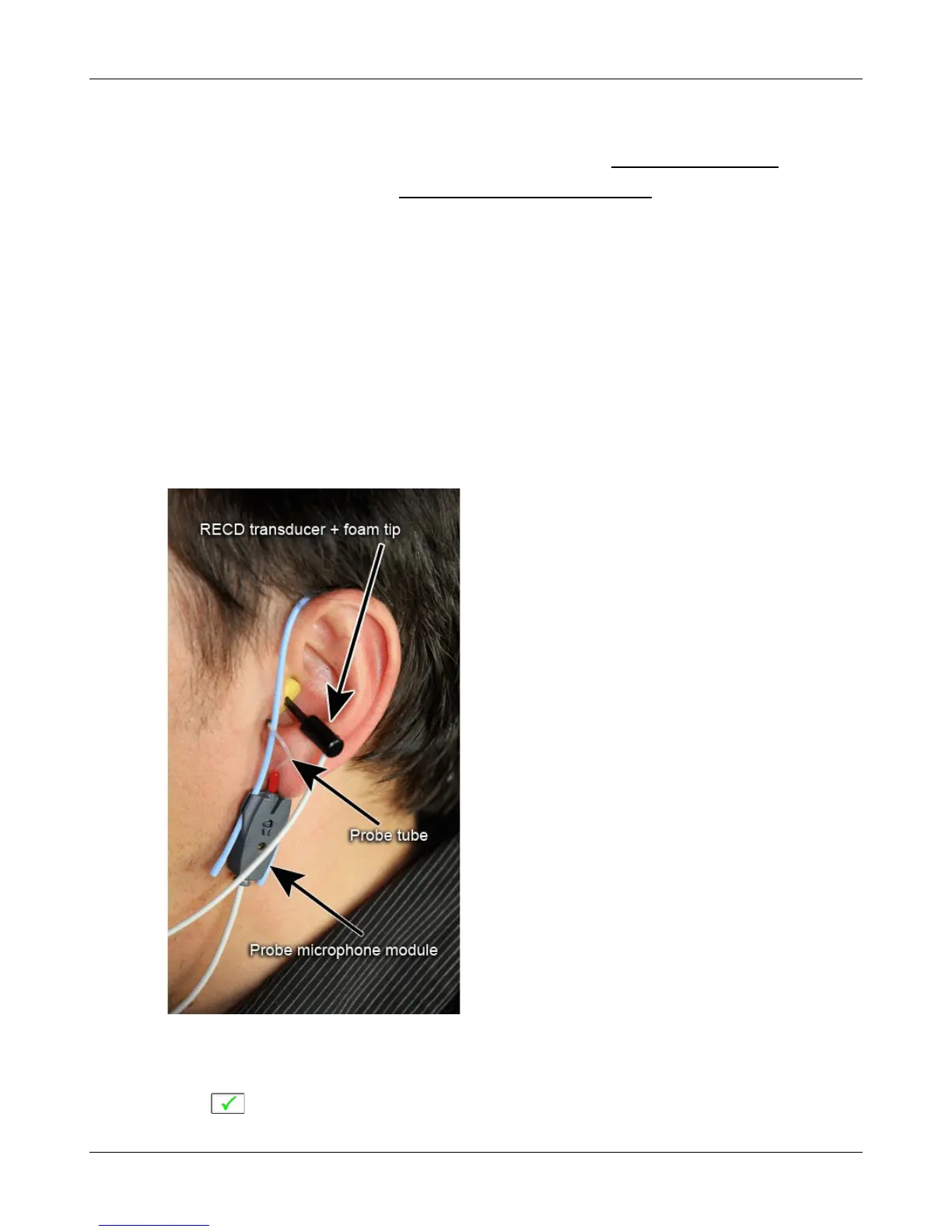
Connect the RECD transducer to the RECD jack on the Probe Dock. See WRECD coupler response.
Prepare the system for on-ear tests. See Calibration of on-ear probe microphone.
1. Select [WRECD] on the home menu.
2. Select the WRECD coupling method that will be used on the ear. Audioscan software supports both foam
eartips and personal earmolds, however this choice must be made prior to measurement.
3. If no RECD calibration exists or the measurement interval has been exceeded, go to 15.3: Calibration of
WRECD transducer. If a valid transducer calibration exists, select [Measure real ear].
4. Couple a standard insert earphone foam eartip to the nozzle of the WRECD transducer. If using an earmold,
seal any vent at its medial end.
5. Refer to Positioning the probe tube and insert the probe tube into the ear canal to within 2 - 5 mm of the
eardrum.
6. Insert the foam tip or earmold into the ear, being careful not to advance the probe tube further into the ear
canal. Insertion depth should be as used with insert phones. Allow the foam tip to fully expand in the ear.
Insertion depth should be as used with insert phones.
7. Select to generate the real-ear response curve (magenta) and the WRECD curve (blue). If the WRECD
79



 To Next Page