Verifit
®
User's Guide Version 4.8 © November 2016
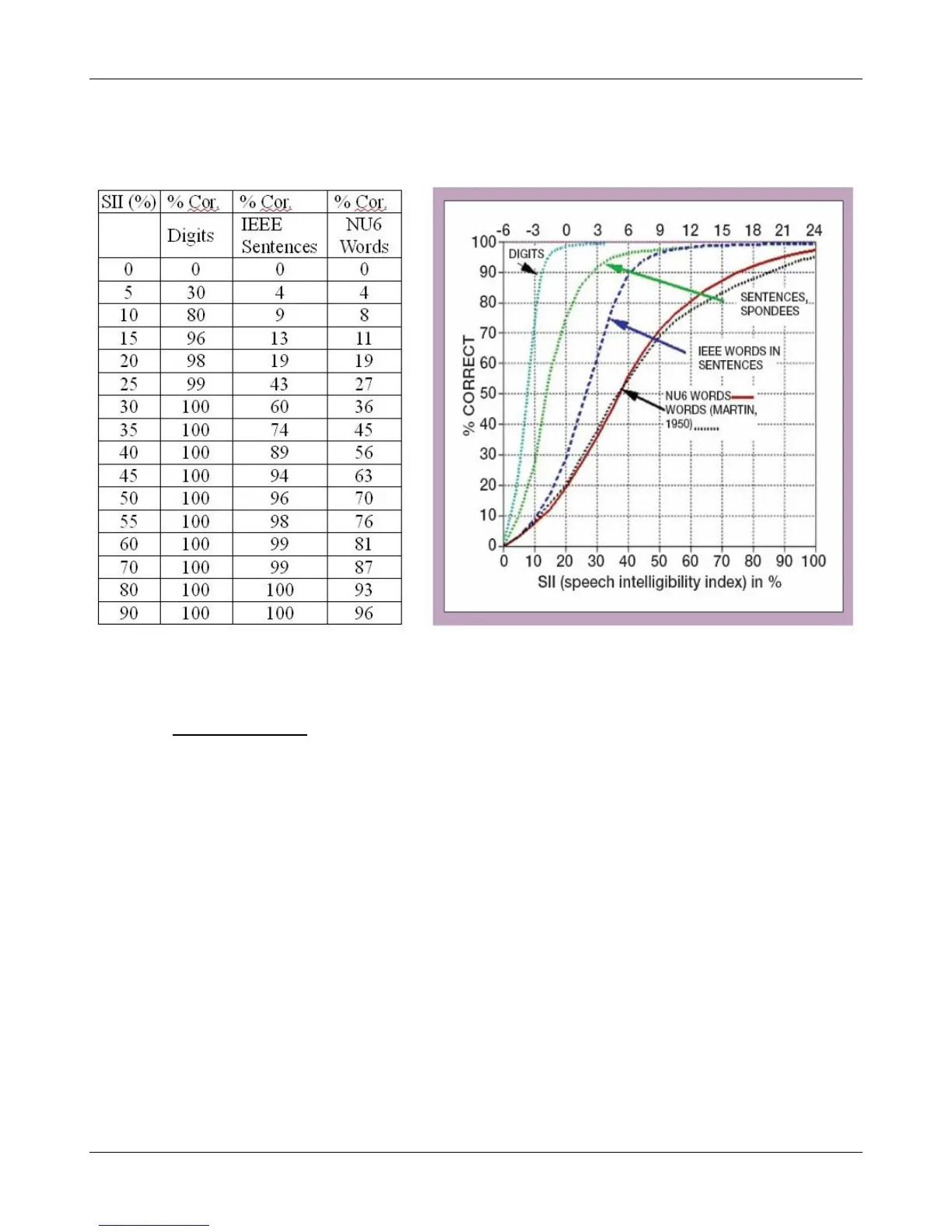
the listener. There is considerable individual variability in relating the SII to speech recognition, especially
amongst impaired listeners. The following shows expected nominal recognition scores vs SII for normals when
using a variety of speech stimulus conditions. (Killion and Mueller, Hearing Journal, January, 2010 pp 10-15).
CROS fitting using Insertion gain
See Insertion gain in SPL.
1. Place a probe module on each ear and insert the probe tube into the good ear only. Position the CROS
instruments on (in) the ears and turn them ON.
2. Position the speaker at 45 degrees to the good ear and set Instrument to [BTE].
3. Select REAR 1 and record a response using [Pink noise] at 55. It should be like a normal REUR. If not, the
ear may not be fully open.
4. Position the speaker at 45 degrees to the poor ear.
5. Set Instrument to [CROS].
6. Select REAR 2 and obtain a response using [Pink noise] at 55. Adjust the response to match that obtained in
step 3.
7. Position the speaker directly in front of the client. Select REAR 3 and use [Pink noise] at 55 to check for a
smooth response. Repeat with Instrument set to [BTE]. An irregular response may be the result of reflections
from nearby objects (including the operator) or it may indicate phasing problems in the aids.
91



 To Next Page