Verifit
®
User's Guide Version 4.8 © November 2016
Binaural Left mic Right mic
Left-only Left mic Left mic
Right-only Right mic Right mic
Mute Off Off
External peripherals
WARNING: To avoid the risk of electrical shock, any line-powered peripheral equipment connected to this
product must comply with UL/IEC 60601-1 OR comply with UL or IEC and ISO safety standards for such
equipment AND a) be operated from an isolating transformer complying with UL/IEC 6061-1 OR b) be kept
at least 6 feet (1.8 m) from the patient.
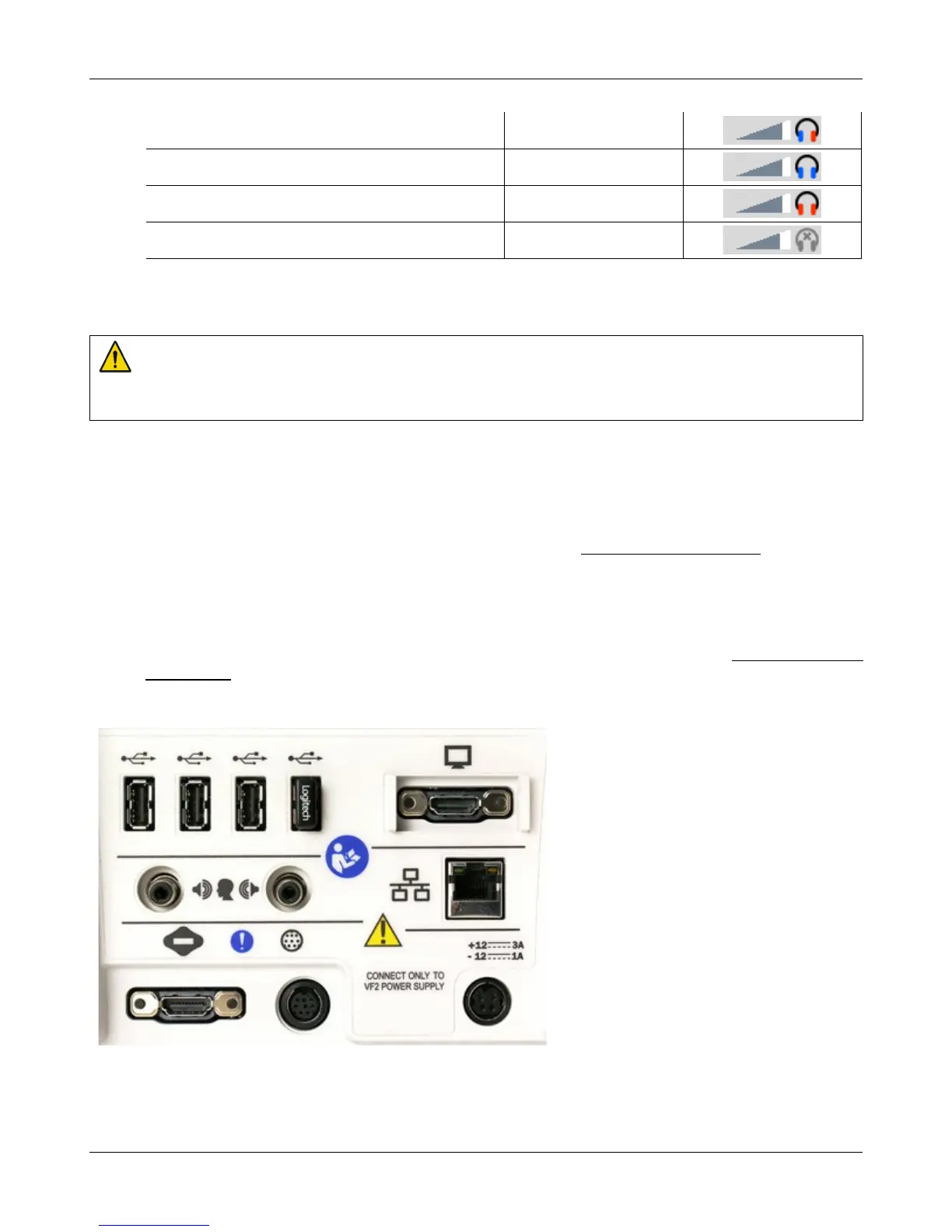
An external video monitor (HDMI or DVI with adapter) may be connected to the HDMI connector on the rear
of the main display unit. The internal display and external monitor will operate simultaneously. The external
monitor must be capable of displaying 1024 x 768 at a refresh rate of 60Hz. Ensure that the external display is
powered up and set to the correct input prior to powering on the Product.
An external printer may be connected to one of the USB ports. See Printing and Storing Results for guidance in
selecting a printer model.
Connectors for external front and back sound field speakers are provided. The VA-111 external speaker with a
multipurpose folding stand is available from Audioscan but any small, non-powered 4 - 8 ohm speaker having
a smooth frequency response and good efficiency may be used. The rear external speaker is automatically
selected when required by a test but the front speaker must first be selected in Setup. See External sound field
speaker setup
Display unit rear connector panel
27



 To Next Page