65
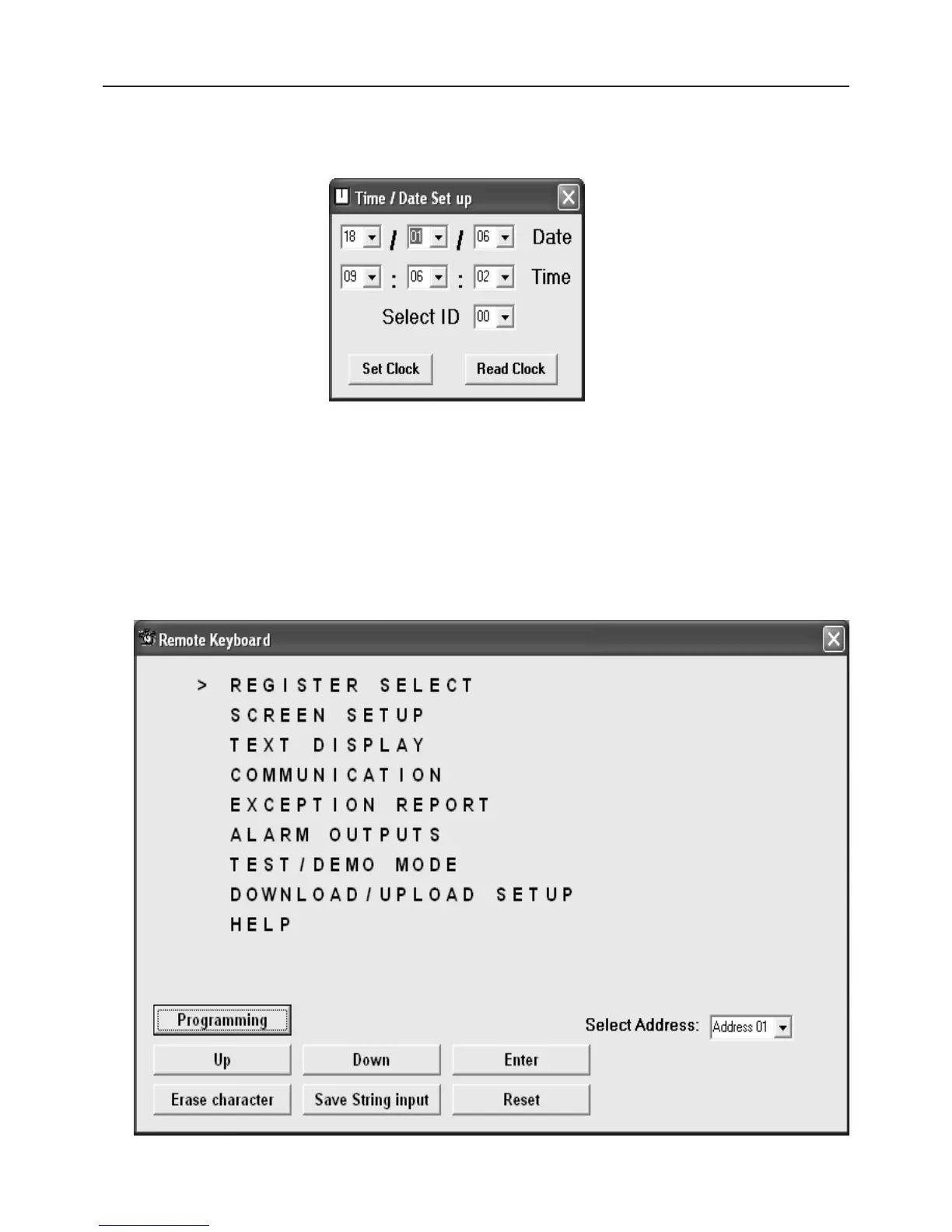
The new menu items are “Set Time / Date” and “Remote Keyboard”.
The “Set Time / Date” functions allows you to set this value from the PC Time/Date or manually enter yourself.
Select ID sets the address value of the appropriate VSI-Pro on the network you wish to up date.
Remote Keyboard
This new function allows the user to select the appropriate VSI-Pro on the network with the Select Address
setting. Once this is done you then click “Programming”. The Vnetworker will then signal the VSI-Pro to exit the
register interface mode and go to the programming mode. Note: While in this mode all data from the cash register
will not be stored or displayed in the VSI-Pro and will be lost.
After a brief pause, communication is established with the VSI-Pro and the following menu will be displayed. This
is the same as the on-screen menu and using the “Up”, “Down”, “Enter” buttons you can navigate the VSI-Pro
menu just like at the local pushbuttons.
APPENDIX F RS-485 VNETWORKER
Figure : Time / Date Set up Menu
Figure : Remote Key-


 To Next Page