66
VSI-Pro VIDEO SERIAL INTERFACE
VSIB for Thai, Korean or Chinese Languages
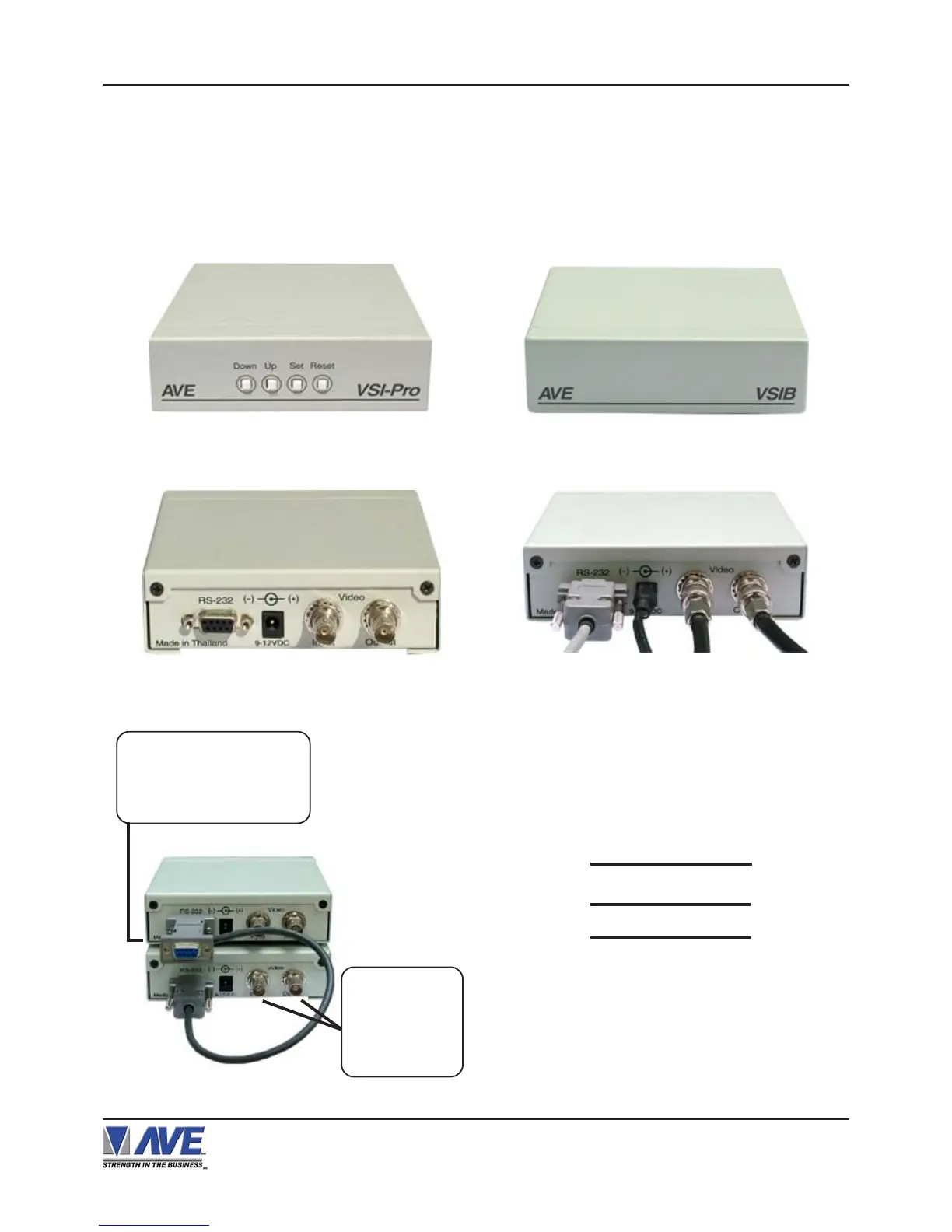
The VSIB is a bit-mapped display device that can display Thai, Korean, or Chinese characters. This device works in
conjunction with the VSI-Pro. A special cable is connected between the VSI-Pro and the VSIB so all on-screen
programming is done via the VSIB but the controls and menus are the same as the VSI-Pro. Therefore after connec-
tion, the programming will be identical to this manual. The VSIB must be ordered independently for any of the above
supported languages and the language must be specified.
Figure 4F: VSIB Connection Cables
Figure 2F: VSIB Front Panel
Figure 3F: VSIB Rear Panel
Serial Input Power Video Input Video Output
Figure 1F: VSI-Pro Front Panel
The pin-out for the VSIB between the VSI-Pro and the VSIB
is as follows:
Figure 6F: Pin-Out for VSIB to VSI-Pro
Figure 5F: Cable Connection to VSIB
VSIB ( DB-9M ) VSI-Pro ( DB-9M )
TXD 3 2 RXD
RTS 7 8 CTS
GND 5 5 GND
Disconnect the stan-
dard VSI-Pro and plug
its cable into the female
connector of the Triport.
Use the BNC
connectors of
the VSIB for
your Video Input
& Output
APPENDIX G VSIB INSTALLATION


 To Next Page