38 USER MANUAL
__________________________________________________________________________________________________________________
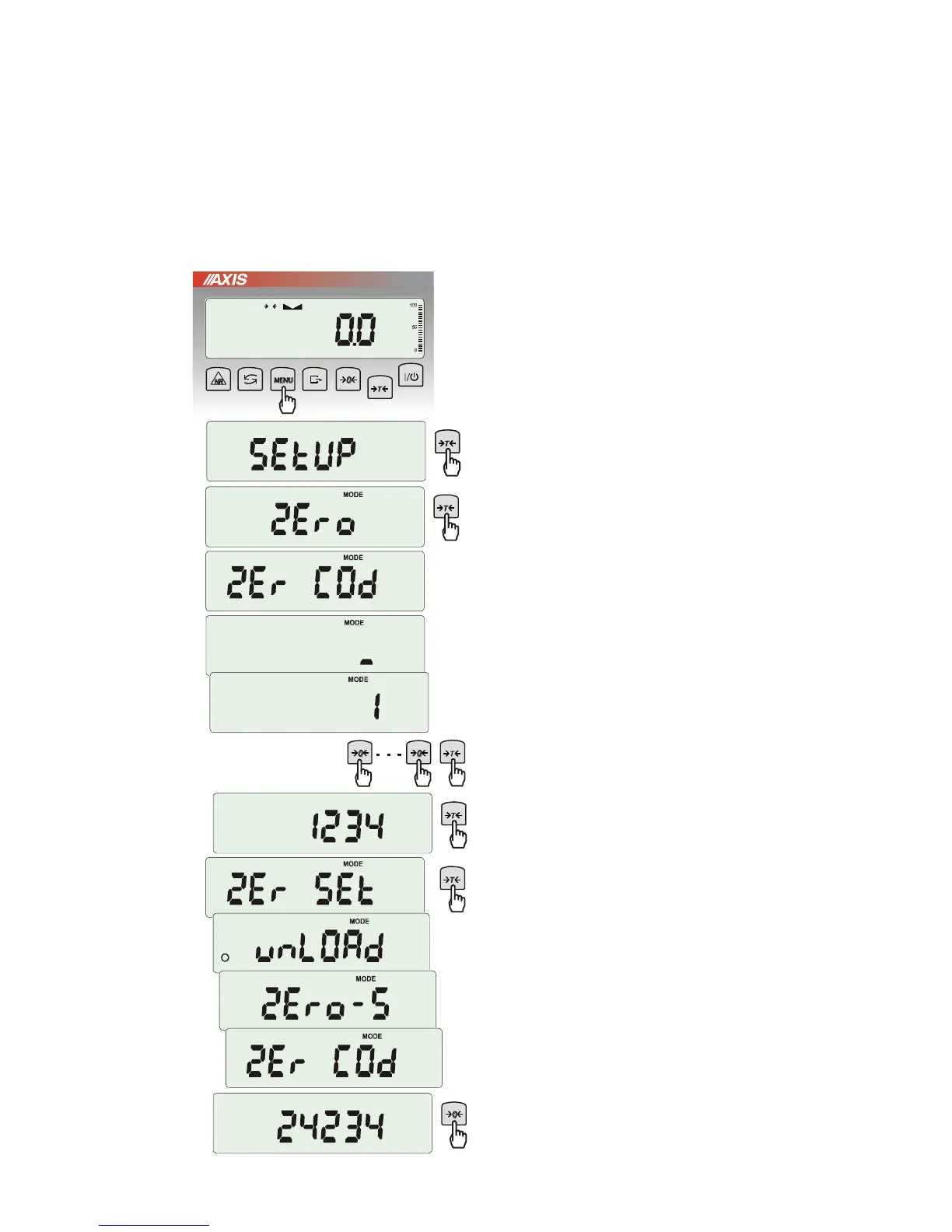
17.7 Entering reference zero value (ZErO)
Note: This function is enabled in non-legalized scales only.
ZEr0 function allows entering new value of reference zero (value referred to empty pan) without need of
contacting with authorised service centre.
Press MENU key.
When ZErO is displayed press
T
key.
On the display a sign ZEr Cod will show up
momentary and the a dash on last digit position.
To enter code ( in new scale: 1234) use keys:
0
- increasing digit,
T
- next digit,
MENU – end of inscribing.
The following options appear successively on
display:
ZEr Cod – enter new secure code value,
ZEr SEt – enter new zero value
Using
T
key, choose ZEr SEt. Direct result
from A/C converter will appear on scale display.
When the pan is empty press
0
key.
Wait for finishing zeroing process.
In order to change access code use
ZEr Cod option (as mentioned earlier).



 To Next Page