46 USER MANUAL
__________________________________________________________________________________________________________________
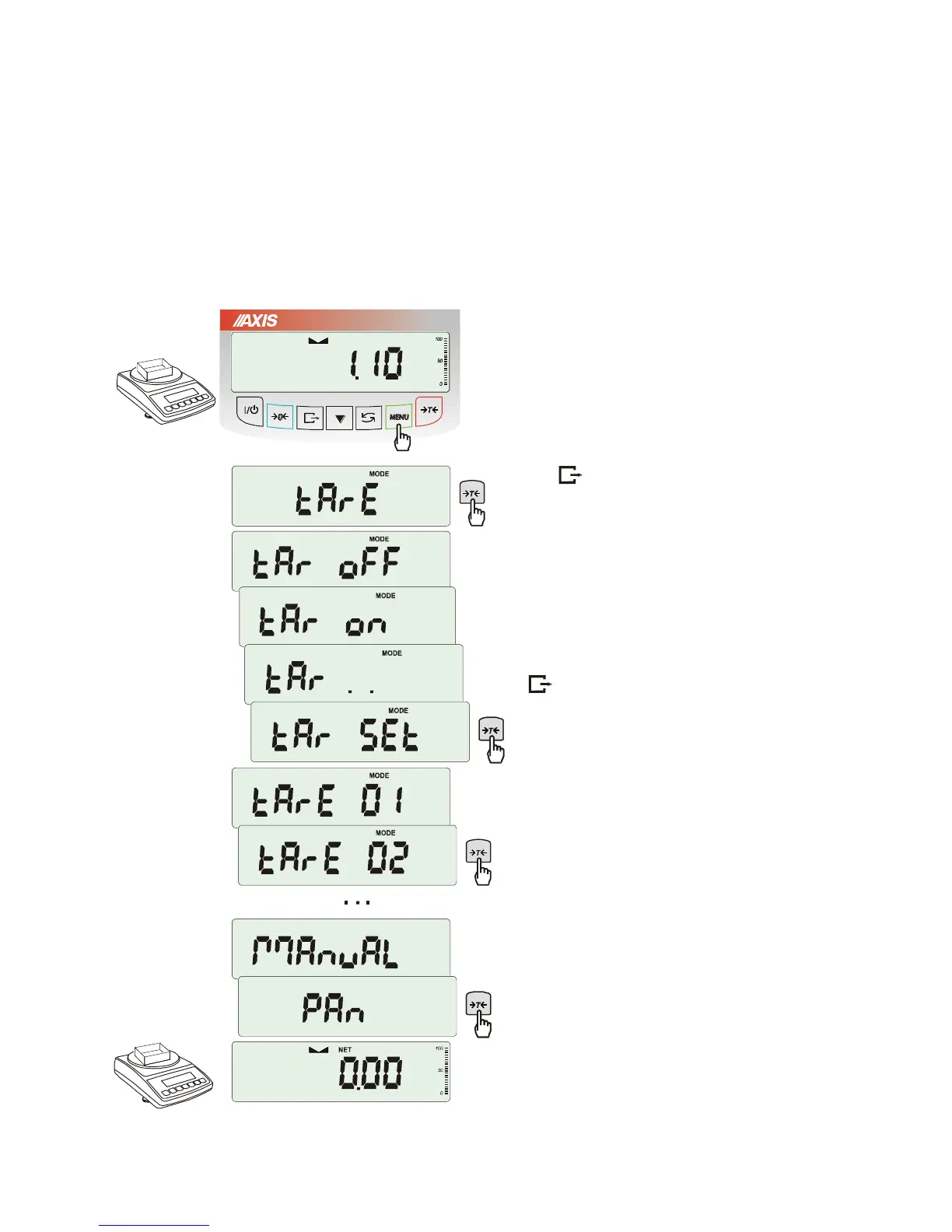
18.6 Constant tare memory function (tArE)
This function enables to measure gross weight of a sample placed in a container of a known weight value
(stored in the memory) and to display calculated net weight of the sample. Tare value is recalled from the
memory with
0
or
T
key when the pan is empty. Tare value may be entered using keypad or
by putting container on the pan.
Inscribing tare value to memory:
After pressing MENU key and choosing tArE
function using
T
key, the following options
are available:
- tAr 0FF – leave the function,
- tAr on – activate the function with the
previous tare value,
- tAr .. – sample tare value from the pan,
- tAr SEt– enter tare value with keys:
0
, ,
T
and MENU
- out – printout a setting value of tare.
Press
T
key when tAr SEt is displayed.
By pressing
T
key choose proper
memory cell where tare will be stored: tAr
01, 02, ... , 10.
Choose inscribing method :
- MAnUAL – inscribing using keys: 0,
, T and MENU,
- Pan – inscribing mass value that is on the
pan.
After storing tare, the scale starts working with
inscribed tare value.
Note:
Tare value is stored in memory also after
unplugging the scale from the mains.



 To Next Page