USER MANUAL 49
__________________________________________________________________________________________________________________
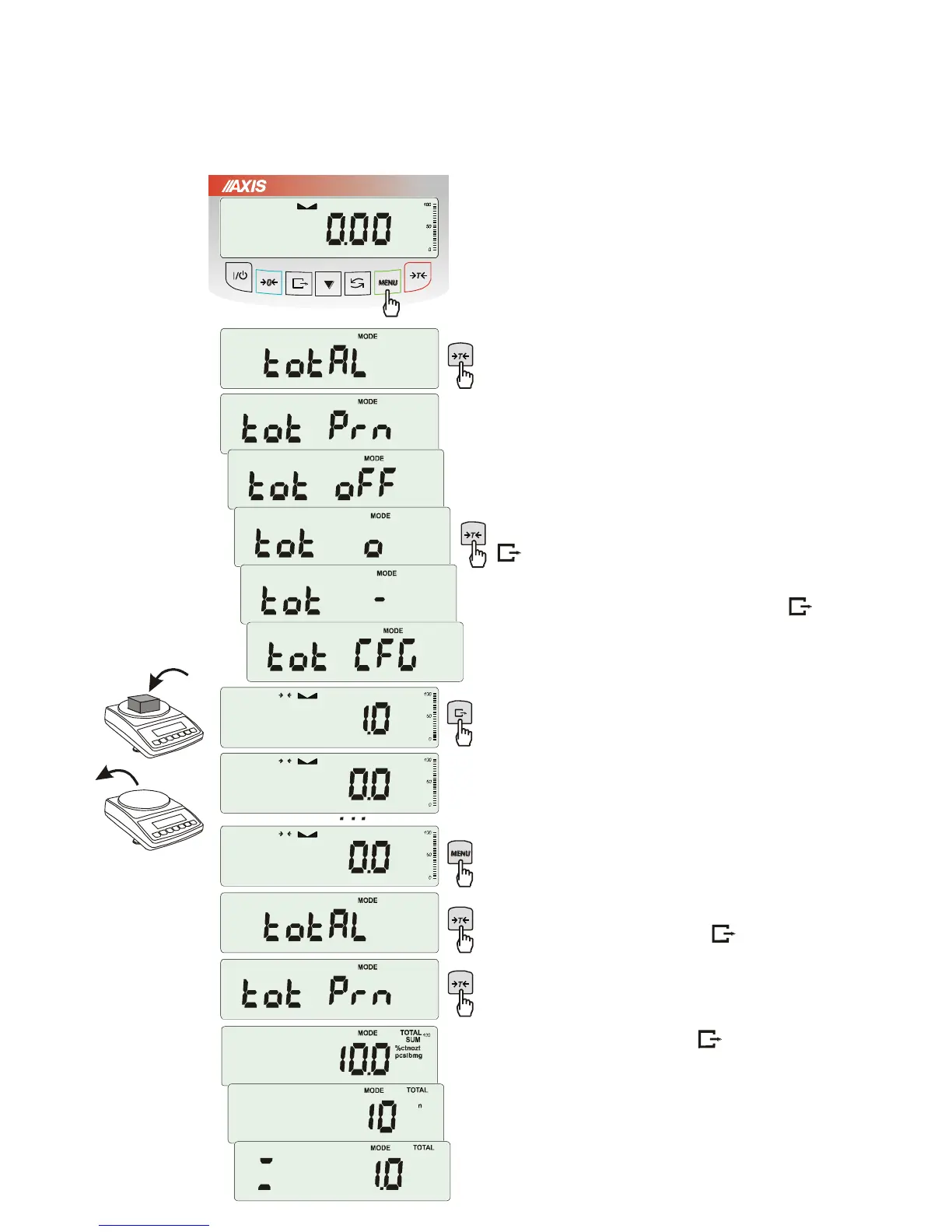
18.8 Total weight function (totAL)
The function allows calculating total weight for
series of measurements, which can be greater
than scale capacity. It allows calculating total
weight as well as average value.
Press MENU key.
When totAL is displayed press
T
key.
The following options will appear successively:
- tot Prn - report printout without clearing total
register,
- tot oFF - clearing total register, report printout
and leaving the function,
- tot - working with receipt printout after
each measurement,
- tot - working without receipt printout,
- tot CFG – saving measurement mode (using
key: Manual, after taking off the load : auto).
Press
T
key when tot is displayed.
Perform measurement series by pressing
key for storing results into total register.
In order to print and display results enter the
function by choosing totAL and tot Prn option
from menu.
The results are displayed in the following
sequence:
- total weight (SUM ),
- number of registered measurements (n),
- average value (=),
regarding that moving to display successive
result is performed after pressing key.
Attention: In scales with LED display SUM sign is
replaced by “”.
In order to go back to total weighing without
zeroing total register press key several
times.



 To Next Page