54 USER MANUAL
__________________________________________________________________________________________________________________
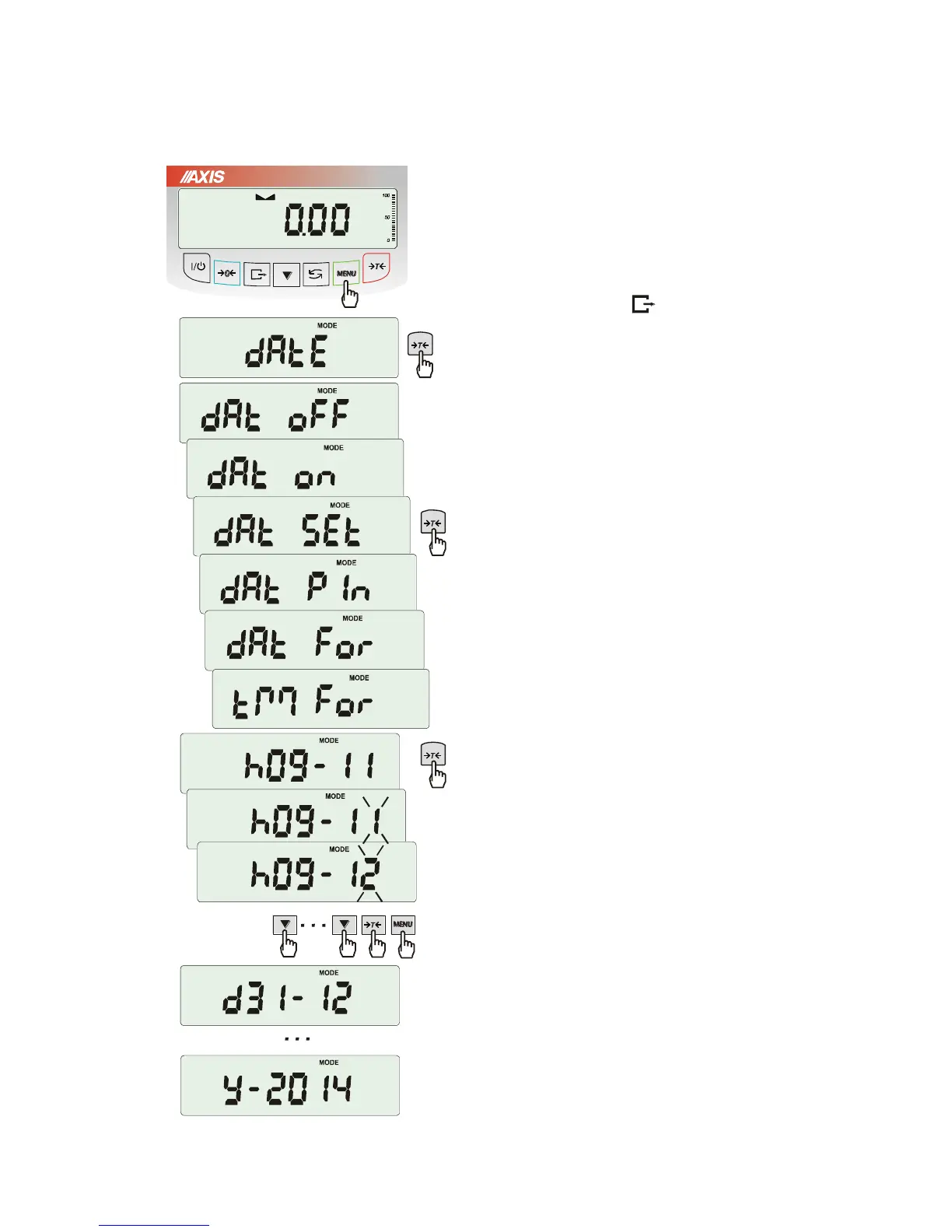
18.10 Setting date and time function (dAtE)
The function allows setting current date and time
of scale internal clock and mode of its use.
The function has the following options:
- dAt oFF – deactivate date and time during
printout of current weighing result,
- dAt on – activate date and time during printout
of current indication ( key),
- dAt SEt - change current date and time,
- dAt PIn – data and time secure password (to
prevent from changing date and time by
unauthorized personel),
- dAt For – data printout in USA or EU format
- tM For – time printout in 24h or 12h format.
The example at the left presents how to set
current date and time using
dAt SEt option.
After setting proper date and time activate it with
dAt on option.
UE: rrrr-mm-dd gg:mm
USA: mm-dd-rrrr gg:mm AM/PM
(gg – hours, mm – minutes, AM – before noon,
PM – after noon, mm - month, dd - day, rrrr -
year).
Attention: Inscribing non-zero PIN value causes
showing PIN sign during next date and time
changing and inscribing 4 digit code is necessary.
(using keys
0
,
T
and MENU).



 To Next Page