2
Panel Controls
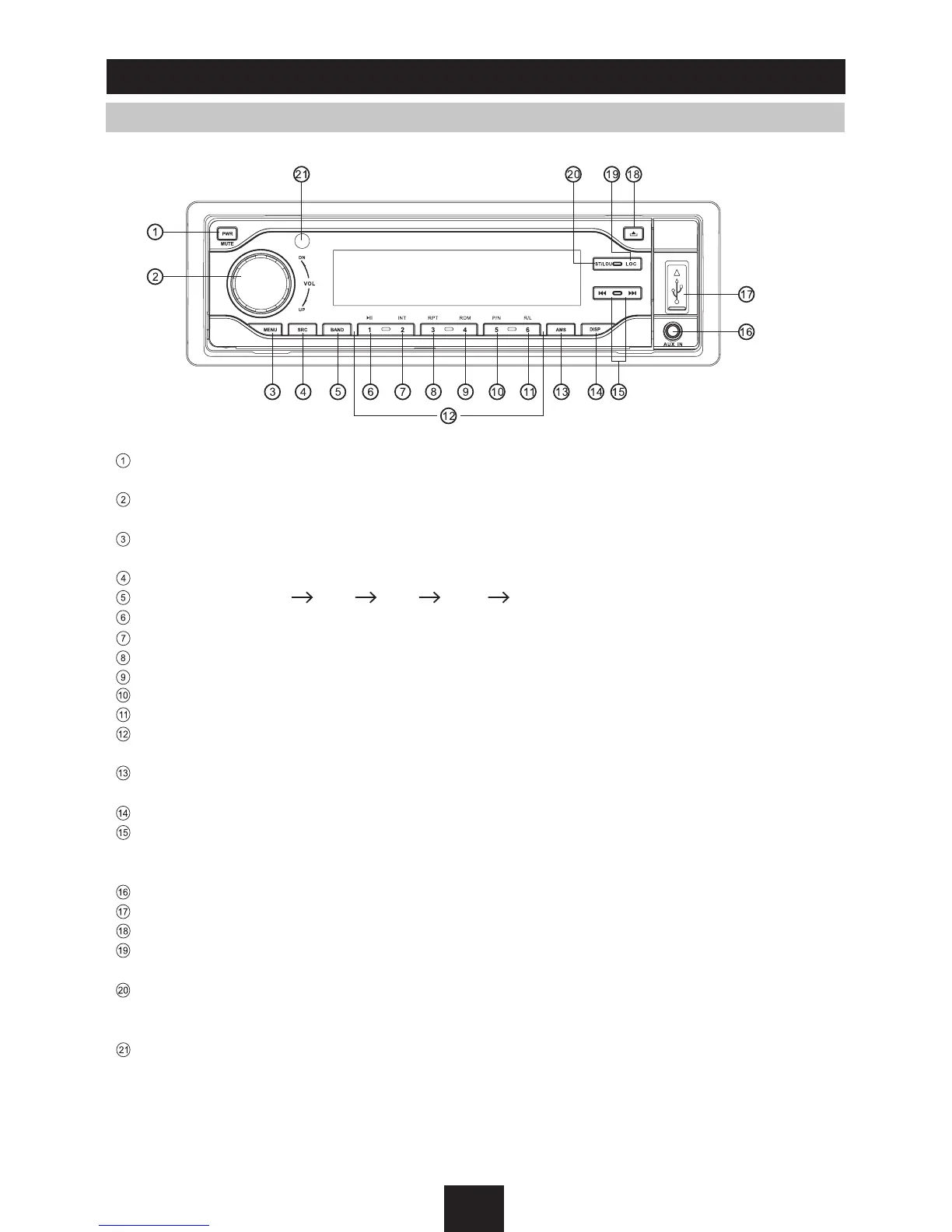
Power on/off: Press
PWR
to turn on/off the unit.
- Power on/off (press more than 2 seconds)
- Mute
- Rotate the knob to adjust volume level.
- Press to be flush with the panel.
- Press to select VOL/SUB VOL/BAS/TRE/BAL/FAD.
- Press more than 2 seconds to enter into menu mode.
- Source switch: Radio,Disc,USB, SD/MMC Card, Aux-in
- Band switch: FM1 FM2 FM3 MW1 MW2
1 button: Play/Pause
2 button: Intro play (10 sec)
3 button: Track repeat play
4 button: Track random play
5 button: Video system NTSC/PAL 60/PAL/AUTO
6 button: DVD audio/VCD audio L/R/ST
1-6 button radio preset: Press to listen to a preset station.
Hold for more than 2 seconds to store station.
- Radio preset scan
- Radio auto preset
Display switch
- Radio tuning backward/forward (Radio mode)
- Previous/Next track (DVD/CD mode)
- Fast backward/forward (DVD/CD mode, press more than 2 seconds)
AUX in
USB port
Panel open
- Radio local/distant (Radio mode)
- Folder up (MP3 mode)
- FM mono/stereo (Radio mode)
- Folder down (MP3 mode)
- Loudness (press more than 2 seconds to turn on/off)
Remote sensor



 To Next Page