3
Remote Controls
Power on/off: Press to turn on/off the unit.
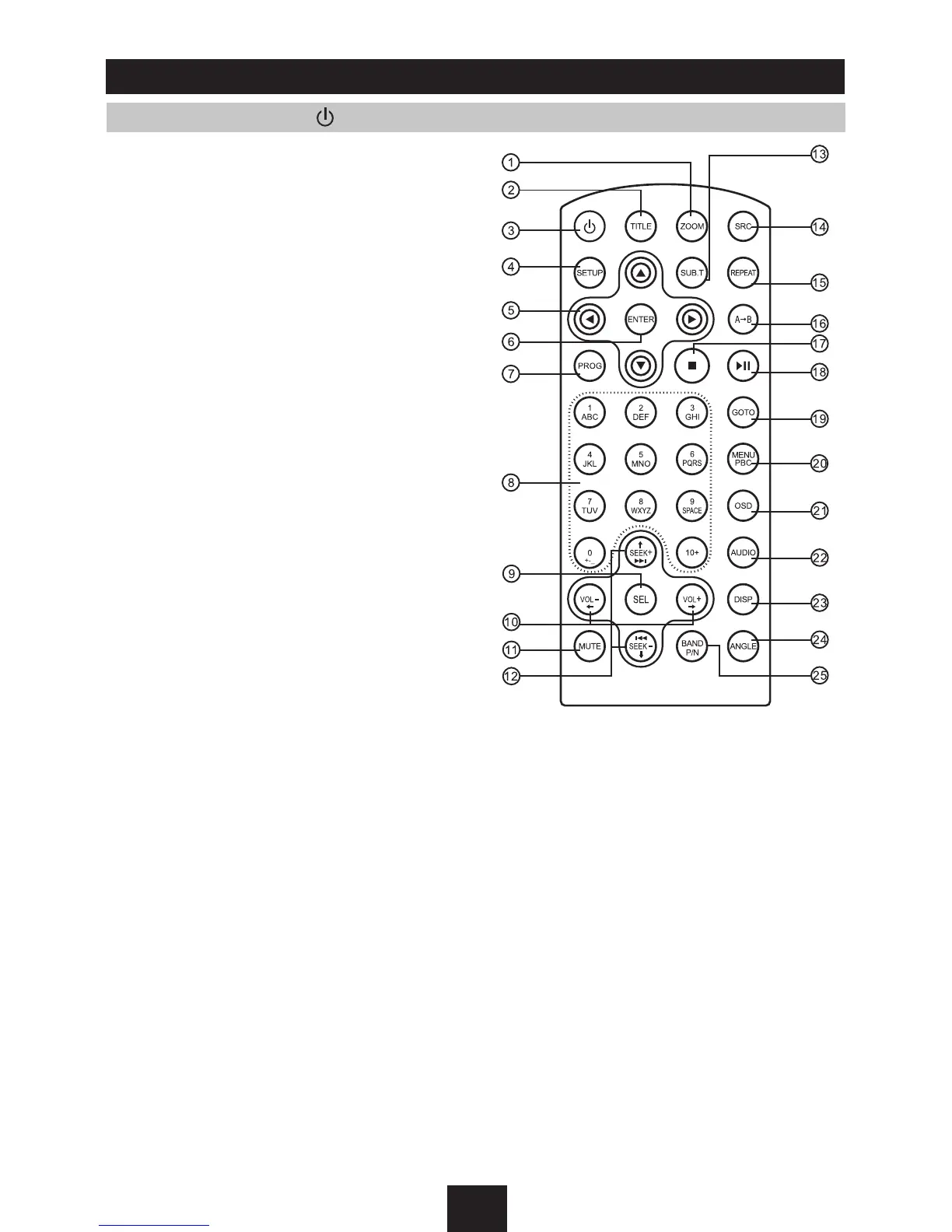
1 Zoom (DVD/VCD only)
2 Title (DVD only)
3 Power on/off
4 Setup
5 Menu cursor
6 Enter
7 Program
8 Digit area
9 - Audio mode select VOL/BAS/TRE/BAL/FAD
- Press more than 2 seconds to menu mode
10 Volume
11 Mute
12 - Radio tune
- Track skip/seek
13 Subtitle (DVD only)
14 - Radio
- Disc (when disc inserted)
- Card (when SD/MMC inserted)
- USB (when USB inserted)
- Aux-in
15 Repeat
16 Repeat A-B
17 Stop/Return
18 Play/Pause
19 Goto search
20 - DVD menu
- PBC (for VCD 2.0 or up)
21 On screen display
22 - DVD audio
- VCD audio L/R/ST
23 On panel display
24 Angle (DVD only)
25 - Video system NTSC/PAL60/PAL/AUTO
- Radio band



 To Next Page