118 Barracuda NG Personal Firewall
9.8.11 Rule Tester
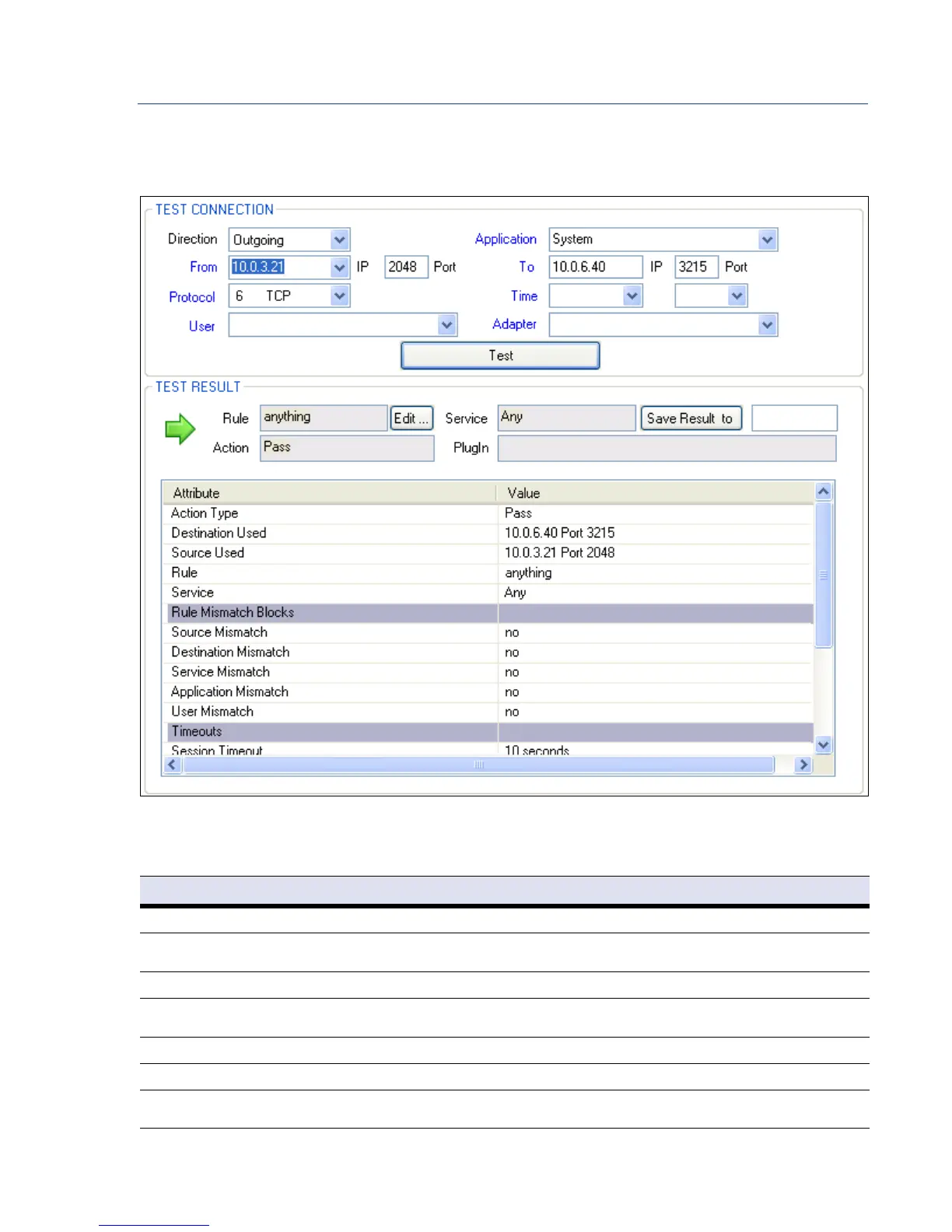
The Rule Tester view allows testing rule sets for consistency.
The following entities are available for rule testing:
Fig. 9–26 Rule Tester
List 9–9 Rule Tester parameters – section TEST CONNECTION
Parameter Description
Direction This is the direction of the traffic policy (Incoming or Outgoing).
Application To query for an arbitrary application leave the asterisk (*), which is set as default value. Click the Application link and Select
Update Applications to reset the field to the default value.
From: IP / Port Insert Source IP and corresponding connection port. Click the From or To link to Swap IP and/or Port information.
Protocol Specify which protocol to test. Click the Protocol link and select Show all Protocols to include other protocols than TCP/UDP and
ICMP into the list.
Time (optional) Insert day of the week and time (optionally). Click the Time link and select Insert current Time to insert current day and time.
User (optional) Select an User from the list (Optionally). Click the User link and select Update Users to clear the field.
Adapter
(optional)
Select an adapter from the list (Optionally). Click the Adapter link and select Update Adapters to clear the field.



 To Next Page